Developer technologies | Visual Basic for Applications
An implementation of Visual Basic that is built into Microsoft products.
This browser is no longer supported.
Upgrade to Microsoft Edge to take advantage of the latest features, security updates, and technical support.
' cx='32' cy='32' r='32' /%3E%3Ctext x='50%25' y='55%25' dominant-baseline='middle' text-anchor='middle' fill='%23FFF' %3EDH%3C/text%3E%3C/svg%3E)
Hello,
I have an Excel macro workbook stored on our SharePoint site. It copies data from that workbook to a separate .xlsx file also on SharePoint.
Once the data is copied, it does an "ActiveWorkbook.Save". When I run this on my local drive, it all works well. But when I run from SharePoint, that's where the problems arise.
It returns this message:
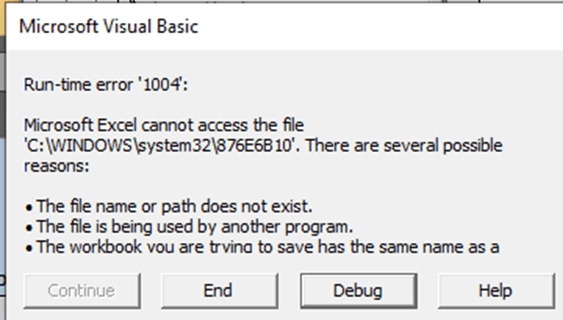
The problem appears to be that the destination workbook is read-only. So I modified my initial "open" statement to this:
Workbooks.Open myFileName, , False, , , , True ' where False is the "ReadOnly" parameter and True is the "IgnoreReadOnlyRecommended" parameter.
But this didn't work. I saw the same error message above.
So this brings me to my laundry list of questions:
Thanks in advance for any insight, advice, and/or guidance you can provide!
Dennis

Hi, @Dennis Hancy
I'm working on it and will reply when there is progress.
Hi, @Dennis Hancy
Welcome to the Q&A forum, your questions are mainly related to VBA and SharePoint. It is recommended that you find relevant content under the office-vba-dev tag and tag your posts with SharePoint.
If the response is helpful, please click "Accept Answer" and upvote it.
Note: Please follow the steps in our documentation to enable e-mail notifications if you want to receive the related email notification for this thread.