Exchange | Exchange Server | Management
The administration and maintenance of Microsoft Exchange Server to ensure secure, reliable, and efficient email and collaboration services across an organization.
This browser is no longer supported.
Upgrade to Microsoft Edge to take advantage of the latest features, security updates, and technical support.
' cx='32' cy='32' r='32' /%3E%3Ctext x='50%25' y='55%25' dominant-baseline='middle' text-anchor='middle' fill='%23FFF' %3EP%3C/text%3E%3C/svg%3E)
We are in a hybrid setup. We have not MS365 as our main MX but a local one because we do separate filtering.
So to protect us from Spammers still delievering directly to MIcrosoft, we made a Rule, which forwards all external emails from the internet to the MX entry first. Everything is described in here:
https://practical365.com/how-to-ensure-your-third-party-filtering-gateway-is-secure/
We also added our local Exchange Server as en exception to the forwarding Rule, so we don't get a loop.
But this exception is not working. It still forwards all emails back to our MX again and creates a loop.
When I check the transport log, I see that the rule still was taken, even when the email came from the excepted IP.
So why does it still forward it again?


' cx='32' cy='32' r='32' /%3E%3Ctext x='50%25' y='55%25' dominant-baseline='middle' text-anchor='middle' fill='%23FFF' %3EJS%3C/text%3E%3C/svg%3E)
Hi @Patrick
Could you please share the complete transport rule you configured in your environment, note to clear your personal information
And have you tried the other two syntaxes to list your ip then see if any difference?

Also take a reference at: Mail flow best practices for Exchange Online, Microsoft 365, and Office 365 (overview)
Hi joyceshen
Thanks for the reply. Yes I also tried the other IP formats but it still ignores them.
The whole rule looks exactly like in the example from the link, just without it being restricted just to the test User.
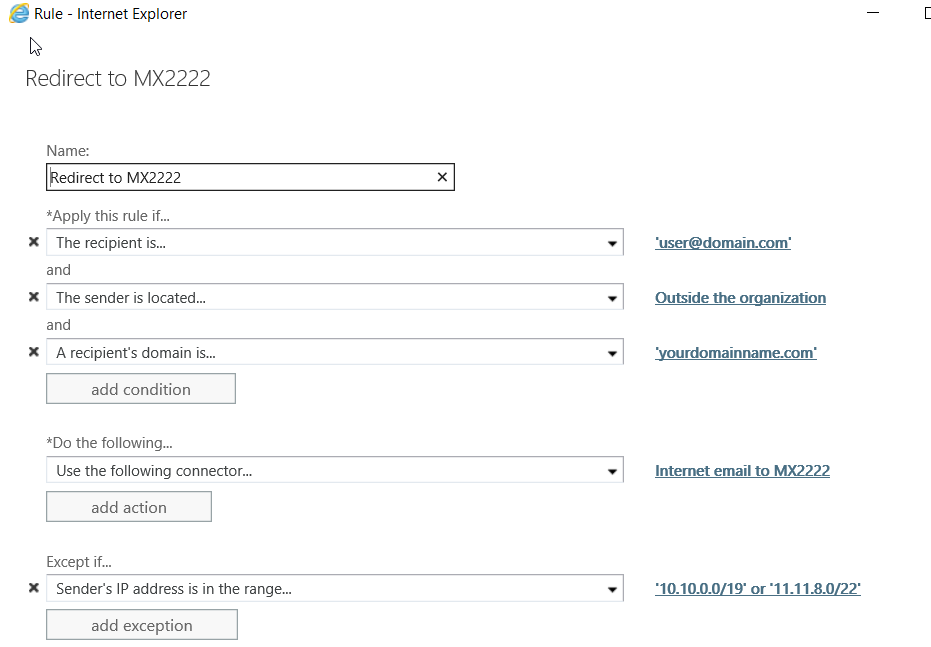
Really weird that it does not ignore this IP.
Hi,
What about referring to the related discussion here: External e-mail disclaimer transport rule is being applied to SMTP relay message
Please Note: Since the web site is not hosted by Microsoft, the link may change without notice. Microsoft does not guarantee the accuracy of this information.
So you think the from IP from the screenshot above is not the real IP MS365 is working with?
I will check it in ExO with: "Get-MessageTrackingLog -MessageSubject "xxx" | fl"
But what if it is the same IP ? If it is it seems there is a bug in the excluding via IP function.
Best regards
Hi,
What's the result checking with the command?
Hi Joce
It does not find the command mentioned in the article:
Get-MessageTrackingLog -MessageSubject "xxx" | fl
Get-MessageTrackingLog: The term 'Get-MessageTrackingLog' is not recognized as a name of a cmdlet, function, script file, or executable program.
Check the spelling of the name, or if a path was included, verify that the path is correct and try again.
Hi,
Where did you run this command, please firstly connect to exchange online powershell:
I firstly connected to the ExO online PowerShell and ran the command. Could it have been changed to a new one?
Hi,
This cmdlet is available only in on-premises Exchange. Run this command in EMS
