Azure SQL Database
An Azure relational database service.
This browser is no longer supported.
Upgrade to Microsoft Edge to take advantage of the latest features, security updates, and technical support.

Looking for if possible and the best way to have real time replication across subscriptions?
How to setup database replication from databases on one subscription to replicate to another subscription.
Example : I have a MSSQL Database called "Customers" inside "SubscriptionA" and want real time replication to a "Customers" database inside "SubscriptionB"
Please tell me if possible and most common approach to take.
An Azure relational database service.

Hi Patrick,
Let me recommend you Azure SQL Data Sync. It allows one-direction and bi-directional sync between databases. One of the use cases for this free tool (SQL Data Sync) is to replicate between databases on different subscriptions.
If the other subscription also belongs to the same tenant, you can directly add it by selecting a different subscription when adding Azure database:
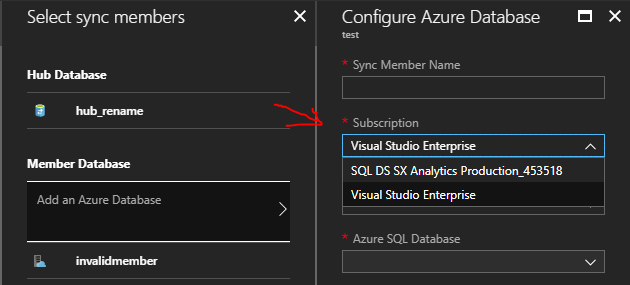
Otherwise, probably it is better to use our PowerShell cmdlet New-AzureRmSqlSyncMember, you need to specify the “MemberServerName” parameter, which is the fully qualified DNS name for the logical server.
To see the subscriptions in portal, they must under the same tenant and the user needs to have permission to both of them. If that’s not the case, they can add the sync member using PowerShell.