Azure Virtual Desktop
A Microsoft desktop and app virtualization service that runs on Azure. Previously known as Windows Virtual Desktop.
1,451 questions
This browser is no longer supported.
Upgrade to Microsoft Edge to take advantage of the latest features, security updates, and technical support.
' cx='32' cy='32' r='32' /%3E%3Ctext x='50%25' y='55%25' dominant-baseline='middle' text-anchor='middle' fill='%23FFF' %3EJ%3C/text%3E%3C/svg%3E)
We have 25 hosts, rather than going to each and every host and check users session status is there a powershell command or an easy way to check list of disconnected/logged off users that get stuck and need to clear manually for them to use their wvd session.
' cx='32' cy='32' r='32' /%3E%3Ctext x='50%25' y='55%25' dominant-baseline='middle' text-anchor='middle' fill='%23FFF' %3EKM%3C/text%3E%3C/svg%3E)
I am currently investigating and will get back to you shortly. Thanks.

Hi @Jaganljpmail ,
did my answer work for you? Are there any additional questions to this topic?
If you found the answer helpful, it would be great if you please mark it "Accept as answer". This will help others to find answers in Q&A
Regards
Andreas Baumgarten
Hi @Jaganljpmail ,
maybe this PowerShell script helps to get started:
$resourceGroupName = "<your-resourcegroup name>"
$hostPoolName = "<your hostpool name>"
Get-AzWvdUserSession -ResourceGroupName $resourceGroupName -HostPoolName $hostPoolName | ForEach-Object {
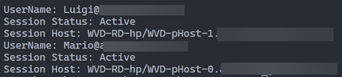
  Write-Output "UserName: $($_.UserPrincipalName)"
  Write-Output "Session Status: $($_.SessionState)"
  Write-Output "Session Host: $($_.Name)"
}
The result will look like this:
----------
(If the reply was helpful please don't forget to upvote and/or accept as answer, thank you)
Regards
Andreas Baumgarten