SQL Server Reporting Services
A SQL Server technology that supports the creation, management, and delivery of both traditional, paper-oriented reports and interactive, web-based reports.
This browser is no longer supported.
Upgrade to Microsoft Edge to take advantage of the latest features, security updates, and technical support.

Hello,
We are doing a study for Sql Server 2012 reporting services. But when I click on the link, the image becomes like 1. I want it to be like image 2 how can I proceed? can you help me?
thanks.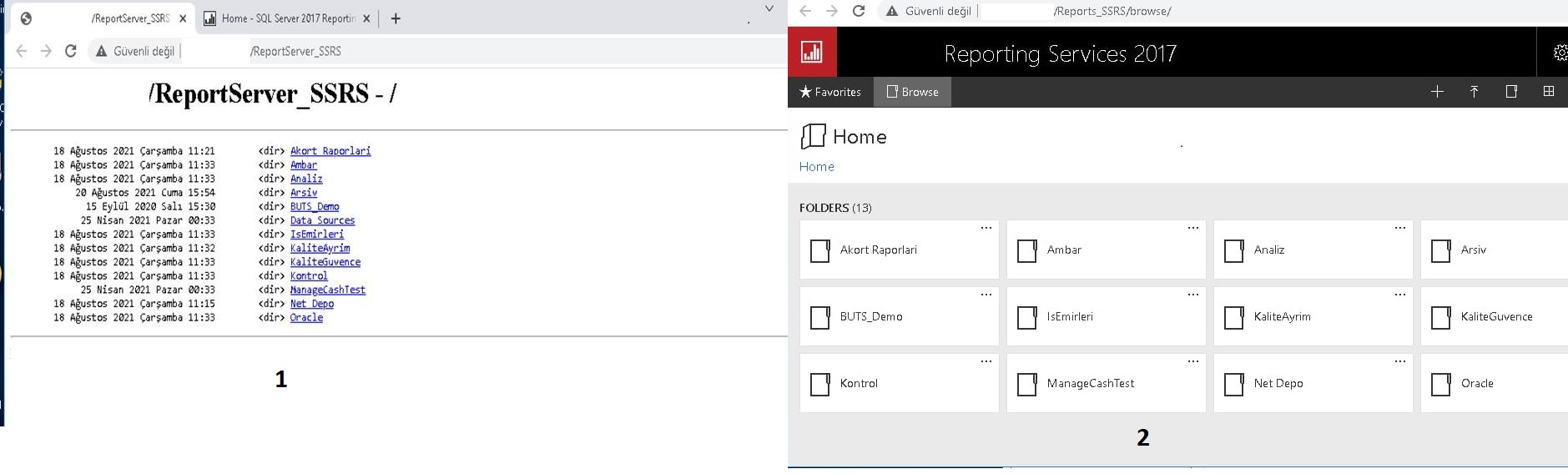

Hi @Beytullah Çakır ,
Image1 shows the Web Service URL, and Image 2 shows the Web portal URL.
If you need the view in Figure 2, click the Web portal URL in Report Server Configuration Manager.

Here is the difference between web portal url and web service url in ssrs:
The Web Service URL page to configure or modify the URL used to access the Report Server.
The Web portal URL page to configure or modify the URL used to access Report Manager.
Web Service URL
Web Service URL is the backend, which is utilize by the frontend and also can be use from own application; see Report Server Web Service.
The web service URL is to access the SSRS Report Server. It is the URL where the reports get deployed to. You also get a raw report listing from this location if you enter it into your browser. When you deploy the reports from the tools such as report designer/report builder, you will need to use the backend web service URL.
Web portal URL
Web Portal / Report Manager URL ist the frontend to manage & Show reports; see Web portal (SSRS Native Mode).
The Web Portal URL is to access the Web Portal (Report Manager) It is a frontend web application which allows a user to view or administer reports in the reports server location. When you want to do the operations such as set user permissions, subscription, viewing and managing reports, you need to navigate to Web Portal URL.
Best Regards,
Joy
If the answer is the right solution, please click "Accept Answer" and kindly upvote it. If you have extra questions about this answer, please click "Comment".
Note: Please follow the steps in our documentation to enable e-mail notifications if you want to receive the related email notification for this thread.
Hello there,
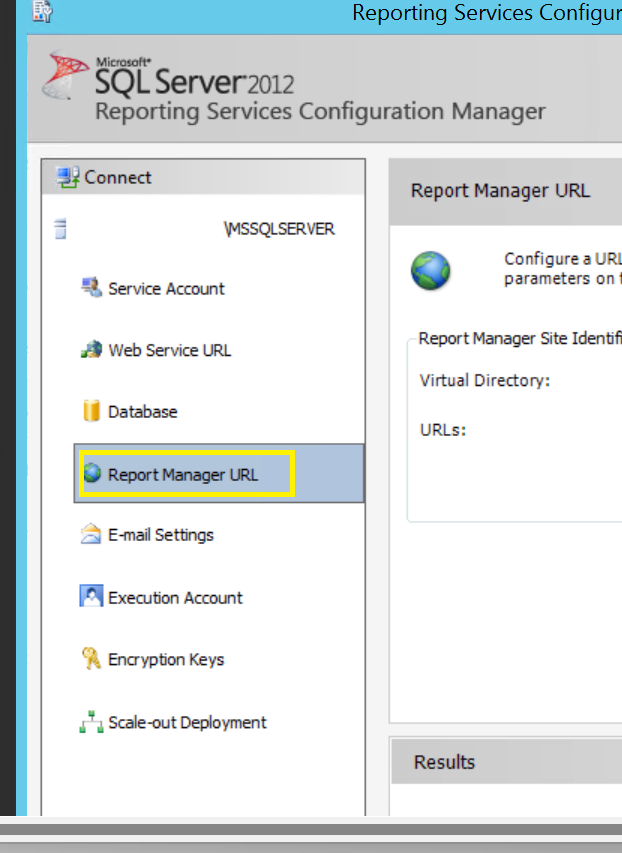
After you check your well-being, I have the Report Manager URL option instead of the Web portal URL option. Could this be the problem? Do you know how to open a web portal?
Thank you very much for your help.
Hi @Beytullah Çakır ,
I am sorry for neglecting your SSRS Edition, you are using SSRS 2012. In this version Report Manager URL can open Report Manager (web portal), it will change to web portal Url in SSRS2016 and later. If you configure Report Manager URL, you will be able to open Image 2. If still in doubt, please feel free to let me know.
Best Regards,
Joy
Hi @Beytullah Çakır ,
If the answer is helpful, please click "Accept Answer".
If you have any questions after installing SSRS2016, please feel free to let me know.
Regards,
Joy
' cx='32' cy='32' r='32' /%3E%3Ctext x='50%25' y='55%25' dominant-baseline='middle' text-anchor='middle' fill='%23FFF' %3EI1%3C/text%3E%3C/svg%3E)
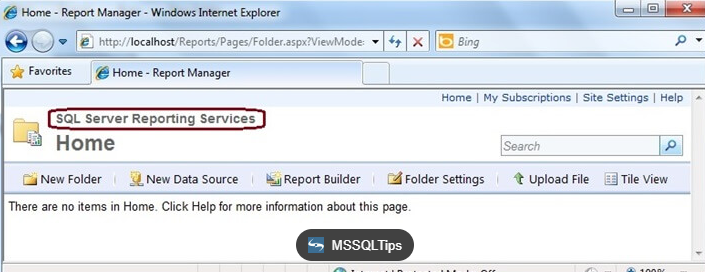
Your image2 is in SSRS 2016 or later,I think in SSRS 2012 the report manager looks like below image:
Best Regards,
Isabella
Thank you for the information. I will install Sql 2016 and I will inform you.
Take care of yourselves.