Azure Virtual Machines
An Azure service that is used to provision Windows and Linux virtual machines.
This browser is no longer supported.
Upgrade to Microsoft Edge to take advantage of the latest features, security updates, and technical support.
' cx='32' cy='32' r='32' /%3E%3Ctext x='50%25' y='55%25' dominant-baseline='middle' text-anchor='middle' fill='%23FFF' %3EGM%3C/text%3E%3C/svg%3E)
Hi All
i have azure virtual machines. from the azure side, for the VM i can see only one network card but within in operating system i can see two network cards.
For example Ethernet and vEthernet(nat). I want to disable second network card vEthernet(nat), i have disabled it and when the VM is restarted this network card gets enabled automatically.
On one of my azure virtual which is a domain controller this network card is creating problem. how do i disable this network card permanently. i dont want this network card to come up automaticaly. i dont have any issue with second network card on any of the VMS except my Domain Controller
An Azure service that is used to provision Windows and Linux virtual machines.
Answer accepted by question author

Hello @Glenn Maxwell
Thanks for posting!
Have you checked if Hyper-V was enabled on this machine?
Have you issued this command "Disable-NetAdapter" from PS terminal?
Looking forward to your feedback.
BR,
I can see HyperV installed if i remove it will the network card get removed?
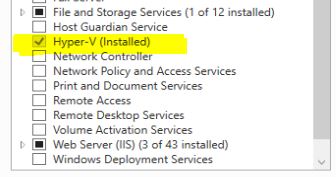
If I am not mistaken when you enable this feature then you get Virtual Switch as well as NAT....
So, if you disable it you will get rid of them.
Thanks!