
Hi,
You check configuration NPS policy and routing ip address dhcp client.
Check on target, windows firewall policy setting to permit access from ip address of dhcp client.
This browser is no longer supported.
Upgrade to Microsoft Edge to take advantage of the latest features, security updates, and technical support.
' cx='32' cy='32' r='32' /%3E%3Ctext x='50%25' y='55%25' dominant-baseline='middle' text-anchor='middle' fill='%23FFF' %3EMS%3C/text%3E%3C/svg%3E)
Hi all ,
After configuring a RRAS service on 2019 windows server, I was able to have an internet access from the server, but I am not able to ping any of RRAS clients even though I can ping the server IP, not able also to reach any local service, The IPv4 router checkbox is checked , LAN and demand dail routing is chosen.
I was trying to connect to this server so that only RRAS clients can access the server's services, by closing firewall to the server's public IP, but that didn't work also since it still recognizes my local public IP.
So can you propose me a solution?
Thanks in advance ,

Hi,
You check configuration NPS policy and routing ip address dhcp client.
Check on target, windows firewall policy setting to permit access from ip address of dhcp client.
Hii VitoProcino-4399,
Thanks for your response, actually I checked these policies and configurations and all are set, but still same issue.
Below is a screenshot for firewall port configuration.
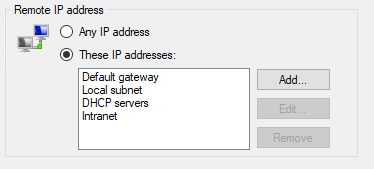
Thanks,