Azure Machine Learning
An Azure machine learning service for building and deploying models.
This browser is no longer supported.
Upgrade to Microsoft Edge to take advantage of the latest features, security updates, and technical support.
' cx='32' cy='32' r='32' /%3E%3Ctext x='50%25' y='55%25' dominant-baseline='middle' text-anchor='middle' fill='%23FFF' %3ESG%3C/text%3E%3C/svg%3E)
Hello Team,
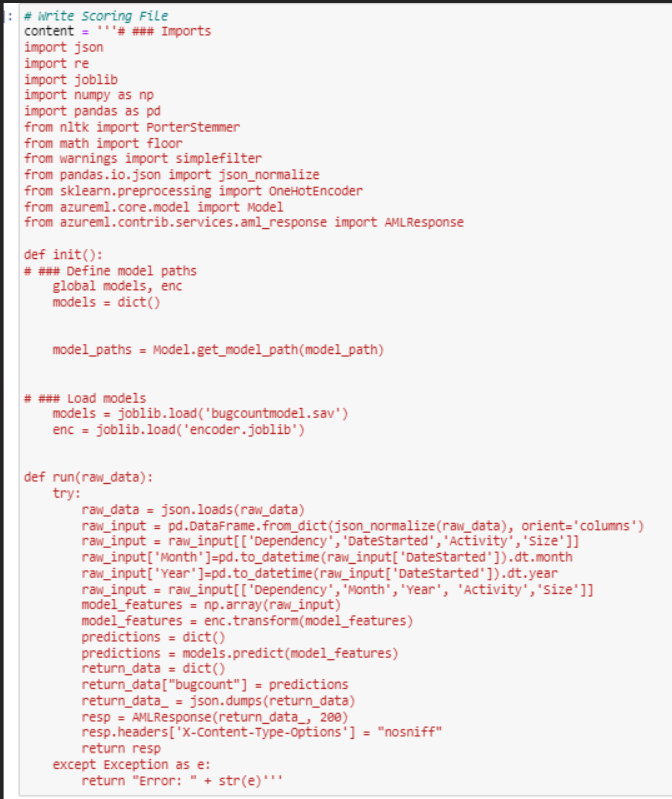
We are trying to deploy a model to Azure ML workspace containing a saved model & One Hot Encoded joblib file.
We are facing issue in init() function.
Please find the below error message:
"message": "Aci Deployment failed with exception: Your container application crashed. This may be caused by errors in your scoring file's init() function.
PFB screenshot of scoring file:
An Azure machine learning service for building and deploying models.
' cx='32' cy='32' r='32' /%3E%3Ctext x='50%25' y='55%25' dominant-baseline='middle' text-anchor='middle' fill='%23FFF' %3ERM%3C/text%3E%3C/svg%3E)
@Sahana Gurumurthy (Accenture International Limite) Thanks for the question. Can you please share the deployment code that you are trying.
@Sahana Gurumurthy (Accenture International Limite) Thanks, I think the problem is that you rely on AML background process to automatically upload content under ./outputs to AML workspace.
But when the upload is not complete and we immediately call run.register_model which takes the content from AML workspace then the error will happen.
To avoid that situation, you can do it like this: