Developer technologies | .NET | Other
Microsoft Technologies based on the .NET software framework. Miscellaneous topics that do not fit into specific categories.
This browser is no longer supported.
Upgrade to Microsoft Edge to take advantage of the latest features, security updates, and technical support.
' cx='32' cy='32' r='32' /%3E%3Ctext x='50%25' y='55%25' dominant-baseline='middle' text-anchor='middle' fill='%23FFF' %3ESU%3C/text%3E%3C/svg%3E)
Hi,
I have a LogHistory table which is available in Entity framework. I have set of values to be set in this table. If I set like below for individual values, I am able to set the values in LogHistory table.
using (var context = new AutomationEntities())
{
var log = new LogHistory
{
UserName = GetUserName(),
UserId = GetUserId(),
ActionPerformed = "EditTestCase"
}
context.LogHistories.Add(log);
context.SaveChanges();
}
However, I wanted to set these values using bulkcopy. I have all the data in "dataTable". The updated values are being set in LogHistory table. I guess I am setting DestinationTableName wrongly.
using (var context = new AutomationEntities())
{
using (SqlBulkCopy bulkCopy = new SqlBulkCopy(connection))
{
bulkCopy.DestinationTableName = "dbo.LogHistory";
bulkCopy.WriteToServer(dataTable);
}
}
Can you please suggest how should I set DestinationTableName in this case ? Kindly waiting for your response.
Thanks,
Santosh
Microsoft Technologies based on the .NET software framework. Miscellaneous topics that do not fit into specific categories.
Additional SQL Server features and topics not covered by specific categories
An object-oriented and type-safe programming language that has its roots in the C family of languages and includes support for component-oriented programming.

Check out Bulk copy with Entity Framework Core 5
Answer accepted by question author

@Santosh Umarani , Welcome to Microsoft Q&A, based on my test, there is no error for me if you want to copy data from datatable to database.
I make a code example and you could refer to it.
 static void Main(string[] args)
        {
           TestEntities1 test=new TestEntities1();

            DataTable table = GetDataTable();
            SqlConnection connection = new SqlConnection(test.Database.Connection.ConnectionString);
            connection.Open();
            using (SqlBulkCopy s = new SqlBulkCopy(connection))
            {
                //set the table name
                s.DestinationTableName = "dbo.LogHistory";

                foreach (var column in table.Columns)

                    s.ColumnMappings.Add(column.ToString(), column.ToString());

                s.WriteToServer(table);
            }
            connection.Close();
        }
Result in Database:
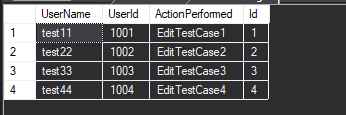
Hope this could help you.
Best Regards,
Jack
If the answer is the right solution, please click "Accept Answer" and upvote it.If you have extra questions about this answer, please click "Comment".
Note: Please follow the steps in our documentation to enable e-mail notifications if you want to receive the related email notification for this thread.