Azure SQL Database
An Azure relational database service.
This browser is no longer supported.
Upgrade to Microsoft Edge to take advantage of the latest features, security updates, and technical support.
' cx='32' cy='32' r='32' /%3E%3Ctext x='50%25' y='55%25' dominant-baseline='middle' text-anchor='middle' fill='%23FFF' %3EH%3C/text%3E%3C/svg%3E)
I am unable to connect a my Azure SQL Database to Purview. I have already followed the steps described in all the documentation. I keep getting the following error code: Error: (5521) Permission is not sufficient to perform SQL action in database.
See also the pictures below.


Does anyone happen to have an answer to this, thanks in advance!

Hi Hicham-0908 I tried to reproduce the issue from my end and it was a successful connection by seeing the error message I noticed that you are selecting Lineage extraction (preview) if you want to enable it then you have to follow the instruction provided in this document
if you want to test the connection please try disabling Lineage extraction (preview)
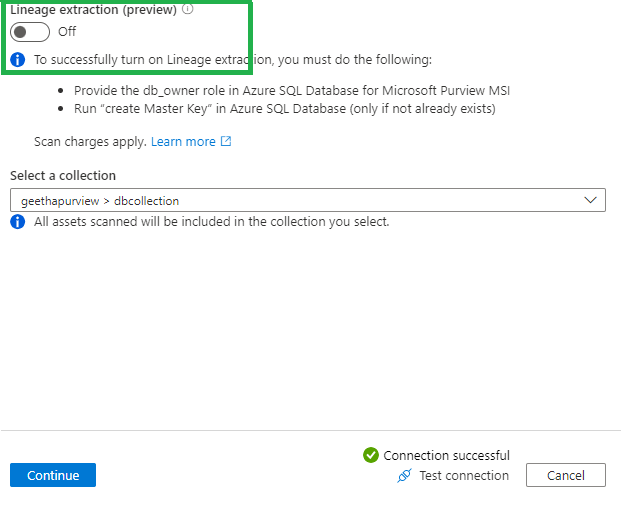
Please let me know if this information helps
Regards
Geetha
Thank you so much. I have deselcted Lineage extraction (preview) and I can make a connection. I will look into it to see if I can get this function working as well. I have one more question at the moment. Now that I have scanned this DB I am trying to register a new DB that is in the same server.
Only I keep getting the following message: This data source already exists. Choose another data source to register.
Do you happen to have any idea how I can register a second Azure SQL DB?

@Hicham Good to hear that your Original query has been resolved.
on your additional question, I will have to repro and provide you with more details.
Please don't forget to click on  or upvote
  button, whenever the information provided, helps you. Original posters help the community find answers faster by identifying the correct answer.
Thank you very much for your quick response each time. I just accepted the answer you gave to my first question.
Do you need more information on my second question?
I was able to add a second Azure SQL database
Click on the new scan here  and you should be able to add
Regards
Geetha
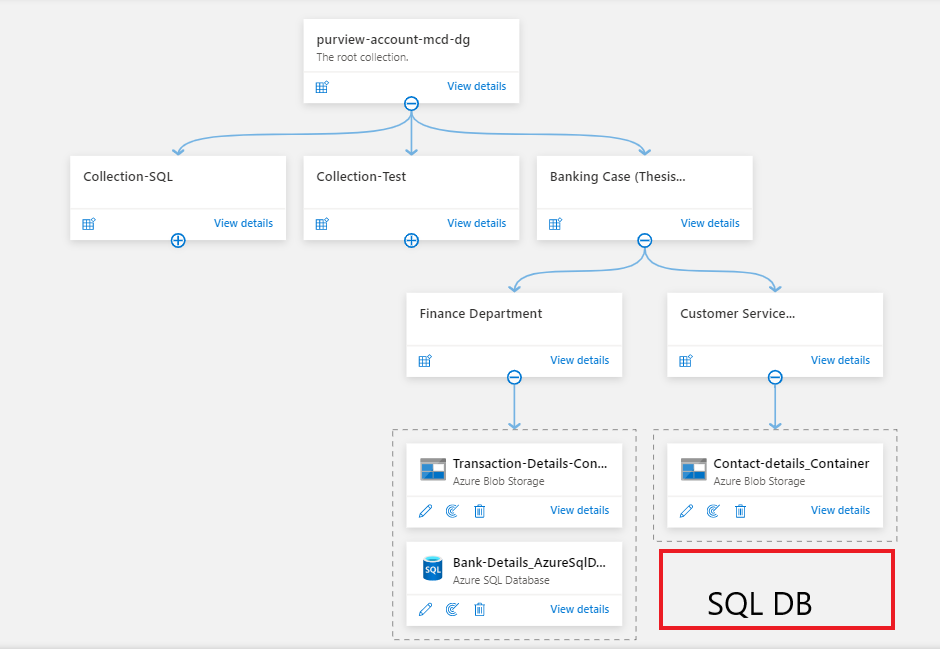
I have scanned the second database now, but I want to show the second database under the collection customer service, as visible in the image below.
Now the scan of the second database should be shown under the already registered database.
So I actually want to have two different azure SQL Databases visible in the directory. One is already visible under the collection Transaction-Details-Container and a second Azure SQL DB under the collection Contact-details_Container. as visible in the image below.
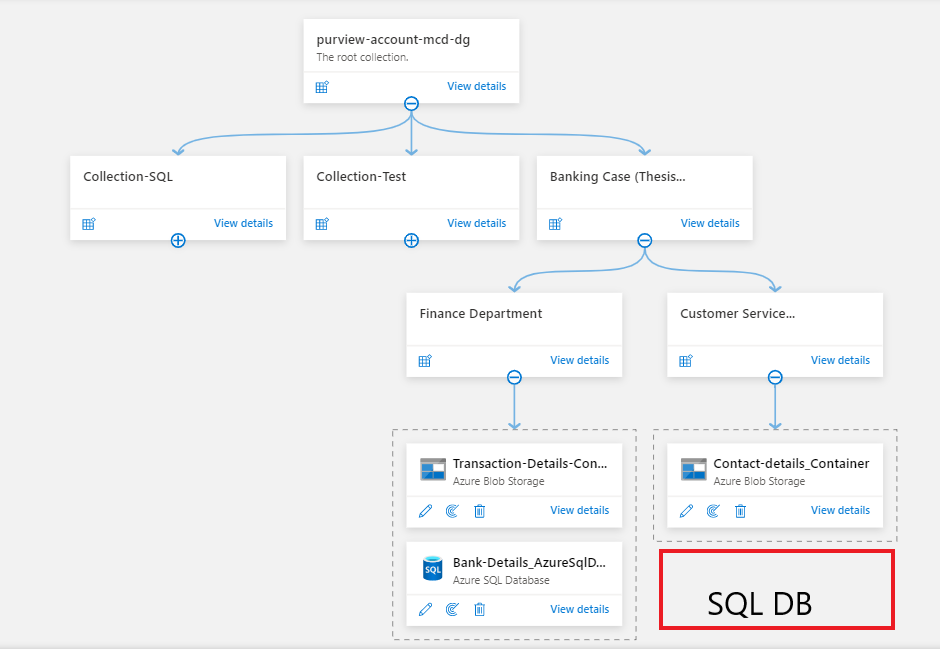
@Hicham I believe you can only register a source once. But you can set up multiple scoped scans on that source, however, I will check with the internal product team and get back to you.
Regards
Geetha
@Hicham Can you provide more details on your use-case?
@GeethaThatipatri-MSFT My use case is about a fictional bank, for which I created the data sources and content myself. I am working out the use case for my thesis research on Azure Purview. The data sources within the use case are from two departments, the finance and customer service department as seen by the two collections. I am now trying to load a second Azure SQL Database under the finance collection so that it can be seen in the lineage. However, I keep running into the message that an Azure DB is already registered.
If you need additional information, I would love to hear about it!
@Hicham as per the product team, You can only register a data source once. You cannot have the same database in multiple collections.
What you can do is register the data source at a higher level and then have scoped scans. So in your example, register the data source at the Banking Case level, and then set up multiple scoped scans. So a subset of the assets of the database will go into the Finance collection, and other assets will go into the Customer Service collection.
Per here this document
By design, you can't register data sources multiple times in a single Microsoft Purview account. This architecture helps to avoid the risk of assigning different levels of access control to a single data source. If multiple teams consume the metadata of a single data source, you can register and manage the data source in a parent collection. You can then create corresponding scans under each subcollection so that relevant assets appear under each child collection.
Please let us know if you need any additional information.
Regards
Geetha
Hi, @Hicham We haven't heard back from you. Just wanted to check if you need any additional information.
Regards
Geetha
Hi, I just had a look at it and wanted to get in touch regarding getting the Lineage Extraction feature working. For this, I keep failing to set "the Prerequisites for setting up scan with Lineage extraction" in SQL server studio. Each time I get an error message saying that it is not possible to create a master key.
@Hicham Please confirm if you have followed all the prerequisites.
Thank you for the quick response. I will try again and get back to you. If in continue to get the same error message, I will also attach a screenshot of it. Thanks again!
I have been once again performing the "Prerequisites for setting up scan with Lineage extraction'' steps, from this document you had sent me earlier: https://learn.microsoft.com/en-us/azure/purview/register-scan-azure-sql-database?tabs=sql-authentication#lineagepreview
Only, when running the query, I keep getting the following error message. Do you happen to have any idea what this is due to? I assume I need to put the name of my purview account in the next query. So the query:
Create user <purview-account> FROM EXTERNAL PROVIDER
Will then become:
Create user "purview-account-mcd-dg" FROM EXTERNAL PROVIDER
Because my Purview account is called as follows: purview-account-mcd-dg
Only I keep getting the following error code in SQL Server Management Studio for this, Do you happen to have any idea what this is due to?
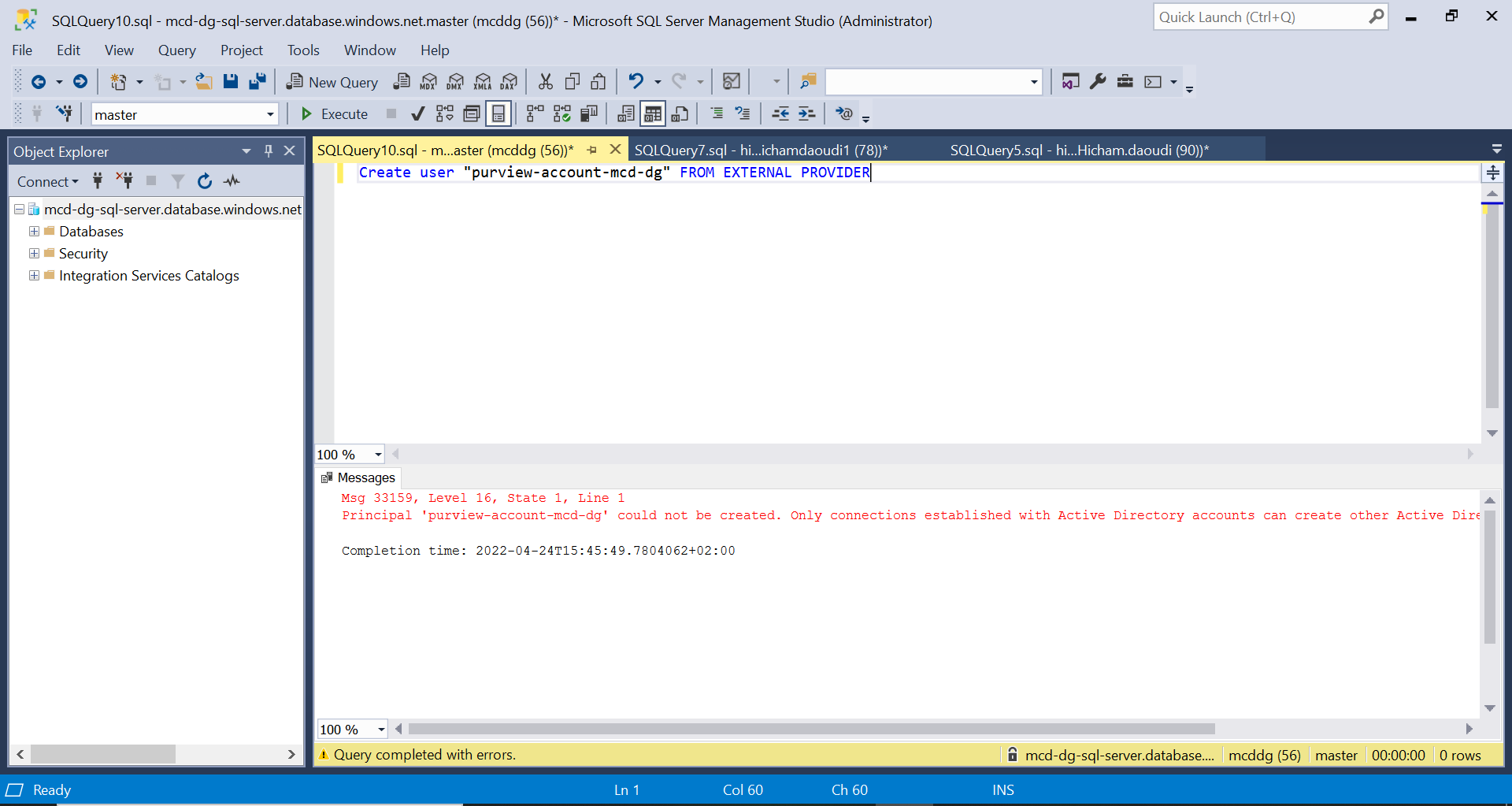
Error code:
Msg 33159, Level 16, State 1, Line 1
Principal 'purview-account-mcd-dg' could not be created. Only connections established with Active Directory accounts can create other Active Directory users.
Completion time: 2022-04-24T15:45:49.7804062+02:00
Thanks in advance!
Hi, @Hicham I see you have created a new thread on the additional question, I will respond to it in that thread.
Thank you for visiting the Microsoft QA forums! Have a great day!
Regards
Geetha

Please make sure you followed the steps provided on this forum thread.
Make sure on Azure SQL firewall you set "Allow Azure services and resources to access this server" to Yes.
Hi Alberto,
Thank you for your answer. I had already done that, but it didn't work out.
And the steps you mentioned you already followed are the steps described on this documentation? Please examine them again one by one.
I went through the steps again, but unfortunately without results. Do you happen to have any idea, what else it could be due to?
Hi Hicham-0908 Thanks for the ask and for using the Microsoft Q&A platform.
Let me reproduce the issue and will get back to you with more details.
Regards
Geetha
Thank you, I hope it is solved since I have been working on it for a long time and it needs to be delivered. I would be happy to hear from you!
No Hicham. I do not have an idea what else could be the cause of the issue.
' cx='32' cy='32' r='32' /%3E%3Ctext x='50%25' y='55%25' dominant-baseline='middle' text-anchor='middle' fill='%23FFF' %3ENK%3C/text%3E%3C/svg%3E)
On sql server I set admin to 'managed identity' of Purvuew service
On sql server I set sql admin to 'managed identity' of purview service and the connection was successful: