Developer technologies | C#
An object-oriented and type-safe programming language that has its roots in the C family of languages and includes support for component-oriented programming.
This browser is no longer supported.
Upgrade to Microsoft Edge to take advantage of the latest features, security updates, and technical support.
' cx='32' cy='32' r='32' /%3E%3Ctext x='50%25' y='55%25' dominant-baseline='middle' text-anchor='middle' fill='%23FFF' %3EM%3C/text%3E%3C/svg%3E)
I try to do something like this.
8257,5321,0181,8279,8661,2120,6641,4000,0752,6975,9849,9106,7661,4522,4287,8613,3279,6296,4498,6003,8273,6642,5201
0 = 10
1 = 10
2 = 14
3 = 5
4 = 8
5 = 6
6 = 14
7 = 8
8 = 9
9 = 8
10=2, 14=2, 5=1, 8=3, 6=1, 9=1,
0 = 10, 2 = 14, 4 = 8
1 = 10, 6 = 14, 7 = 8
6235,5507,0126,9753,0354,0423,0328,6185,8449,3424,1481,1861,3234,5928,3503,1966,0513,2306,2315,3750,0190,1510,0063
0 = 14
1 = 12
2 = 9
3 = 15
4 = 8
5 = 12
6 = 8
7 = 3
8 = 6
9 = 5
14=1, 12=2, 9=1, 15=1, 8=2, 3=1, 6=1, 5=1,
1 = 12, 4 = 8
Here is code;
using System;
using System.Collections.Generic;
using System.ComponentModel;
using System.Data;
using System.Drawing;
using System.IO;
using System.Linq;
using System.Text;
using System.Threading.Tasks;
using System.Windows.Forms;

namespace TestFor_39
{
    public partial class Form1 : Form
    {
        List<string> Data1 = new List<string>();
        List<string> Data2 = new List<string>();

        public Form1()
        {
            InitializeComponent();
            foreach (var s in File.ReadLines(@"C:\Users\family\Documents\Tool_3.txt"))
            {
                //txt file = 8257,5321,0181,8279,8661,2120,6641,4000,0752,6975,9849,9106,7661,4522,4287,8613,3279,6296,4498,6003,8273,6642,5201
                //6235,5507,0126,9753,0354,0423,0328,6185,8449,3424,1481,1861,3234,5928,3503,1966,0513,2306,2315,3750,0190,1510,0063
                Data1.Add(s);
                listBox1.Items.Add(s);
            }

        }

        private void button1_Click(object sender, EventArgs e)
        {
            foreach (var item_ in Data1)
            {
                listBox2.Items.Add(item_);

                var MyItems = new List<myItem>();

                for (int j = 0; j <= 9; j++)
                {
                    String Number_ = j.ToString();
                    int NumberCount_ = item_.Replace(",", "").ToCharArray().Count(c => c.ToString() == Number_);
                    MyItems.Add(new myItem() { Index = Convert.ToInt32(Number_.ToString()), Value = NumberCount_ });
                }

                foreach (myItem ITM in MyItems)
                {
                    listBox2.Items.Add(ITM.Index + "   = " + ITM.Value);
                }

                var Result = new Dictionary<string, int>();
                foreach (myItem ITM in MyItems)
                {
                    if (Result.ContainsKey(ITM.Value.ToString()))
                    {
                        Result[ITM.Value.ToString()] += 1;
                    }
                    else
                    {
                        Result.Add(ITM.Value.ToString(), 1);
                    }
                }

                string List = "";

                for (int i = 0; i <= MyItems.Count - 1; i++)
                {
                    foreach (KeyValuePair<string, int> KV in Result)
                    {
                        List += KV.Key + "=" + KV.Value.ToString() + MyItems[i].ToString();
                        List += ", ";
                    }
                }

                listBox2.Items.Add(List);
                listBox2.Items.Add("==============================");

            }

        }

        private void button2_Click(object sender, EventArgs e)
        {


        }
    }
}
public partial class myItem
{
    public int Index;
    public int Value;

    public override string ToString()
    {
        return Index.ToString() + " => " + Value.ToString();
    }
}

@MiPakTeh , is any update? Please tell me for free if you still have problems about your question.
JackJJun,
If i want to use my code method ,How to do?.Difficult to show "After count more than 1".
@MiPakTeh , Sorry for the late response, based on my test, I make a code example for you to ahieve your requirement.
  private void button1_Click(object sender, EventArgs e)
        {
            foreach (var item_ in Data1)
            {
                listBox2.Items.Add(item_);

                var MyItems = new List<myItem>();

                for (int j = 0; j <= 9; j++)
                {
                    String Number_ = j.ToString();
                    int NumberCount_ = item_.Replace(",", "").ToCharArray().Count(c => c.ToString() == Number_);
                    MyItems.Add(new myItem() { Index = Convert.ToInt32(Number_.ToString()), Value = NumberCount_ });
                }

                foreach (myItem ITM in MyItems)
                {
                    listBox2.Items.Add(ITM.Index + "   = " + ITM.Value);
                }

                var Result = new Dictionary<string, int>();
                foreach (myItem ITM in MyItems)
                {
                    if (Result.ContainsKey(ITM.Value.ToString()))
                    {
                        Result[ITM.Value.ToString()] += 1;
                    }
                    else
                    {
                        Result.Add(ITM.Value.ToString(), 1);
                    }
                }

                string List = "";
                foreach (KeyValuePair<string, int> KV in Result)
                {
                    List += KV.Key + "=" + KV.Value.ToString();
                    List += ", ";
                }

                listBox2.Items.Add(List);

                foreach (KeyValuePair<string, int> KV in Result)
                {
                    string duvalue = string.Empty;
                    if (KV.Value>1)
                    {
                        var result = MyItems.Where(m => m.Value.ToString() == KV.Key);

                        foreach (var item in result)
                        {
                            duvalue += item.Index + "= " + item.Value+" ,";

                        }
                        listBox2.Items.Add(duvalue);
                    }

                }
                listBox2.Items.Add("==============================");

            }
        }
Result:
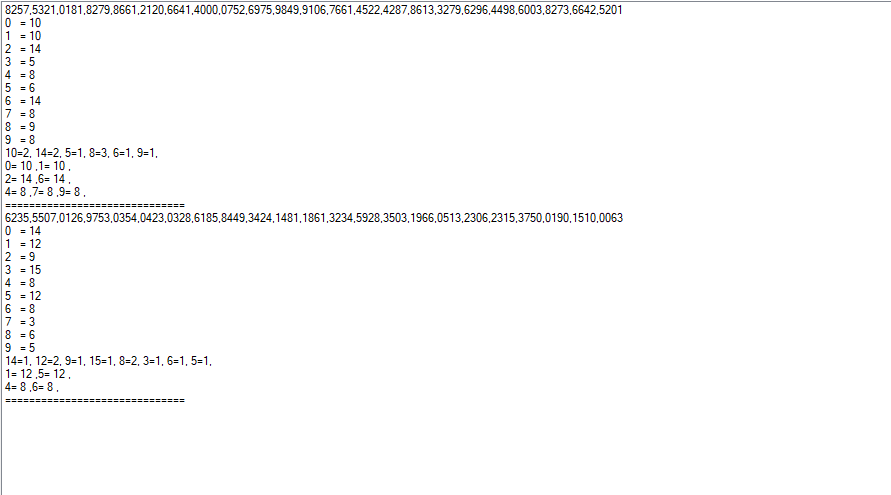
Hope the above code could help you.
Best Regards,
Jack
If the answer is the right solution, please click "Accept Answer" and upvote it.If you have extra questions about this answer, please click "Comment".
Note: Please follow the steps in our documentation to enable e-mail notifications if you want to receive the related email notification for this thread.

Looks like you want a count for each number, perhaps the following will work for you, done in this case for a single string. To use while iterating lines in a file call the code for each line.
public static List<Item> GetAllItems(string values)
{
    var itemsGroup = (
            from chr in values.ToCharArray()
            group chr by chr into grp
            select new Item
            {
                Character = grp.Key,
                Occurrences = grp.Count(),
                Code = Convert.ToInt32((int)grp.Key)
            })
        .ToList()
        .OrderBy(item => item.Character.ToString());

    return (from item in itemsGroup select item).ToList();

}
See full code in the following repository.
private void ReadFileButton_Click(object sender, EventArgs e)
{
    List<Item> GetInfo(List<List<Item>> list, int findChar)
    {
        var items =
            (
                from sublist in list
                from item in sublist
                where item.Character == findChar select item).ToList();
        return items;
    }

    List<List<Item>> itemList = Operations.ReadFromFile();

    var one = GetInfo(itemList, '1').Sum(x => x.Occurrences);
    var eight = GetInfo(itemList, '8').Sum(x => x.Occurrences);
    Console.WriteLine($"1 = {one,-4}8 = {eight}");

}
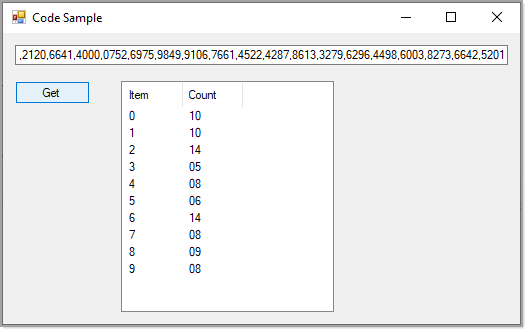
Thank Karen,
I want to separate IF Count have same value .Example above
Number 0 count 10 and 1 count 10
Number 2 count 14 and 6 count 14
Number 4 count 8 and 7 count 8 and 9 count 8
put at bottom.
Bottom of what, can you do a mock-up?
Karen,

See the link in my first reply, I added code to read two lines from a file and produce totals for two numbers, from there follow the pattern for all other numbers.
Karen , Thank for your feedback.Try to find "Item" reference cannot find where it is.
Right where it should be
https://github.com/karenpayneoregon/q-a-questions/blob/master/OccurrencesApp/Classes/Item.cs