Azure Document Intelligence in Foundry Tools
An Azure service that turns documents into usable data. Previously known as Azure Form Recognizer.
This browser is no longer supported.
Upgrade to Microsoft Edge to take advantage of the latest features, security updates, and technical support.
' cx='32' cy='32' r='32' /%3E%3Ctext x='50%25' y='55%25' dominant-baseline='middle' text-anchor='middle' fill='%23FFF' %3EAD%3C/text%3E%3C/svg%3E)
I need to extract text from pdf.
I have used form recognization v2.1 https://fott-2-1.azurewebsites.net/ for model building, but I'm facing error in connection.

I have configured CORS

But when I try to generate SAS key, I will select all the permissions for the container and then click on generate SAS but is not getting saved by default it will be READ permission only
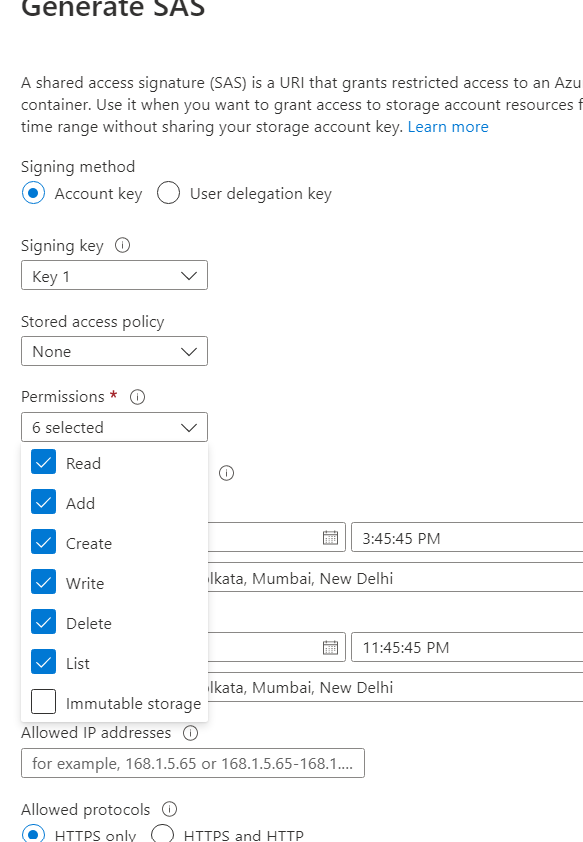
Can anyone please help me out to solve this error?
Or can anyone suggest how to extract data from pdf by using Custom model Form Recognizer in Azure Logic App?
An Azure service that turns documents into usable data. Previously known as Azure Form Recognizer.
' cx='32' cy='32' r='32' /%3E%3Ctext x='50%25' y='55%25' dominant-baseline='middle' text-anchor='middle' fill='%23FFF' %3EGM%3C/text%3E%3C/svg%3E)
Hi, thanks for reaching out. You'll need save the Blob SAS token and URL values in a secure location. They'll only be displayed once and cannot be retrieved once the window is closed. There may be multiple reasons for the error. At a quick glance, please specify "*" as the Allowed Origin. Use the values provided here. More suggestions are provided below based on comments in the following thread:
--please don't forget to Accept Answer if the reply is helpful. Thanks.--