Microsoft 365 and Office | SharePoint Server | For business
A family of Microsoft on-premises document management and storage systems.

This browser is no longer supported.
Upgrade to Microsoft Edge to take advantage of the latest features, security updates, and technical support.
' cx='32' cy='32' r='32' /%3E%3Ctext x='50%25' y='55%25' dominant-baseline='middle' text-anchor='middle' fill='%23FFF' %3EJW%3C/text%3E%3C/svg%3E)
Hi,
After last security update on our server - KB5002180. We are having lots of issues on our SharePoint 2019 on Premise. And since it is security update I can't uninstall it.
From server side all services are working, but from user side there are serious problems:
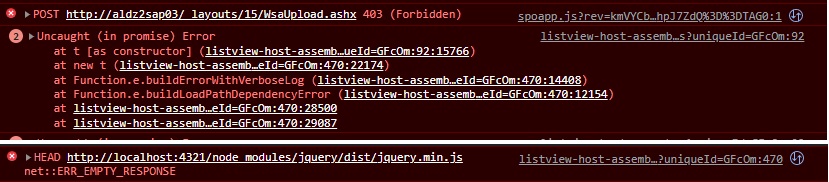
A family of Microsoft on-premises document management and storage systems.
' cx='32' cy='32' r='32' /%3E%3Ctext x='50%25' y='55%25' dominant-baseline='middle' text-anchor='middle' fill='%23FFF' %3ECM%3C/text%3E%3C/svg%3E)
Hi @Jakub Witoński ,
Thank you for your question. We will give you an update as soon as possible. Thank you for your understanding and support.
Hi @Jakub Witoński ,
Did you get any other error message? Per my research, i didn't find any useful information about this issue. Have you back up your content database before install this security update? As i am not able to reproduce this issue, i would suggest you open a ticket with Microsoft for further help.
If the answer is helpful, please click "Accept Answer" and kindly upvote it. If you have extra questions about this answer, please click "Comment".
Note: Please follow the steps in our documentation to enable e-mail notifications if you want to receive the related email notification for this thread.
Unfortunately, we got only client side exceptions in browser. There are lots of them, but are mostly information about failing load resource etc.
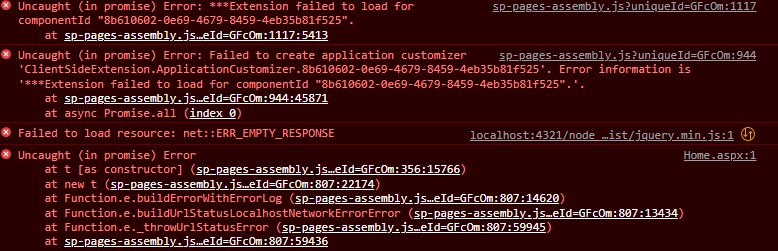
Errors same like this repeat with different details.
From server side everything there is none.
We have snapshoot of virtual machine from before update. So we could revert to it, but on the same server we got SQL instance of content database. Unfortunately users work would also be reverted which I am wary to do. Now, I see that setting everything on one server was a mistake. I was thinking that since we don't have so many users, there will be no performance problem with having SQL on same server and there is no need of another machine.
@CaseyYang-MSFT could you guide me where I can open ticket with Microsoft?
Hi @Jakub Witoński ,
You could create a support ticket by visiting this site: https://support.microsoft.com/en-us/hub/4343728/support-for-business.