FSLogix errors 26 and 41 in event log

Ben Wosjke 136 Reputation points
2022-04-29T09:05:18.503+00:00

Hi all, new to FSLogix.

I am running FSLogix 2.9.8 and I have configured settings via Group policy.

In the event log i am getting the following errors

Event ID 26 - The required VHDLocations/CCDLocations setting is not present (One or more arguments are not correct.)
Event ID 41 - SessionId: 3, ErrorCode: 160, Detail: Logon failed, Please check logs and tracelogging and verify that the users disk was detached.

The user disk is successfully attached and detached every time - but these errors persist - and i cant work out why.

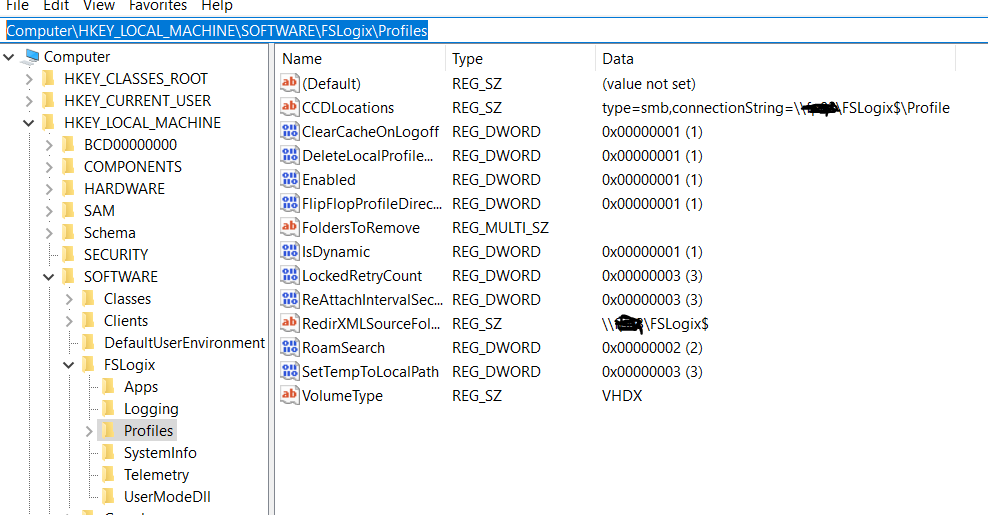
if i go into the registry to check the group policies are applied i see the following (which looks correct to me)

197639-image.png

can anyone help shed some light as to why im getting these errors ?

I cant see any errors in the CloudCacheService<date>.log

Additionally, am i correct in stating that if i have Profile containers configured, that this includes office settings ? i dont need to separately configure Office 365 containers ?

Windows for business | Windows Client for IT Pros | User experience | FSLogix
0 comments No comments

2 answers

Sort by: Most helpful
  1. Ben Wosjke 136 Reputation points
    2022-04-29T20:56:39.45+00:00

    Thanks - i was under the impression that configuring cloud cache - even if it was only using SMB for a local server - was the recommended configuration due to the reasons listed here
    https://learn.microsoft.com/en-us/fslogix/cloud-cache-resiliency-availability-cncpt

    The error messages actually turned out to be that i had accidentally enabled Office containers, without defining a location for the office container.... once i removed that - the error messages went away.

    Was this answer helpful?

    0 comments No comments

  2. Thomas Brandlehner 1 Reputation point
    2022-04-29T13:08:56.13+00:00

    Because you only set the Cloud Cache Directory and not the VHDLocation.
    Cloud Cache is a second/backup location for your Profile. You have to set the first location as well.
    Please also check if you really need cloud cache in your environment.

    197822-image.png

    Thomas

    Was this answer helpful?

    0 comments No comments

Your answer

Answers can be marked as 'Accepted' by the question author and 'Recommended' by moderators, which helps users know the answer solved the author's problem.