SQL Server Integration Services
A Microsoft platform for building enterprise-level data integration and data transformations solutions.
This browser is no longer supported.
Upgrade to Microsoft Edge to take advantage of the latest features, security updates, and technical support.
' cx='32' cy='32' r='32' /%3E%3Ctext x='50%25' y='55%25' dominant-baseline='middle' text-anchor='middle' fill='%23FFF' %3ESR%3C/text%3E%3C/svg%3E)
Hi,
I have 10 Excel files in a folder D:\Excel_Files\ (file_1.xlsx, File_2.xlsx ......and so on)
Each excel file has one sheet. The name of the sheet is same as file name.
This is what I wanted to do;
The 3rd column of all 10 excel sheets needs to be deleted. I am using Microsoft Visual studio 2010 and I want a script task code which can delete the 3rd column of all 10 excel sheets.
thanks in advance.
Sajid

Hi @SAJID RAZA KHAN ,
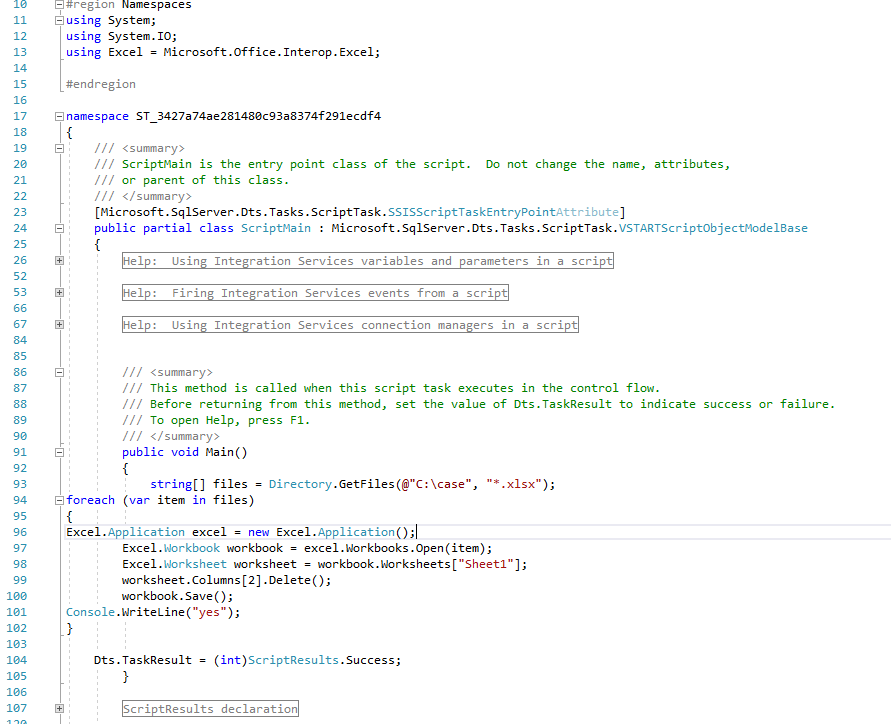
Please check below code.
string[] files = Directory.GetFiles(@"C:\Test", "*.xlsx");
foreach (var item in files)
{
Excel.Application excel = new Excel.Application();
Excel.Workbook workbook = excel.Workbooks.Open(item);
Excel.Worksheet worksheet = workbook.Worksheets["Sheet1"];
worksheet.Columns[3].Delete();
workbook.Save();
Console.WriteLine("yes");
}
Don't forget to add Microsoft.Office.Interop.Excel in NuGet package.
Regards,
Zoe
If the answer is the right solution, please click "Accept Answer" and kindly upvote it. If you have extra questions about this answer, please click "Comment".
Note: Please follow the steps in our documentation to enable e-mail notifications if you want to receive the related email notification for this thread.
Do you have further question on this , could we offer more support?
If this helps on your issue, you could mark it as answer so other user with similar problem could see this easier. :)