Microsoft 365 and Office | SharePoint | Development
The process of building custom applications and tools that interact with Microsoft SharePoint, including SharePoint Online in Microsoft 365.

This browser is no longer supported.
Upgrade to Microsoft Edge to take advantage of the latest features, security updates, and technical support.
' cx='32' cy='32' r='32' /%3E%3Ctext x='50%25' y='55%25' dominant-baseline='middle' text-anchor='middle' fill='%23FFF' %3ET%3C/text%3E%3C/svg%3E)
I am trying to update the CheckoutUser for a file in SharePoint because when the file is checked out in my code, it is being checked out by a SharePoint admin account and I want the CheckoutUser to show the person who actually checked it out. Whenever I make a request to _api/web/GetList(@path)/items(id)/ValidateUpdateListItem()?@path='/url' with the user info, I get a 200 response back and no errors, but for some reason the CheckoutUser value is cleared instead up updating to be the user that I want to set. This is what the request body looks like:
{
    "formValues": [
        {
            "FieldName": "CheckoutUser",
            "FieldValue": "[{'Key': 'i:0#.w|user.name'}]"
        }
    ],
    "bNewDocumentUpdate": true
}
I have tested out requests to both SharePoint 2016 and SharePoint Online using Postman and have not been able to get the CheckoutUser to update in either case.
' cx='32' cy='32' r='32' /%3E%3Ctext x='50%25' y='55%25' dominant-baseline='middle' text-anchor='middle' fill='%23FFF' %3ETZ%3C/text%3E%3C/svg%3E)
Hi @Tony ,
Thanks for the detailed description of the case. When I received the case, I searched a lot of documents did a lot of researches.
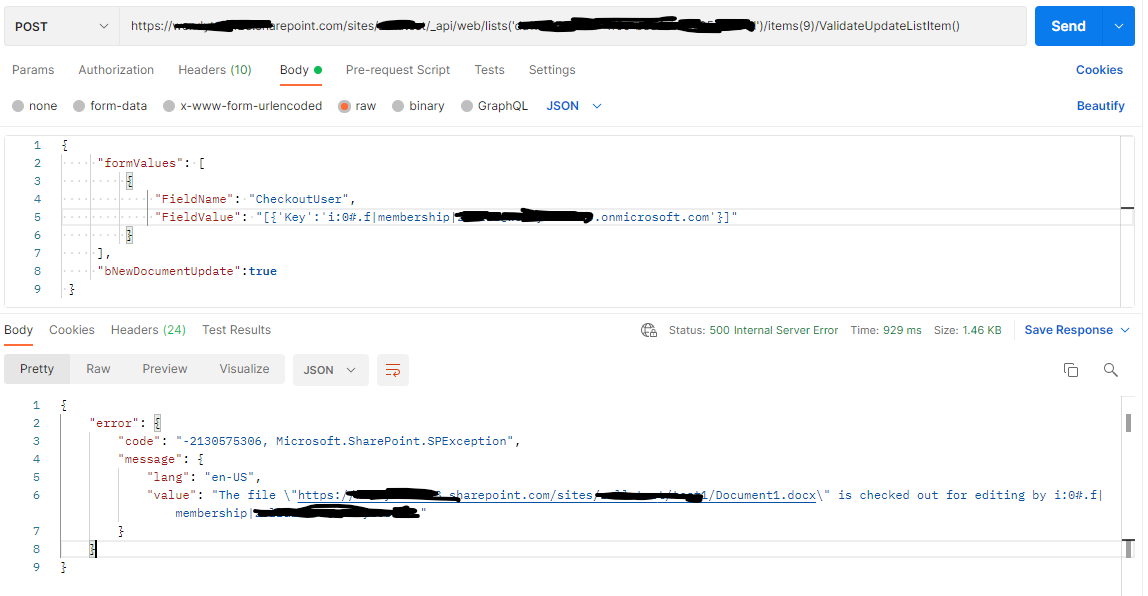
I use the REST API _api/web/lists('list-id')/items(id)/ValidateUpdateListItem() to do test ,but I get the error: The file \"https://xxxxx.sharepoint.com/sites/xxxx/test1/Document1.docx\" is checked out for editing by i:0#.f|membership|xxx@xxxxx. (the screenshot of my test results is as follows) .
We will continue to research this issue ,If there is an update or progress, will tell you in time. Thank you for your understanding and support.
If the answer is helpful, please click "Accept Answer" and kindly upvote it. If you have extra questions about this answer, please click "Comment".
Note: Please follow the steps in our documentation to enable e-mail notifications if you want to receive the related email notification for this thread.
Hi @Tony
I am checking to see if the problem has been resolved. If you have any questions or progress, you can contact me in time.
Hi @Tong Zhang_MSFT , haven't been able to make any progress on this so let me know if this gets resolved.

I guess you are missing sharedLockId.
If that is the case first you need to check if the file is locked.
Method:
GET
Uri:
_api/web/lists/getbyid('*****')/items(55)/File/lockedByUser
Headers:
{
	"Accept": "application/json; odata=nometadata",
	"Content-Type": "application/json; odata=nometadata; charset=utf-8"
}
Afterwards check if body('HTTP_check_if_the_file_is_locked')?['odata.null'] is NOT equal to true.
If that is the case you need to get vti_x005f_sourcecontrollockid file property value.
Method:
GET
Uri:
_api/web/lists/getbyid('*****')/items(55)/File/Properties?$select=vti_x005f_sourcecontrollockid
Headers:
{
	"Accept": "application/json; odata=nometadata",
	"Content-Type": "application/json; odata=nometadata; charset=utf-8"
}
Finally, we need to include this value in the HTTP call.
Method:
POST
Uri:
_api/web/lists/getbyid('*****')/items(55)/ValidateUpdateListItem
Headers:
{
	"Accept": "application/json; odata=nometadata",
	"Content-Type": "application/json; odata=nometadata; charset=utf-8"
}
Body:
{
"formValues": [
    {
      "FieldName": "DocumentType",
      "FieldValue": "Doc type"
    },
    {
      "FieldName": "Title",
      "FieldValue": "Doc title"
    }
  ],
  "sharedLockId": "@{body('HTTP_get_shared_lock_id')?['vti_x005f_sourcecontrollockid']}",
  "bNewDocumentUpdate": true
}