Microsoft Security | Intune | Application management
Managing apps and software deployment through Microsoft Intune

This browser is no longer supported.
Upgrade to Microsoft Edge to take advantage of the latest features, security updates, and technical support.

In SCCM, I have the ability to use the parenthesis ( ) to group Detection Method rules. This is extremely helpful when the rules require an OR statement. For example, I deploy Cisco AnyConnect Secure Mobility, Umbrella + XML Files, ISE Posture, and the Start Before Logon modules through a detailed PowerShell script. I used a File Detection method for each app except for the Start before Login module. For that I grouped two registry options that would satisfy my deployment.
(Side note - I deploy a current version, but detect the current or newer as successful. Since there is not a file I can reference to show the version number (if there is - please share!), I use the reg entry at HKLM\SOFTWARE\WOW6432Node\Microsoft\Windows\CurrentVersion\Uninstall\ for the Start Before Login Module which is different depending on the version installed. I do this because the version deployed sometimes gets auto updated when our engineers connect to other appliances set to auto update)
In any case, as I move towards Intune, I am not seeing a way to create a detection rule that uses the OR statement? Is this a possibility or is the answer to create a custom script to detect what I need?
' cx='32' cy='32' r='32' /%3E%3Ctext x='50%25' y='55%25' dominant-baseline='middle' text-anchor='middle' fill='%23FFF' %3ECM%3C/text%3E%3C/svg%3E)
@Matt Dillon , Thanks for posting in Q&A. From your description, it seems you want to detect the app as installed when one registry key is there or one file version met. If there's any misunderstanding, feel free to let us know.
And you want to know if the custom script can accomplish this. Based on my experience, I would like to say yes. In fact, Intune agent checks the results from the script. It reads the values written by the script to the STDOUT stream, the standard error (STDERR) stream, and the exit code. If the script exits with a nonzero value, the script fails and the application detection status is not installed. If the exit code is zero and STDOUT has data, the application detection status is installed. We can see more details in the following link:
https://learn.microsoft.com/en-us/mem/intune/apps/apps-win32-add#step-4-detection-rules
So in our situation, we can set the script to exit with 0 when the registry is there or the related version of the file is there.
Here is a link with one script example for your reference:
https://www.techuisitive.com/post/intune-understanding-win32-app-detection-rules#viewer-97kh0
Note: Non-microsoft link, just for the reference.
Hope it can help.
If the answer is helpful, please click "Accept Answer" and kindly upvote it. If you have extra questions about this answer, please click "Comment".
Note: Please follow the steps in our documentation to enable e-mail notifications if you want to receive the related email notification for this thread.
I figured I would need to use a script. My actual question was will grouping be available in Intune detection methods ever? i.e. - can I have two detection methods separated with an OR and if either are detected, the application install is detected without using a script?
@Matt Dillon ,, Thanks for the reply. For Intune detection methods, grouping is available. But it is only for “And”. Which means we can create multiply rules under detection method. The conditions for all rules must be met to detect the app.
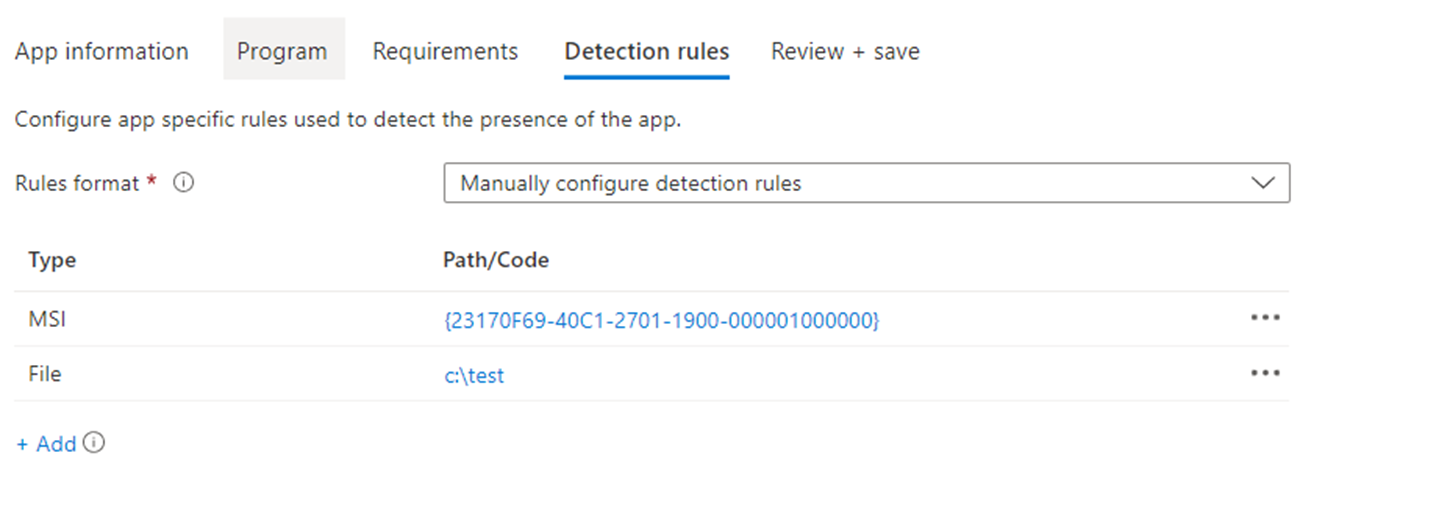
For more details, please refer to the following article:
https://learn.microsoft.com/en-us/mem/intune/apps/apps-win32-add#step-4-detection-rules
For the “Or” operation, currently this is not available in Intune. But you could feedback to our Intune user voice to see if we can get this new feature in this future
https://feedbackportal.microsoft.com/feedback/forum/ef1d6d38-fd1b-ec11-b6e7-0022481f8472
Thanks for the understanding.
I was able to get craft and script this out and it works perfectly. An OR would be awesome.
@Matt Dillon , Thanks for the reply. I'm glad that craft and script works perfectly. I fully understand your feeling. The "OR” really can bring a lot of convenience. Your feedback is greatly appreciated to improve our Product. You can feedback it on our Intune uservoice. It is a place where our Product team collect customer feedback to help design the release of our product. Meanwhile, I will also try my best to feedback. Hope we can get this feature in the later future.
Thank you for your time and have a nice day!