Exchange | Exchange Server | Management
The administration and maintenance of Microsoft Exchange Server to ensure secure, reliable, and efficient email and collaboration services across an organization.
This browser is no longer supported.
Upgrade to Microsoft Edge to take advantage of the latest features, security updates, and technical support.
' cx='32' cy='32' r='32' /%3E%3Ctext x='50%25' y='55%25' dominant-baseline='middle' text-anchor='middle' fill='%23FFF' %3EAS%3C/text%3E%3C/svg%3E)
Powershell command to enable email forwarding from Distribution list to other user
' cx='32' cy='32' r='32' /%3E%3Ctext x='50%25' y='55%25' dominant-baseline='middle' text-anchor='middle' fill='%23FFF' %3EKY%3C/text%3E%3C/svg%3E)
Another method would be creating a Outlook inbox rule in one member mailbox of this distribution list to forward the email sent to this distribution list to the other user.
For detailed information about how to create a rule in Outlook or OWA:
Set up rules in Outlook
Use inbox rules in Outlook on the web
The rule would be like:
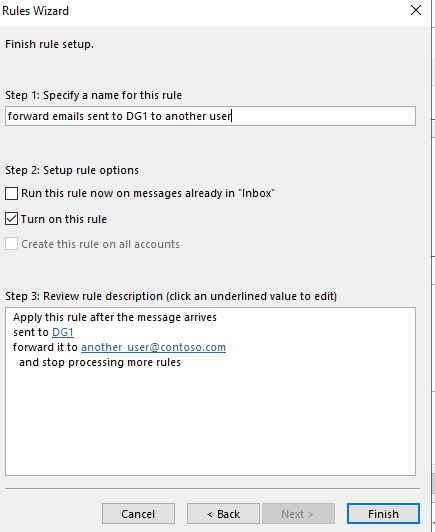
If you would like to use Exchange Management Shell, you can use this cmdlet:
New-InboxRule
If the answer is helpful, please click "Accept Answer" and kindly upvote it. If you have extra questions about this answer, please click "Comment".
Note: Please follow the steps in our documentation to enable e-mail notifications if you want to receive the related email notification for this thread.

You dont forward from a Distribution List, but if you want to add a member to it
Add-DistributionGroupMember -Identity "Staff" -Member "******@contoso.com"
Thank you so much @Kai Yao , let me repro the case and follow the above steps .
Do you have a chance to try the suggestions?
If any updates on this issue, please feel free to post back.
Hello ,
Yes, it worked for us. We tried this last week and we got the results . What we're looking for.
Hi,
Glad to hear that!
If the suggestions work for you, please accept the helpful reply as the answer to the question.
It would also help other community members.
Thanks for your understanding.
