Azure SQL Database
An Azure relational database service.
This browser is no longer supported.
Upgrade to Microsoft Edge to take advantage of the latest features, security updates, and technical support.
' cx='32' cy='32' r='32' /%3E%3Ctext x='50%25' y='55%25' dominant-baseline='middle' text-anchor='middle' fill='%23FFF' %3ESJ%3C/text%3E%3C/svg%3E)
Hi,
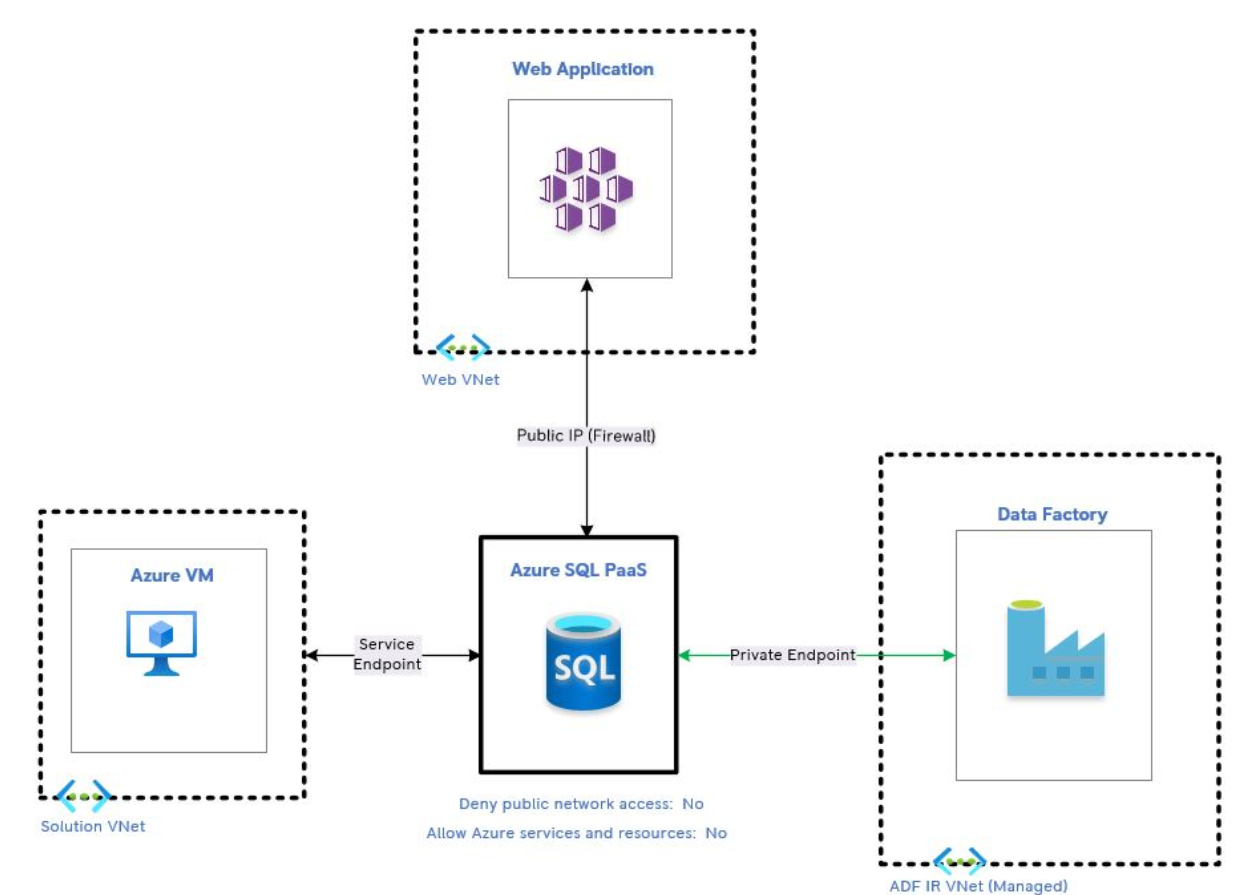
I am trying to configure the network setting for Azure SQL server. I have got three services interacting with SQL. They are VM, Azure Data Factory and Web Service. Below are their details.
VM will access SQL using Service Endpoint. ADF will access SQL using Private Endpoint as it uses its own managed VNet. Finally, the Web App will access SQL using its public IP whitelisted at the Server's network setting. The following picture explains the setup.
Below are my questions?

Hi @senthilnathanjegadeeswaran-0788 Thank you for posting your query on Microsoft Q&A and for using Azure services.
In response to this question: *I have now tested by creating a private endpoint to the VM subnet and the connectivity works from the VM to SQL. However, a VM in another subnet under the same VNet is not able to reach SQL DB. Subnets do have NSGs enforced. Not sure if this was due to DNS issue, routing or NSG rules. *
Looks like you are pinging from one subnet to another. The traffic must be able to get out of the first subnet and into the second. Therefore, you need to define both inbound and outbound rules.
See: https://learn.microsoft.com/en-us/azure/virtual-network/security-overview#default-security-rules
https://stackoverflow.com/questions/62601960/azure-vms-on-the-same-vnet-different-subnet-can-not-ping-to-port-other-then-338
Regards,
Oury
Hi @senthilnathanjegadeeswaran-0788 Please let us know if this is what you are looking for.
Regards,
Oury

SQL server does support access over Private Endpoint and Service Endpoints at the same time, however if your leaving public access on the database, then using service endpoints on your VM has little point. Your not locking down who can connect, and service endpoints traffic still goes over the internet so you may as well use public access. Using a private endpoint with your VM instead would give you the benefit of traffic routing over the private network.
If you want the most secure configuration you would do the following:
Sam, Thanks for your answers.