Microsoft 365 and Office | Excel | For business | Windows
A family of Microsoft spreadsheet software with tools for analyzing, charting, and communicating data

This browser is no longer supported.
Upgrade to Microsoft Edge to take advantage of the latest features, security updates, and technical support.
' cx='32' cy='32' r='32' /%3E%3Ctext x='50%25' y='55%25' dominant-baseline='middle' text-anchor='middle' fill='%23FFF' %3EP%3C/text%3E%3C/svg%3E)
We have multiple Excel files that we use for reporting. Until today they worked fine but now when we try to refresh data we get this error:
"An error happened while reading data from the provider: 'Could not load file or assembly 'System.EnterpriseServices, Version=4.0.0.0, Culture=neutral, PublicKeyToken=b03f5f7f11d50a3a' or one of its dependencies. Either a required impersonation level was not provided, or the provided impersonation level is invalid. (Exception from HRESULT: 0x80070542)'"
When we run Excel as administrator, the data refresh works fine, however we have permissions locked down so not everyone that needs to access/update reports can be elevated to admin.

Hi @pgohbs ,
What kind of data source are you connecting?
Which authentication method are you using?
How did you create the connection?
As you said if you run as an Administator, you can refresh without problem.
I suggest you check if this related to the connection authentication or the system login permission.
please be a bit more precise to explain your requirement or you can upload a screenshot so that I can get more accurate solutions to this problem. I’m glad to help and follow up your reply.
If the response is helpful, please click "Accept Answer" and upvote it.
Note: Please follow the steps in our documentation to enable e-mail notifications if you want to receive the related email notification for this thread.
What kind of data source are you connecting?
MS-SQL Server database
Which authentication method are you using?
AD
How did you create the connection?
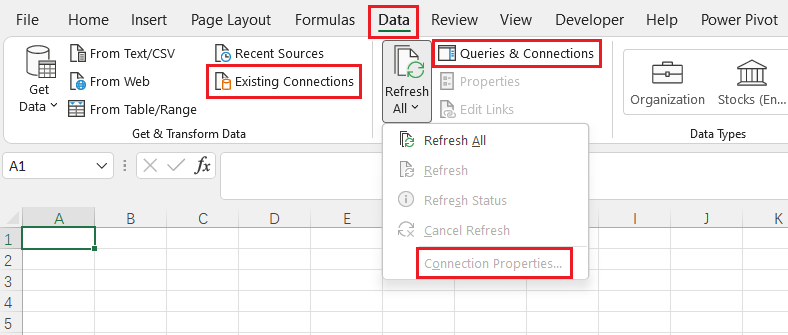
I'm not sure: the Excel files predate me. What's a good way to get at the information you're looking for from an existing spreadsheet?
Hi,
What version of Excel are you using? If you're using Excel 365, you can go to Data tab and check the Existing Connection, Connection Porperties...- Queries & Connections: