Community Center | Not monitored
Tag not monitored by Microsoft.

This browser is no longer supported.
Upgrade to Microsoft Edge to take advantage of the latest features, security updates, and technical support.
' cx='32' cy='32' r='32' /%3E%3Ctext x='50%25' y='55%25' dominant-baseline='middle' text-anchor='middle' fill='%23FFF' %3ERL%3C/text%3E%3C/svg%3E)
Good Afternoon,
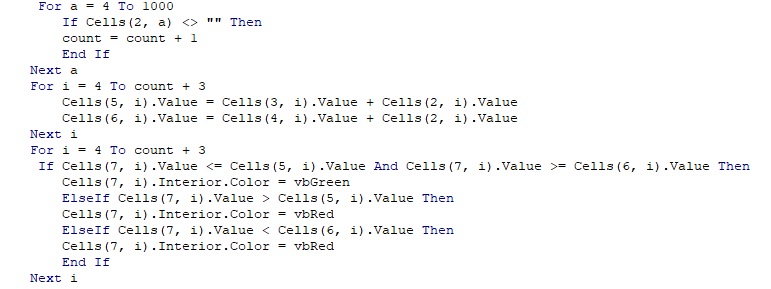
I have a macro that combines excel files into one. It works flawlessly, I just need it to "conditional format" as well, I thought that I had used the correct code but it doesn't seem to correct. The first screenshot is what the file looks like after it has been combined. Rows 7 & 8 contain the actual data that would need to turn red or green based on if it's out of tolerance. As you can see, I have my nominal tolerance, along with my upper and lower limit based on the plus and minus tolerances. If for example cell D7 is greater than or equal to D6 AND less than or equal to D5, then turn cell D7 green. I don't want to use the Range syntax, but the number of columns is never definite, it could/will change each time. The second screenshot is my code, I'm using the first for loop to count my columns, the second for loop to populate each upper and lower limit, and then the third for loop is my conditional formatting code. What route should I take for this to work correctly?
Thanks in advance!


@Ross Leonard ,
Issues related to VBA code are not currently supported on Q&A, I suggest you post a new question in Excel for Developers forum.
Besides, I would remove the "office-excel-itpro" tag, as questions about it are general questions of Excel desktop app.
Thanks for your understanding.
' cx='32' cy='32' r='32' /%3E%3Ctext x='50%25' y='55%25' dominant-baseline='middle' text-anchor='middle' fill='%23FFF' %3EA%3C/text%3E%3C/svg%3E)
Excel development is not currently supported here on QnA. They're actively answering questions in dedicated forums here.
https://answers.microsoft.com/en-us/msoffice/forum/msoffice_excel-msoffice_custom
https://social.msdn.microsoft.com/Forums/Lync/en-US/home?forum=exceldev
--please don't forget to Accept as answer if the reply is helpful--

Well my first thought is that some of your cells might be "text" instead of a number and the compare is failing. You might have to "clng(cells(5, i).value)" to insure a numeric compare.
I liked to use "debug.print()" liberally and set breakpoints to step through my code to verify the values that I was looking at contain what I expected.