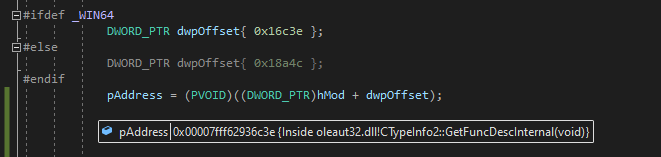
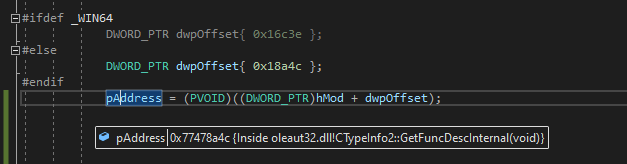
Hello,
When I add a COM reference to "MediaMonkey5 Library" (it's a music library software) in a .NET project, Visual Studio crashes. I'd like to figure out what's wrong with the program's COM configuration that's causing Visual Studio to crash.
To reproduce it:
0) install MediaMonkey v5.0+ (I'm not gonna link to its website because that might be considered advertising, but it's the first result if you google it.)
- in Visual Studio 2017 or 2019, create a new .NET project (WPF app or Windows Forms app, or possibly some other types)
- under References in the Solution Explorer, right click > Add Reference
- under COM, check MediaMonkey5 Library and click OK
- Visual Studio crashes
I don't know the first thing about debugging Visual Studio itself, and googling "debugging visual studio" simply gives results for how to use Visual Studio to debug programs you're developing. What can I do to figure out what's causing VS to crash? It's only the "MediaMonkey 5 Library" that's crashing VS, and it occurs on multiple people's computers, so I don't believe it's an issue with VS's configuration.
=== UPDATE ===
Found another post suggesting to search through Event Viewer and I've pasted all the details in the following text file: 199370-visualstudiocrasheventlog.txt
Shortened preview of first log (Error):
Application: devenv.exe
Framework Version: v4.0.30319
Description: The process was terminated due to an unhandled exception.
Exception Info: System.AccessViolationException
   at Microsoft.VisualStudio.Shell.Interop.IVsReferenceManagerUser.ChangeReferences(UInt32, Microsoft.VisualStudio.Shell.Interop.IVsReferenceProviderContext)
   at Microsoft.VisualStudio.ReferenceManager.ReferenceManagerControl.Control_OnReferenceChanged(Microsoft.VisualStudio.Shell.Interop.__VSREFERENCECHANGEOPERATION, Microsoft.VisualStudio.Shell.Interop.IVsReferenceProviderContext)
   at Microsoft.VisualStudio.ReferenceManager.ReferenceManagerControl.ApplyChangeOperation(System.Collections.Generic.IEnumerable`1<Microsoft.VisualStudio.Shell.Interop.IVsReferenceProviderContext>, Microsoft.VisualStudio.Shell.Interop.__VSREFERENCECHANGEOPERATION, Boolean, System.Collections.Generic.List`1<System.Exception> ByRef)
Shortened preview of second log (Error):
Faulting application name: devenv.exe, version: 17.0.31903.59, time stamp: 0x6182abc9
Faulting module name: OLEAUT32.dll, version: 10.0.19041.985, time stamp: 0x61567b6b
Exception code: 0xc0000005
Fault offset: 0x0000000000016c3e
Shortened preview of third log (Information):
Fault bucket 1208009750557970256, type 4
Event Name: APPCRASH
Response: Not available
Cab Id: 0
I can also access the files that the third event is referencing. Which ones would be helpful in this case?
' cx='32' cy='32' r='32' /%3E%3Ctext x='50%25' y='55%25' dominant-baseline='middle' text-anchor='middle' fill='%23FFF' %3ED%3C/text%3E%3C/svg%3E)


' cx='32' cy='32' r='32' /%3E%3Ctext x='50%25' y='55%25' dominant-baseline='middle' text-anchor='middle' fill='%23FFF' %3ETS%3C/text%3E%3C/svg%3E)