Microsoft Graph
A Microsoft programmability model that exposes REST APIs and client libraries to access data on Microsoft 365 services.
10,645 questions
This browser is no longer supported.
Upgrade to Microsoft Edge to take advantage of the latest features, security updates, and technical support.
' cx='32' cy='32' r='32' /%3E%3Ctext x='50%25' y='55%25' dominant-baseline='middle' text-anchor='middle' fill='%23FFF' %3ELJ%3C/text%3E%3C/svg%3E)
when I request to https://graph.microsoft.com/v1.0/users?$filter=mobilePhone eq '13111111111'&$count=true response is 'Unsupported or invalid query filter clause specified for property 'mobilePhone' of resource 'User'',I change request to https://graph.microsoft.com/v1.0/users?$count=true&$filter=mail eq '13111111111' it's working

Hi @Liang, Jone [GTSCN NON-J&J] ,
As documented here, mobilePhone property does supports filter OData query parameter and it seems to be issue with API and this API filter query is not working as expected. I would advise you to use the below alternative filter API query along with request header (ConsistencyLevel: eventual) as shown below and it is working fine.
GET https://graph.microsoft.com/v1.0/users?$filter=mobilePhone eq '1234567890'&$count=true
ConsistencyLevel: eventual
(Or)
GET https://graph.microsoft.com/v1.0/users?$filter=startsWith(mobilePhone, '1234')&$count=true
ConsistencyLevel: eventual
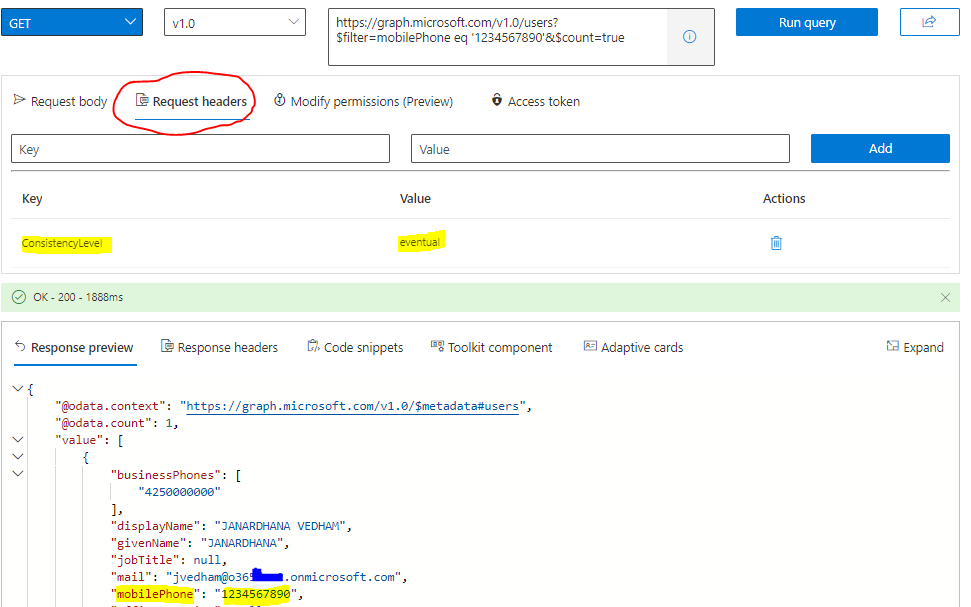
For escalating this API issue regarding normail filter query with mobilePhone property to Microsoft Engineering team for thier analysis & resoultion , I would request you to open up a support case either from your Azure portal or M365 admin portal and please mention "Graph API" term in your issue description for quick assignment with our MS graph customer support team. Thanks for your understanding.
Hope this helps.
If the answer is helpful to you, please click "Accept Answer" and kindly upvote it. If you have additional questions about this answer, please click "Comment".
' cx='32' cy='32' r='32' /%3E%3Ctext x='50%25' y='55%25' dominant-baseline='middle' text-anchor='middle' fill='%23FFF' %3EJJ%3C/text%3E%3C/svg%3E)
I am running my query against an AD B2C repository.
I have tried all of the above, specifically:
I am still getting the 'Unsupported or invalid query filter clause specified for property 'mobilePhone' of resource 'User'
I can filter on the other properties ("givenName", "surname", etc...) so there does not appear to be anything intrinsically wrong with the way in which I am performing queries.
Does MSGraph implement "mobilePhone" as a filter option for B2C? The online documentation doesn't indicate that B2C doesn't allow it.
' cx='32' cy='32' r='32' /%3E%3Ctext x='50%25' y='55%25' dominant-baseline='middle' text-anchor='middle' fill='%23FFF' %3EWX%3C/text%3E%3C/svg%3E)
I am having the issue. did you find solution?

Hi @Liang, Jone [GTSCN NON-J&J]
This is because you are missing the ConsistencyLevel: eventual header. Also, I think if you call https://graph.microsoft.com/v1.0/users?$count=true&$filter=mail eq '13111111111' api without ConsistencyLevel: eventual header , it should not work, please check.
Refer to: Advanced query capabilities on Azure AD directory objects.
If the answer is helpful, please click "Accept Answer" and kindly upvote it. If you have extra questions about this answer, please click "Comment".
Note: Please follow the steps in our documentation to enable e-mail notifications if you want to receive the related email notification for this thread.
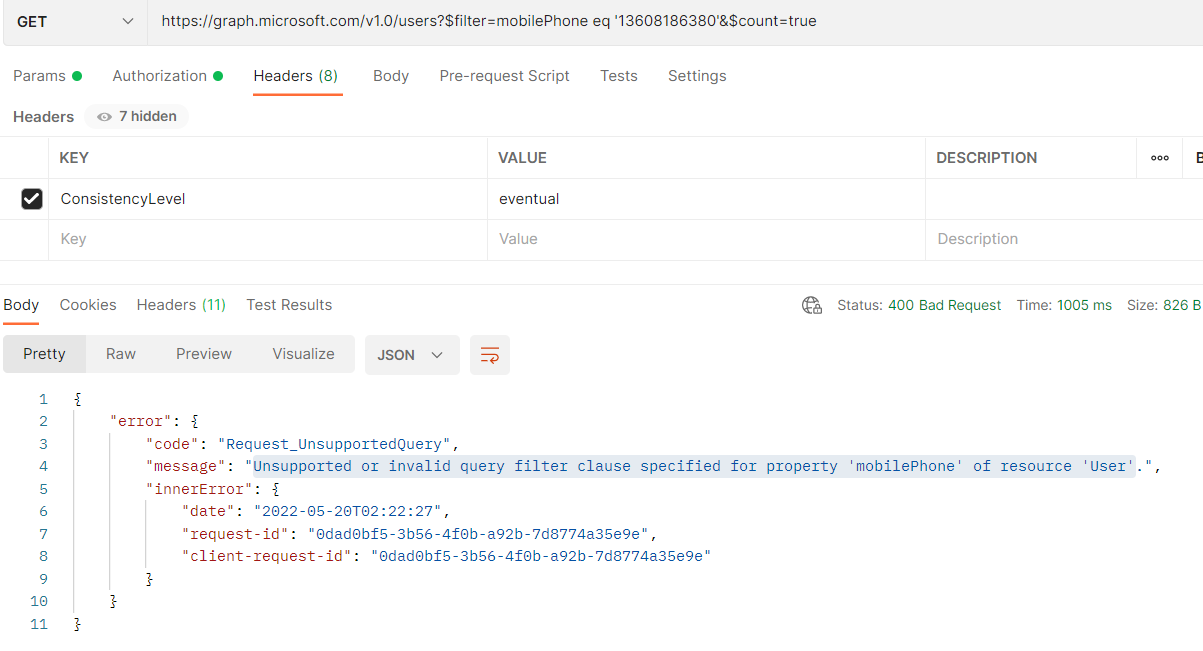
It's not working by postman
' cx='32' cy='32' r='32' /%3E%3Ctext x='50%25' y='55%25' dominant-baseline='middle' text-anchor='middle' fill='%23FFF' %3EPS%3C/text%3E%3C/svg%3E)
I'm literally having this issue as well. Even with the requirements for advanced queries filled, the API says the attempted query is invalid.