Microsoft 365 and Office | Excel | For business | Windows
A family of Microsoft spreadsheet software with tools for analyzing, charting, and communicating data

This browser is no longer supported.
Upgrade to Microsoft Edge to take advantage of the latest features, security updates, and technical support.
' cx='32' cy='32' r='32' /%3E%3Ctext x='50%25' y='55%25' dominant-baseline='middle' text-anchor='middle' fill='%23FFF' %3EDP%3C/text%3E%3C/svg%3E)
I believe I am attempting to use VLOOKUP as described, however I am getting a #NAME? error I can't seem to resolve. I have a project worksheet which lists certain inventory item numbers in column A, and I am trying to look up the current price of those items on a master price list (which is on another worksheet) using the item number, not a cell reference. My formula is: =VLOOKUP(A1, ARINVT_E [the worksheet with the master inventory],9 [the column containing the current price]) If I use the wizard, I get the #NAME? error on the array_table line, even if I copy the master inventory list into the same workbook as Sheet 2. The list of inventory items is Column A of the master price list. What am I doing wrong?
A family of Microsoft spreadsheet software with tools for analyzing, charting, and communicating data

Hi @David Page
Can you take some screenshots of the formula and the data on master sheet?
Please note, if there is any privacy information, you can cover it.
Then according to the article "How to correct a #NAME? error", I suggest you check whether "ARINVT_E [the worksheet with the master inventory]" in your formula is written correctly. Not just the writing format, the spelling, but also the data range.
Such as my sample, my "master sheet" is called "Sheet2".
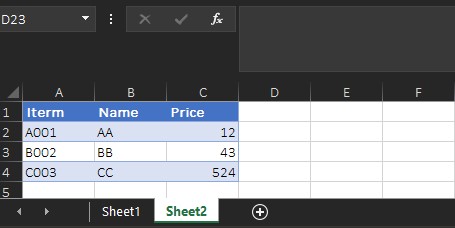
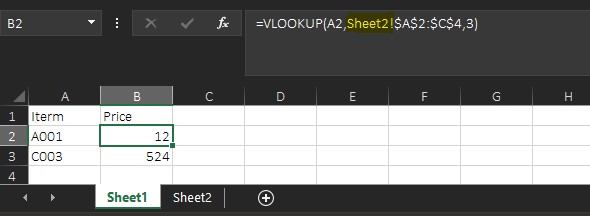
The "project sheet" is called "Sheet1", and I need to add Sheet2! to point the range of the data source (From A2 to C4 on Sheet 2) in my formula.
Any updates, welcome to post back.
If the answer is helpful, please click "Accept Answer" and kindly upvote it. If you have extra questions about this answer, please click "Comment".
Note: Please follow the steps in our documentation to enable e-mail notifications if you want to receive the related email notification for this thread.
Hi @David Page
I am glad that your issus has went away. You found out that you were not including the cell range with the target sheet name.
Can you accept the helpful information as an answer?
This action can help other users on Q&A forum who encounter the same issue.
Thanks for your understandings.