Developer technologies | VB
An object-oriented programming language developed by Microsoft that can be used in .NET.
This browser is no longer supported.
Upgrade to Microsoft Edge to take advantage of the latest features, security updates, and technical support.
' cx='32' cy='32' r='32' /%3E%3Ctext x='50%25' y='55%25' dominant-baseline='middle' text-anchor='middle' fill='%23FFF' %3EK%3C/text%3E%3C/svg%3E)
I have a query where I calculate the total sum of an item based on different prices.
If I enter a new article and I leave certain cells empty, the price is calculated correctly with an empty cell.
If I now put a value in the empty cell, the calculation also happens correctly, but the cell cannot be emptied afterwards (no empty cell is allowed).
In the DB it says "Allow null's"
This only happens in cells where a number is stated, not in a cell with text.
CREATE VIEW dbo.Particulier
AS
SELECT        Auto_Merk, Plaats, ref_vast, ref_es, Ref, Omschrijving, Datum, snijden, snijden_foto, Bol, ref_set7P, ref_set13P, werk_vast, werk_orig, werk_es, opleg_13P, Caravan, prijs_vast, prijs_es, prijs_set7P, prijs_set13P, Spoiler_ref,
                         Spoiler_prijs, Codering, Codering_prijs, Uitbreidingsset, Uitbreidingsset_prijs, PDC_uitschakeling, ROUND((prijs_es * 1.21 + werk_es + prijs_set7P + ISNULL(Spoiler_prijs, '0') + ISNULL(Codering_prijs, '0')
                         + ISNULL(Uitbreidingsset_prijs, '0')) / 10, 0) * 10 AS geplaatstes, ROUND((prijs_vast * 1.21 + werk_orig + prijs_set7P + ISNULL(Spoiler_prijs, '0') + ISNULL(Codering_prijs, '0') + ISNULL(Uitbreidingsset_prijs, '0')) / 10, 0)
                         * 10 AS geplaatstorig, ROUND((prijs_vast * 1.21 + werk_vast + prijs_set7P + ISNULL(Spoiler_prijs, '0') + ISNULL(Codering_prijs, '0') + ISNULL(Uitbreidingsset_prijs, '0')) / 10, 0) * 10 AS geplaatstvast, checkvast, checkorig,
                         checkes, Cataloog_ID
FROM            dbo.Cataloog
An object-oriented programming language developed by Microsoft that can be used in .NET.
I don't think the problem is in saving once I clear the cell I can't select anything else.
Something has to be filled in first before I can continue.
Could this be because the cell is used in a query calculation and therefore cannot be empty?
it's a winform and i use this code to save the data.
 Function Save_cataloog() As Boolean
        Try
            Me.Validate()
            Me.CataloogBindingSource.EndEdit()
            Me.CataloogTableAdapter.Update(Me.CataloogDataSet.Cataloog)

            Return True
        Catch ex As Exception
            MsgBox(ex.ToString)
            Return False
        End Try
    End Function

As an intermediate workaround, maybe write a loop that replaces the empty strings from corresponding columns of Me.CataloogDataSet.Cataloog with DbNull.Value or with Nothing. Do it before calling Update.
If you are using Management Studio, then try pressing <Ctrl+0> to empty the numeric nullable cell.
What are you doing in VB, that does not work?
I fill my database via a winform.
If I enter data in these fields, I can no longer make them empty "field cannot be empty"
I can make the text fields empty, but not the fields with a number.
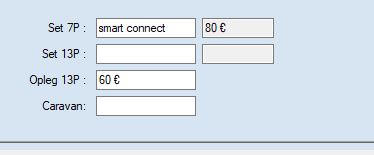
Do you have some VB code that is associated with this form or which saves the data to database?
What kind of window is this?