Azure Logic Apps
An Azure service that automates the access and use of data across clouds without writing code.
This browser is no longer supported.
Upgrade to Microsoft Edge to take advantage of the latest features, security updates, and technical support.
' cx='32' cy='32' r='32' /%3E%3Ctext x='50%25' y='55%25' dominant-baseline='middle' text-anchor='middle' fill='%23FFF' %3EKR%3C/text%3E%3C/svg%3E)
Hi Team,
I am working on scenario in that I need to transfer the file from one location to another using Azure Logic App. Let's take an example : -
Suppose I have a folder name TEST in azure file share and inside folder has multiple files. My Aim is to copy only latest file from TEST folder to TEST-1 folder.
Please provide me the steps to perform my task.
Thanks

@Keshav Rajput Thanks for reaching out. Unfortunately, we don't have any built-in Azure file storage connector triggers to copy files from one location to another location. To achieve this, you need to create a custom workflow by combining multiple actions (compose, list files, get file, control, copy file). I have created a workflow by including all the actions that i have mentioned before.
Get Files Pulled the list of existing files in that file share. for each loop to iterate those lists of files using Get File metadata using path to get the file creation time. div(sub(ticks(utcNow()),ticks(body('Get_file_metadata_using_path')?['LastModified'])),3600000000) **workflow. Json file: **
{
    "definition": {
        "$schema": "https://schema.management.azure.com/providers/Microsoft.Logic/schemas/2016-06-01/workflowdefinition.json#",
        "actions": {
            "For_each": {
                "actions": {
                    "Condition": {
                        "actions": {
                            "Copy_file": {
                                "inputs": {
                                    "headers": {
                                        "ReadFileMetadataFromServer": true
                                    },
                                    "host": {
                                        "connection": {
                                            "name": "@parameters('$connections')['azurefile']['connectionId']"
                                        }
                                    },
                                    "method": "post",
                                    "path": "/datasets/default/copyFile",
                                    "queries": {
                                        "destination": "<destinationPath>",
                                        "overwrite": true,
                                        "queryParametersSingleEncoded": true,
                                        "source": "@items('For_each')?['Path']"
                                    }
                                },
                                "runAfter": {},
                                "type": "ApiConnection"
                            }
                        },
                        "expression": {
                            "and": [
                                {
                                    "equals": [
                                        "@div(sub(ticks(utcNow()),ticks(body('Get_file_metadata_using_path')?['LastModified'])),3600000000)",
                                        0
                                    ]
                                }
                            ]
                        },
                        "runAfter": {
                            "Get_file_metadata_using_path": [
                                "Succeeded"
                            ]
                        },
                        "type": "If"
                    },
                    "Get_file_metadata_using_path": {
                        "inputs": {
                            "host": {
                                "connection": {
                                    "name": "@parameters('$connections')['azurefile']['connectionId']"
                                }
                            },
                            "method": "get",
                            "path": "/datasets/default/GetFileByPath",
                            "queries": {
                                "path": "@items('For_each')?['Path']",
                                "queryParametersSingleEncoded": true
                            }
                        },
                        "runAfter": {},
                        "type": "ApiConnection"
                    }
                },
                "foreach": "@body('List_files')?['value']",
                "runAfter": {
                    "List_files": [
                        "Succeeded"
                    ]
                },
                "type": "Foreach"
            },
            "List_files": {
                "inputs": {
                    "host": {
                        "connection": {
                            "name": "@parameters('$connections')['azurefile']['connectionId']"
                        }
                    },
                    "method": "get",
                    "path": "/datasets/default/foldersV2/@{encodeURIComponent(encodeURIComponent('JTJmdGVzdGluZ2ZpbGVz'))}",
                    "queries": {
                        "nextPageMarker": "",
                        "useFlatListing": false
                    }
                },
                "metadata": {
                    "JTJmdGVzdGluZ2ZpbGVz": "/testingfiles"
                },
                "runAfter": {},
                "type": "ApiConnection"
            }
        },
        "contentVersion": "1.0.0.0",
        "outputs": {},
        "parameters": {
            "$connections": {
                "defaultValue": {},
                "type": "Object"
            }
        },
        "triggers": {
            "Recurrence": {
                "evaluatedRecurrence": {
                    "frequency": "Minute",
                    "interval": 1
                },
                "recurrence": {
                    "frequency": "Minute",
                    "interval": 1
                },
                "type": "Recurrence"
            }
        }
    },
    "parameters": {
        "$connections": {
            "value": {
                "azurefile": {
                    "connectionId": "/subscriptions/<subscriptionId>/resourceGroups/<resourcegroup>/providers/Microsoft.Web/connections/azurefile",
                    "connectionName": "azurefile",
                    "id": "/subscriptions/<subscriptionId>/providers/Microsoft.Web/locations/eastus/managedApis/azurefile"
                }
            }
        }
    }
}
**Here is the screenshot of the Workflow Designer: **
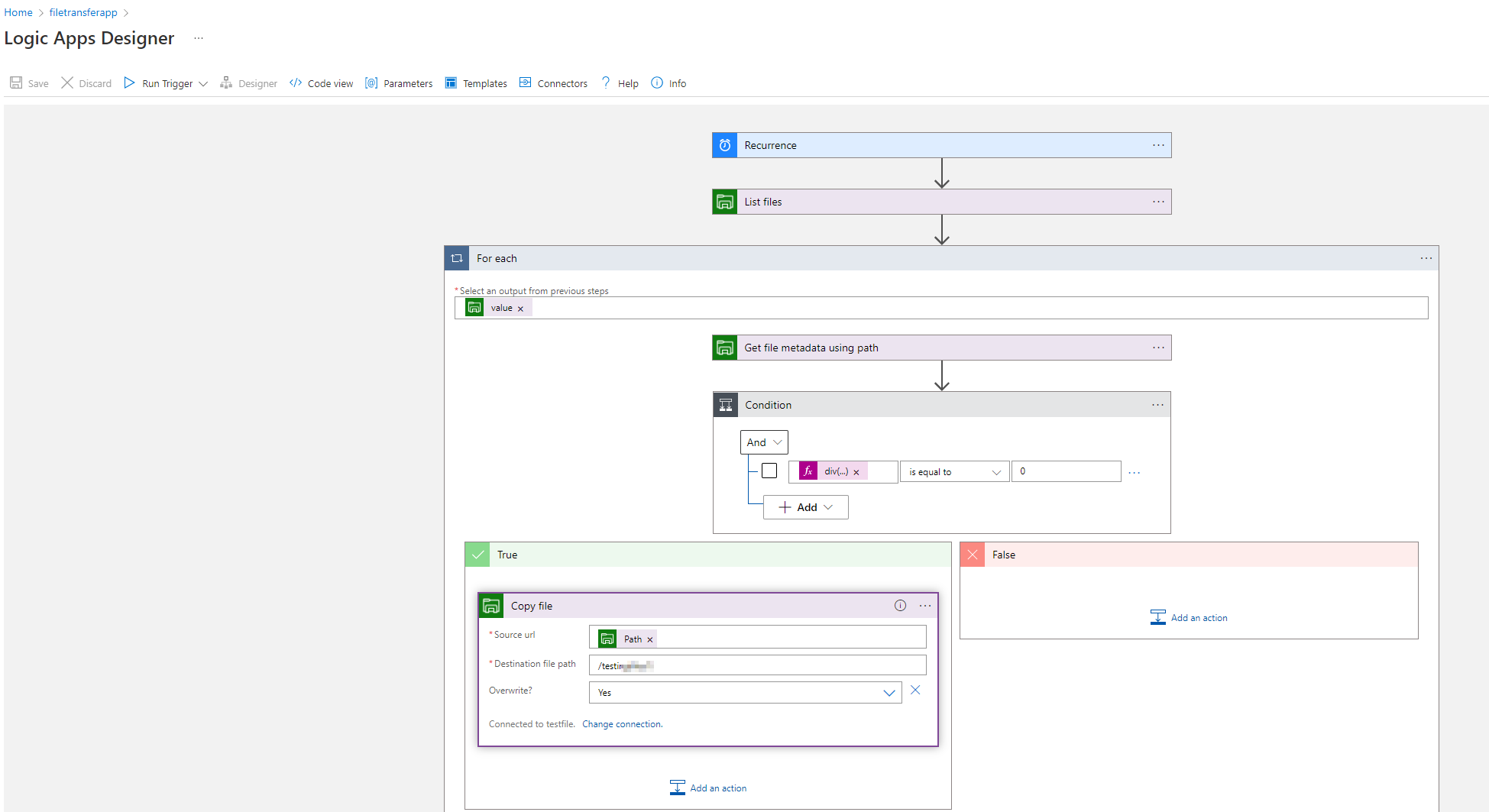
Feel free to reach back to me if you have any further questions.
' cx='32' cy='32' r='32' /%3E%3Ctext x='50%25' y='55%25' dominant-baseline='middle' text-anchor='middle' fill='%23FFF' %3EMD%3C/text%3E%3C/svg%3E)
Hi,
Thanks for the detailed explanation. I have a slight different requirement. I wanted to fetch the latest file from the ADLS path and send that file as an attachment on emails. I am able to send an email when a file is generated however I am still not able to attached that file with the email.
Is it possible to help me with this?
Thanks
Dhara
' cx='32' cy='32' r='32' /%3E%3Ctext x='50%25' y='55%25' dominant-baseline='middle' text-anchor='middle' fill='%23FFF' %3ERK%3C/text%3E%3C/svg%3E)
With send email v2, you can attach the files in email.