Exchange Online
A cloud-based service included in Microsoft 365, delivering scalable messaging and collaboration features with simplified management and automatic updates.
This browser is no longer supported.
Upgrade to Microsoft Edge to take advantage of the latest features, security updates, and technical support.
' cx='32' cy='32' r='32' /%3E%3Ctext x='50%25' y='55%25' dominant-baseline='middle' text-anchor='middle' fill='%23FFF' %3EVA%3C/text%3E%3C/svg%3E)
Hi Experts,
I have an issue in exchange.
I have created two shared mailbox, sharedX and sharedY and a user Admin1 .
Full Access rights has been granted to user Admin1 in shared mailbox sharedY.
And sharedY is given full access permissions in sharedX.
Now shared mailbox sharedY has automapped in user Admin1's mailbox. But sharedX has not automapped in user Admin1's mailbox.
And according to the rule sharedX mailbox should automap under the sharedY folder in the outlook of user Admin1's mailbox.
please suggest me something so that I can solve this issue.
Command used: Add-MailboxPermission -Identity ******@mydomain.com -User ******@mydomain.com -AccessRights FullAccess -InheritanceType All -Automapping $true
Thanks in Advance.

Hi,
Just wanted to check if there are any updates. If the response is helpful, please click "Accept Answer" and upvote it.
Hi,
To achieve your scenario, you have provide full access permission for Admin1 on SharedX mailbox as well. Automapping works based on the periodic autodiscover requests which happens for the users with logon. Shared mailboxes does not have a username and password.
A shared mailbox is a type of user mailbox that doesn't have its own username and password. As a result, users can't log into them directly. To access a shared mailbox, users must first be granted Send As or Full Access permissions to the mailbox. Once that's done, users sign into their own mailboxes and then access the shared mailbox by adding it to their Outlook profile.
Please try the below command,
Add-MailboxPermission -Identity ******@mydomain.com -User ******@mydomain.com -AccessRights FullAccess -InheritanceType All -Automapping $true
Thanks for the response.
But the scenario is we need to automapping of shared mailbox in a heirachy.
Like Admin1 user is granted full access in SharedY and SharedY is granted full access in SharedX.
So we need the automaping as:-
Admin1-> SharedY->SharedX.
i.e, without giving Admin1 user any permissions in SharedX.
In there any command to do so? Please suggest some solution if possible.
Thanks Again.
This is not possible since shared mailbox doesn't have a login and outlook profile cannot be configured for a shared mailbox. Shared mailboxes can be accessed by providing permissions to the user's mailboxes. So, in this case, to have both the mailboxes to be in Admin1's outlook profile, then full access permission has to be given to Admin1 on both the SharedX & SharedY mailboxes. Actually, there is no purpose of giving full access for SharedY on SharedX.
' cx='32' cy='32' r='32' /%3E%3Ctext x='50%25' y='55%25' dominant-baseline='middle' text-anchor='middle' fill='%23FFF' %3EEY%3C/text%3E%3C/svg%3E)
There's no command could make sharedX existing in Admin1's mailbox. It's by-design phenomenon of mailbox permission.
"And according to the rule sharedX mailbox should automap under the sharedY folder in the outlook of user Admin1's mailbox."
-Actually, Full access means Allows the delegate to open the mailbox, and view, add and remove the contents of the mailbox. It doesn't mean Admin1 can open/view those mailboxes that delegated by SharedY. If SharedX exsits in Admin1's mailbox as you expected, you are full accessing a mailbox without permission, Microsoft doesn't want to see it happening.
According to my test, no matter the shared mailbox is mapped due to automapping or manually adding it in "Account setting", you can't view the mailboxes delegated by SMB2:
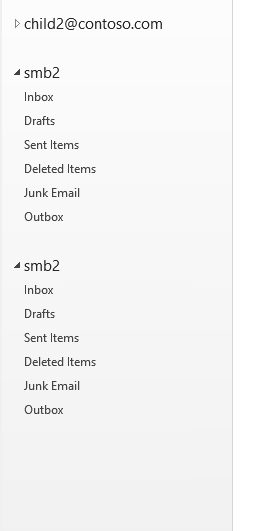
By the way, I've also tested replacing SharedY with a user mailbox, same phenomenon as above.
If the response is helpful, please click "Accept Answer" and upvote it.
I am writing here to confirm with you how the thing going now?
If you need further help, please provide more detailed information, so that we can give more appropriate suggestions.
If an Answer is helpful, please click "Accept Answer" and upvote it.
Note: Please follow the steps in our documentation to enable e-mail notifications if you want to receive the related email notification for this thread.