Developer technologies | Transact-SQL
A Microsoft extension to the ANSI SQL language that includes procedural programming, local variables, and various support functions.
This browser is no longer supported.
Upgrade to Microsoft Edge to take advantage of the latest features, security updates, and technical support.
' cx='32' cy='32' r='32' /%3E%3Ctext x='50%25' y='55%25' dominant-baseline='middle' text-anchor='middle' fill='%23FFF' %3EMB%3C/text%3E%3C/svg%3E)
Is it possible to set up a sync between publisher and subscriber for merge replication that syncs automatically? Say once a day or once an hour? If so, how do you set that up and have it run automatically??

Hi @MR BILL ,
We have not received a response from you. Did the reply could help you? If the response helped, do "Accept Answer". If it is not, please let us know. Your contribution is highly appreciated.
Hi Cathy, sorry for the delay. My client wasn't available until today. I tried to add a comment to your reply, but it wouldn't let me, so I sent it as an answer.
Hi @MR BILL ,
Yes, it is possible. Merge replication is implemented by the SQL Server Snapshot Agent and Merge Agent. You can modify the replication agent schedule of these two job to achieve your requirement.


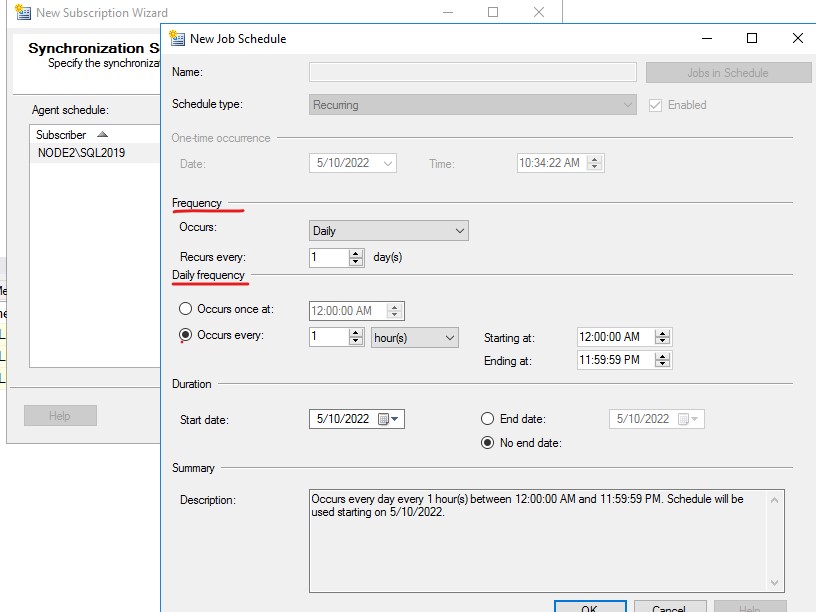

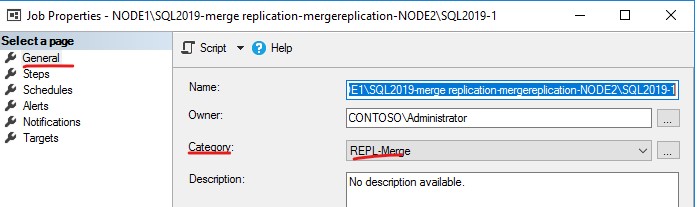
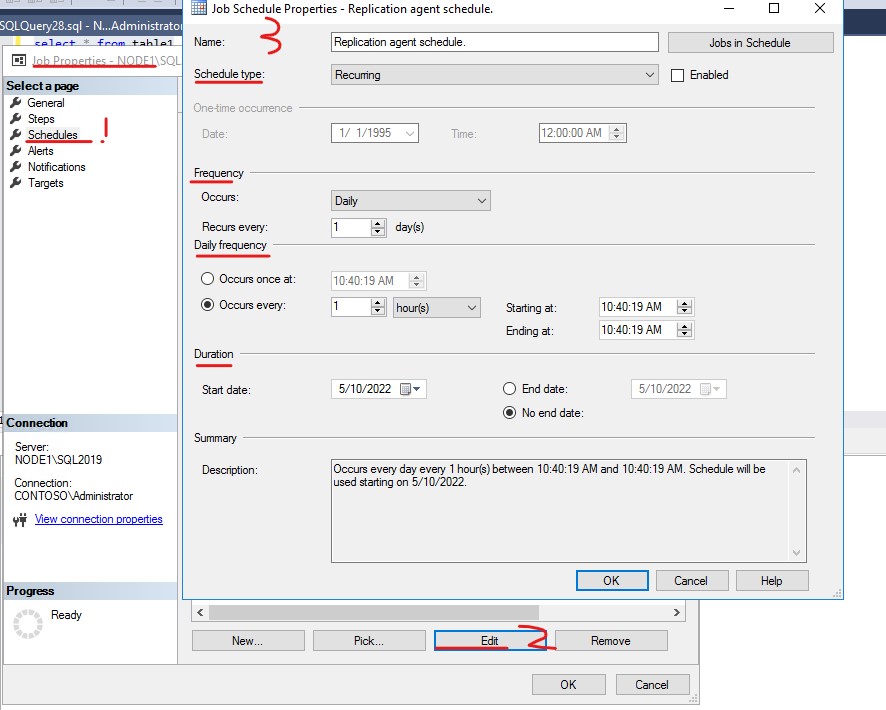
If the answer is helpful, please click "Accept Answer" and kindly upvote it. If you have extra questions about this answer, please click "Comment".
I initially missed the Subscription side of: "After configuring Publication and Subscription, ". I ended up creating my subscription from right clicking the publication and selecting "New Subscriptions". Then I finally had the job agent you were referring too. Thanks for all your help.
This is failing for some reason and I'm not sure why. On my clients server where I have setup up distribution and publisher the job says it runs successfully. On my cloud server where the subscription db is it created the subscription. The job agent however is failing. The replication agent successfully starts, Then I get this error: (Do I need to create an alias on my cloud server that connects to my Clients server?)
Date 5/12/2022 11:00:00 AM
Log Job History (Jobname- 0)
Step ID 1
Server MyCloudServer
Job Name Jobname- 0
Step Name Run agent.
Duration 00:01:05
Sql Severity 0
Sql Message ID 0
Operator Emailed
Operator Net sent
Operator Paged
Retries Attempted 0
Message
2022-05-12 16:00:00.560 Copyright (c) 2016 Microsoft Corporation
2022-05-12 16:00:00.560 Microsoft SQL Server Replication Agent: replmerg
2022-05-12 16:00:00.560
2022-05-12 16:00:00.560 The timestamps prepended to the output lines are expressed in terms of UTC time.
2022-05-12 16:00:00.560 User-specified agent parameter values:
-Publisher Client Publisher
-PublisherDB dbname
-Publication pubname
-Subscriber MyCloudServer
-SubscriberDB Subscriberdbname
-SubscriptionType 1
-SubscriberSecurityMode 1
-Distributor Client Distributor
-XJOBID 0x8E0DBB13EDF5BE4E8CFAEB48357491E3
-XJOBNAME Jobname- 0
-XSTEPID 1
-XSUBSYSTEM Merge
-XSERVER MyCloudServer
-XCMDLINE 0
-XCancelEventHandle 0000000000004734
-XParentProcessHandle 0000000000005A18
2022-05-12 16:00:00.580 Connecting to Subscriber 'MyCloudServer'
2022-05-12 16:00:00.672 Connecting to Distributor 'Client Distributor'
2022-05-12 16:00:17.892 The process could not connect to Distributor 'Client Distributor'.
2022-05-12 16:00:17.898 Category:AGENT
Source: Merge Process
Number: 20084
Message: The process could not connect to Distributor 'Client Distributor'.
2022-05-12 16:00:17.902 Category:SQLSERVER
Source: Client Source
Number: -1
Message: SQL Server Network Interfaces: Error Locating Server/Instance Specified [xFFFFFFFF].
2022-05-12 16:00:17.904 Category:SQLSERVER
Source: Client Source
Number: -1
Message: A network-related or instance-specific error has occurred while establishing a connection to SQL Server. Server is not found or not accessible. Check if instance name is correct and if SQL Server is configured to allow remote connections. For more information see SQL Server Books Online.
2022-05-12 16:00:17.908 Category:SQLSERVER
Source: Client Source
Number: 0
Message: Query timeout expired, Failed Command:
2022-05-12 16:00:17.910 Category:SQLSERVER
Source: Client Source
Number: 0