Microsoft Security | Microsoft Graph
An API that connects multiple Microsoft services, enabling data access and automation across platforms

This browser is no longer supported.
Upgrade to Microsoft Edge to take advantage of the latest features, security updates, and technical support.
' cx='32' cy='32' r='32' /%3E%3Ctext x='50%25' y='55%25' dominant-baseline='middle' text-anchor='middle' fill='%23FFF' %3ES%3C/text%3E%3C/svg%3E)
How to iterate or loop to list of folders of selected mail folder and work on it using graph client in C#
Use case 1:
GraphServiceClient graphClient = new GraphServiceClient( authProvider );
var mailFolder = await graphClient.Me.MailFolders["msgfolderroot"]
.Request()
.GetAsync();
Use case 2 :
GraphServiceClient graphClient = new GraphServiceClient( authProvider );
var mailFolder = await graphClient.Me.MailFolders[id]
.Request()
.GetAsync();

Hi @SAC_535 ,
Refer to example list-childfolders, the code snippet should be able to get list of folders of selected mail folder.
GraphServiceClient graphClient = new GraphServiceClient( authProvider );

var childFolders = await graphClient.Me.MailFolders["{mailFolder-id}"].ChildFolders
	.Request()
	.GetAsync();
Hope this helps,
If the answer is helpful, please click "Accept Answer" and kindly upvote it. If you have further questions about this answer, please click "Comment".
@SrinivasaRaoDarnaMSFT-7657
Thanks for answer but i want how to use for loop or foreach loop to loop thorough folders either child folder or mail folder in C#.

Hi @SAC_535
Please refer to my code, hope it helps you:
    GraphServiceClient graphClient = new GraphServiceClient( authProvider );

    var mailFolders = await graphClient.Me.MailFolders
        .Request()
        .GetAsync();

    for (int i = 0; i < mailFolders.Count; i++) {

        var mailFolderId = mailFolders[i].Id.ToString();

        var childFolders = await graphClient.Me.MailFolders[mailFolderId].ChildFolders.Request().GetAsync();

        Console.WriteLine("childFolders:" + JsonConvert.SerializeObject(childFolders));
    }
If the answer is helpful, please click "Accept Answer" and kindly upvote it. If you have extra questions about this answer, please click "Comment".
Note: Please follow the steps in our documentation to enable e-mail notifications if you want to receive the related email notification for this thread.
Thanks for solution but its giving only 10 records. How to iterate for all folders or records? records available in all pages?
Weird, I tested fine locally. Does it throw an error after returning 10 records?
no its not throwing any error but it giving only 10 records but how to fetch or loop if we have more than 10 records?
I have to confirm with you one thing, when you say that only 10 data are returned, is it only returned 10 arrays( childFolders:[] ) or all data in all arrays returned a total of 10?
Is there anything else I can help with regarding this issue?
You can comment us at any time and we will continue to follow up.
Thanks,
Carl Zhao
@ CarlZhao-MSFT,
its returning only 10 arrays not all childfolders.
Hi @SAC_535
This means that you only have 10 mailfolders, the childFolders:[] array represents not your childfolders but mailfolders, and the data in the childFolders:[] array is the childfolders in each of your mailfolders. You can use $count to count the number of your mailfolders.
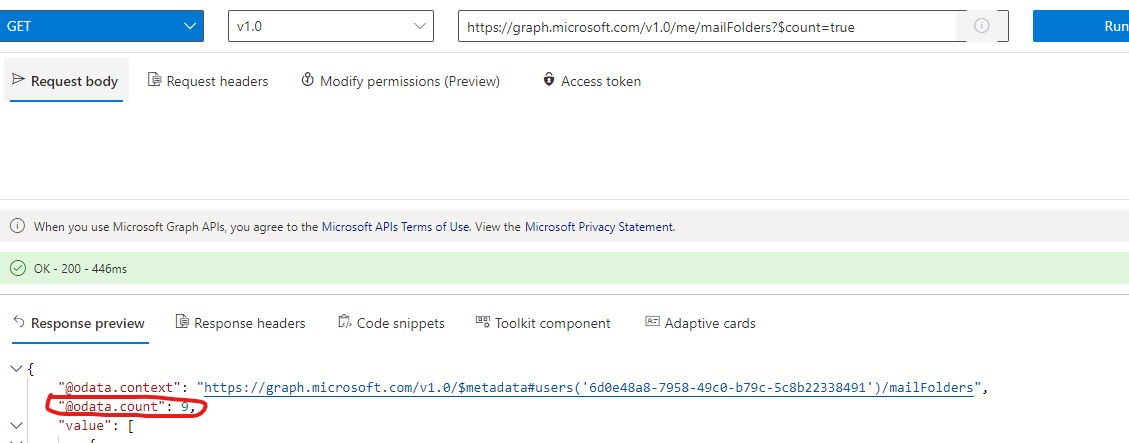
Hi @SAC_535 Would you please provide us with an update on the status of your issue?
' cx='32' cy='32' r='32' /%3E%3Ctext x='50%25' y='55%25' dominant-baseline='middle' text-anchor='middle' fill='%23FFF' %3ESJ%3C/text%3E%3C/svg%3E)
Had the same problem, only got 10 items in my result list - this does NOT mean "I only have 10 mailfolders"
You have do add a TOP clause to the request:
 var mailFolders = await graphClient.Me.MailFolders
     .Request()
     .Top(1000) // Be generous to be sure to get all folders!!!
     .GetAsync();