Exchange | Exchange Server | Management
The administration and maintenance of Microsoft Exchange Server to ensure secure, reliable, and efficient email and collaboration services across an organization.
This browser is no longer supported.
Upgrade to Microsoft Edge to take advantage of the latest features, security updates, and technical support.
' cx='32' cy='32' r='32' /%3E%3Ctext x='50%25' y='55%25' dominant-baseline='middle' text-anchor='middle' fill='%23FFF' %3EC%3C/text%3E%3C/svg%3E)
hello all,
we change a client from office 2013 to office 2021. Now Online Archiv is not displayed in Outlook. What can we do. Permission is ok (Full Access/Self)
Server: Exchange 2016 CU23
The administration and maintenance of Microsoft Exchange Server to ensure secure, reliable, and efficient email and collaboration services across an organization.
Answer accepted by question author
' cx='32' cy='32' r='32' /%3E%3Ctext x='50%25' y='55%25' dominant-baseline='middle' text-anchor='middle' fill='%23FFF' %3EJS%3C/text%3E%3C/svg%3E)
Hi @Chris ,
Any update here about your question, feel free to share your progress here if any. Some additional information below:
As I know, the online archive feature is available to some specific version of Outlook, it's recommended to follow this document to check if your Outlook 2021 could meet the requirements of license. I used to see the user using Office Home & Business version encountered the same problem.
If that's not your case, based on my research, I found a related document about How to troubleshoot an Exchange Online Archive mailbox that is not displayed in Outlook, please follow it to check if that could work for you.
If an Answer is helpful, please click "Accept Answer" and upvote it.
Note: Please follow the steps in our documentation to enable e-mail notifications if you want to receive the related email notification for this thread.
thanks for your answer. Owa and autoconfiguration show Archiv Mailbox. I think it's a Bug with german characters in her name.
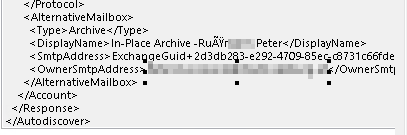
we change Exchange Archiv Name and hope tomorrow it works

Does it show in OWA?
If not, perhaps it was not an (Exchange) In-place Archive (PST?)
If so, Archive should also automatically appear in the Outlook nav pane. Check the autodiscover result (ctrl-right-click outlook, Test email auto configuration) and check XML tab for AlternativeMailbox entries, e.g.
<AlternativeMailbox>
<Type>Archive</Type>
<DisplayName>In-Place Archive - ....</DisplayName>
<SmtpAddress>ExchangeGuid+...@Company portal .com.com</SmtpAddress>
<OwnerSmtpAddress>john@Company portal .com</OwnerSmtpAddress>
</AlternativeMailbox>