Microsoft Security | Intune | Configuration Manager | Other
Other Configuration Manager-related features and issues

This browser is no longer supported.
Upgrade to Microsoft Edge to take advantage of the latest features, security updates, and technical support.
' cx='32' cy='32' r='32' /%3E%3Ctext x='50%25' y='55%25' dominant-baseline='middle' text-anchor='middle' fill='%23FFF' %3ED%3C/text%3E%3C/svg%3E)
Hello, I have a 1 line powershell script I am trying to deploy to a test machine via packages. I have tested the script on my own computer locally and it is working. It is supposed to copy a icon to the my desktop. The trouble is when I try to run it through sccm. I am not sure if it is the command line. I have tried a few different commands so far.
Not knowing which is best, I tried:
copysierra.ps1
Powershell.exe -ExecutionPolicy ByPass -copysierra.PS1
"%Windir%\sysnative\WindowsPowerShell\v1.0\powershell.exe" -ExecutionPolicy Bypass -Command .\copysierra.ps1
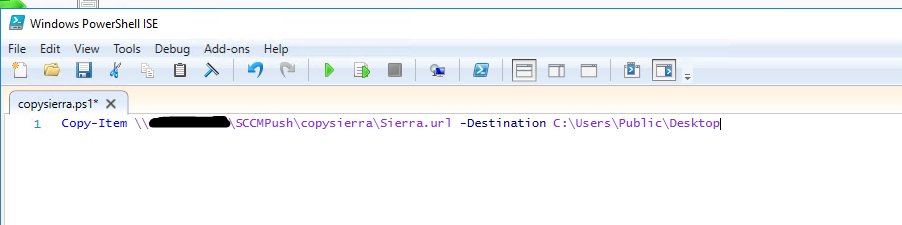
Here is my script:
Other Configuration Manager-related features and issues
Answer accepted by question author

The problem is you are copying the file from a unc, which the local system doesn't have access to. Include the file with the PowerShell script and copy it from the cache.
Is this the cache? C:\Windows\ccmcache
Thanks, good to know. I ended up doing this through group policy instead

Correct that is the right folder location. But keep in mind that you will not know the subfolder location so you will need to use the ".\" path option.

Hi, @ChristopherWhalen-6797
Thank you for posting in Microsoft Q&A forum.
You may refer to Jason's article to use a bat file to copy files to clients easily.
https://home.memftw.com/copying-files-to-clients-using-configmgr/
If the answer is the right solution, please click "Accept Answer" and kindly upvote it. If you have extra questions about this answer, please click "Comment".
Note: Please follow the steps in our documentation to enable e-mail notifications if you want to receive the related email notification for this thread.