Developer technologies | .NET | Xamarin
A Microsoft framework for building cross-platform mobile apps using .NET and C# with native performance and user interfaces.
This browser is no longer supported.
Upgrade to Microsoft Edge to take advantage of the latest features, security updates, and technical support.

Hello. Please tell me how to turn from the class of folders in the Android namespace to the general classes of the project. I tried to output data through interfaces, but it did not give results, I also accessed the project classes through an instance of the class, but this also does not give results. How to solve this problem of data output from the Android space class to the general classes of the project? and if possible, please post the code of your solution . Thanks !
A Microsoft framework for building cross-platform mobile apps using .NET and C# with native performance and user interfaces.
Answer accepted by question author
' cx='32' cy='32' r='32' /%3E%3Ctext x='50%25' y='55%25' dominant-baseline='middle' text-anchor='middle' fill='%23FFF' %3EA%3C/text%3E%3C/svg%3E)
Hello,
How to solve this problem of data output from the Android space class to the general classes of the project?
Do you want to transfer data from Xamarin.Android project to Share project?
If so, you can use MessageCenter to achieve it. Send a message from the Xamarin.Android project which will then be received by the Share project.
===========
Update=============
If you want to transfer data from DataSource.cs to MainPage.xaml.cs
For example, I transfer result data from Accelerometer_ReadingChanged method of DataSource.cs like following code.
   void Accelerometer_ReadingChanged(object sender, AccelerometerChangedEventArgs e)
            {
                var data = e.Reading;
                result = counter / 2;
   //add transfer code here
               MessagingCenter.Send<Object, string>(this, "TestMessage", result.ToString());
           }
Then, you can get result in MainPage.xaml.cs , for testing, I set the text for Rakaat_1.Text
   public MainPage()
           {
               InitializeComponent();

               MessagingCenter.Subscribe<Object, string>(this, "TestMessage", (sender, arg) =>
               {
                   string message = arg;
                   Rakaat_1.Text = message;
               });

           }
Best Regards,
Leon Lu
If the answer is the right solution, please click "Accept Answer" and kindly upvote it. If you have extra questions about this answer, please click "Comment".
Note: Please follow the steps in our documentation to enable e-mail notifications if you want to receive the related email notification for this thread.
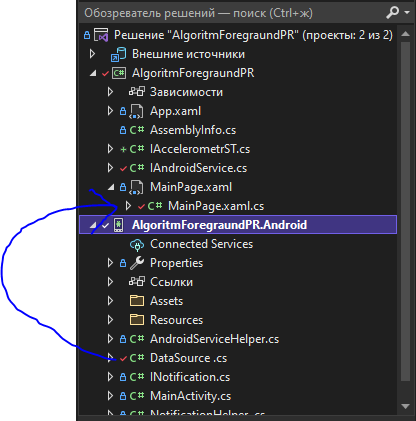
I need to transfer the function data from the Datasource.cs class to the MainPage.cs class. The problem is that the MainPage.cs class does not see the Datasource.cs class (Even when sending messages,since it doesn't see the sender instance.)
Which type that you transfer data? If the type is List, you can send it as well.MessagingCenter.Send<Object, List<Object>> (this, "ParsedSmsReceived", parsedsms); If not, please post your Datasource.cs class and transfer data.
I updated my answer, please check it.
@Ilim Gusseinov I have not heard from you for a couple of days. Please let me know if there is anything that I can help here.
Thanks a lot))) I haven't tested your code quite recently, and it works as it should. Thank you very much ))))