Cannot delete a file

Flaviu_ 1,091 Reputation points
2022-05-15T12:17:20.51+00:00

I have the following code:

{
    std::string line{};
    std::ifstream file(sFile, std::ifstream::in);
    TRACE("Openning %S\n", sFile);

    if (file)
    {
        while (std::getline(file, line))
        {
            // do something here
        }
    }
}

BOOL b = DeleteFile(sFile);
TRACE("+++%d|%d|%x\n", b, GetLastError(), GetLastError());

The file itsn't deleted, and the output of these TRACEs are:

Openning C:\Temp\MyFile.tmp
+++0|32|20

Which means:

ERROR_SHARING_VIOLATION
32 (0x20)
The process cannot access the file because it is being used by another process.

Of course, I don't touch that file with something else ... What could be the problem here ?

Developer technologies | C++
A high-level, general-purpose programming language, created as an extension of the C programming language, that has object-oriented, generic, and functional features in addition to facilities for low-level memory manipulation.
0 comments No comments
{count} votes

Answer accepted by question author
  1. RLWA32 51,536 Reputation points
    2022-05-16T12:23:40.77+00:00

    And finally, you could try opening your file with exclusive access -

    std::ifstream file(sFile, std::ifstream::in, _SH_DENYRW);
    
    0 comments No comments

3 additional answers

Sort by: Most helpful
  1. RLWA32 51,536 Reputation points
    2022-05-15T12:56:51.79+00:00

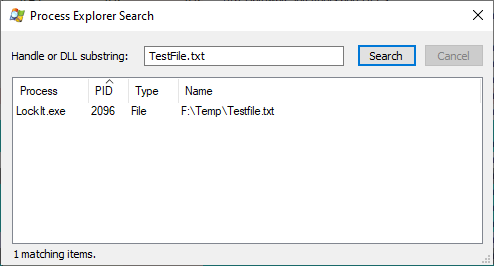
    If the file was opened successfully then the destructor for the ifstream object should close the file when it goes out of scope. If there is still an open handle to the file it may be antivirus or some other process on your system. Process Explorer can identify the process holding an open handle to your file.

    0 comments No comments

  2. Minxin Yu 13,506 Reputation points Microsoft External Staff
    2022-05-16T05:45:38.173+00:00

    Hi,

    Try to close the file before deleting it.

        ... ...  
    file.close();  
    BOOL b = DeleteFile(sFile);  
    

    Best regards,

    Minxin Yu


    If the answer is the right solution, please click "Accept Answer" and kindly upvote it. If you have extra questions about this answer, please click "Comment".
    Note: Please follow the steps in our documentation to enable e-mail notifications if you want to receive the related email notification for this thread.


  3. RLWA32 51,536 Reputation points
    2022-05-16T11:46:07.147+00:00

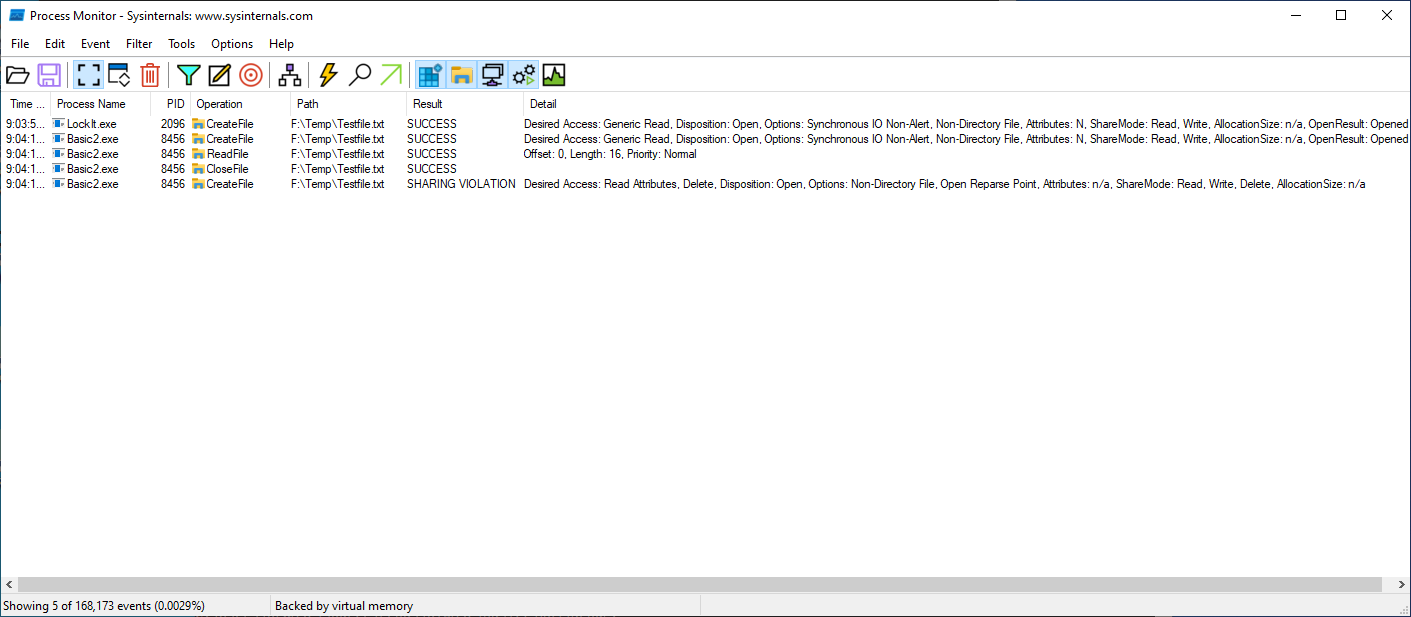
    In addition to Process Explorer you can use Process Monitor to track all file system usage for your target file. This is another way to identify a process other than your own that is using the target file when you attempt to delete it.

    Updated to add images from Process Monitor and Process Explorer

    Process Monitor -

    202269-proclock.png

    Process Explorer -

    202270-procxlock.png


Your answer

Answers can be marked as 'Accepted' by the question author and 'Recommended' by moderators, which helps users know the answer solved the author's problem.