Microsoft 365 and Office | SharePoint | Development
The process of building custom applications and tools that interact with Microsoft SharePoint, including SharePoint Online in Microsoft 365.

This browser is no longer supported.
Upgrade to Microsoft Edge to take advantage of the latest features, security updates, and technical support.
' cx='32' cy='32' r='32' /%3E%3Ctext x='50%25' y='55%25' dominant-baseline='middle' text-anchor='middle' fill='%23FFF' %3ENB%3C/text%3E%3C/svg%3E)
Hi,
We have a requirement where we need to programmatically detect whenever any items in a list have been checked out/in. I am currently using Sharepoint CSOM List.GetChanges API. It returns a ChangeItem object with the ChangeType property set to "Update" but it looks like no data is being returned that tells us what exactly has been updated(I couldn't find any property suggesting what properties have been changed).
Remote event receivers solve the problem, it provides subscribing for specific events like ItemCheckingOut/In etc..but unfortunately we can't use remote event receivers.
Thank you.
The process of building custom applications and tools that interact with Microsoft SharePoint, including SharePoint Online in Microsoft 365.
' cx='32' cy='32' r='32' /%3E%3Ctext x='50%25' y='55%25' dominant-baseline='middle' text-anchor='middle' fill='%23FFF' %3ETZ%3C/text%3E%3C/svg%3E)
Hi @Nagarjuna B ,
To help you better ,can you share any code on this issue to help me reproduce the problem?
Based on my research and testing ,as a workaround, you can follow these code to get items have been checked out using CSOM :
        static void Main(string[] args)
        {
            var ctx = GetonlineContext();
            Web oweb = ctx.Web;
            ctx.Load(ctx.Web, a => a.Lists);
            ctx.ExecuteQuery();

            var listName = "test";
            List list = ctx.Web.Lists.GetByTitle(listName);
            var items = list.GetItems(
                new CamlQuery()
                {
                    ViewXml = @"<View Scope='RecursiveAll'><Query>
            <Where><IsNotNull><FieldRef Name='File_x0020_Type' /></IsNotNull></Where>
            </Query></View>"
                });
            ctx.Load(items, a => a.IncludeWithDefaultProperties(item => item.File, item => item.File.CheckedOutByUser));
            ctx.ExecuteQuery();
            foreach (var item in items)
            {
                if (item.File.CheckOutType != CheckOutType.None)
                {
                    Debug.WriteLine("File: " + item["FileRef"].ToString().Split('/').LastOrDefault());
                    Debug.WriteLine("Checked-Out By: " + item.File.CheckedOutByUser.Title);
                    Debug.WriteLine("Checked-Out User Email: " + item.File.CheckedOutByUser.Email);
                    Debug.WriteLine("Last Modified: " + DateTime.Parse(item["Last_x0020_Modified"].ToString()));
                    Debug.WriteLine("-----------------------");
                    Debug.WriteLine("");
                }
            }
        }
My test result:
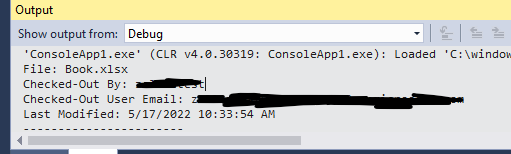
Hope it can help you.
If the answer is helpful, please click "Accept Answer" and kindly upvote it. If you have extra questions about this answer, please click "Comment".
Note: Please follow the steps in our documentation to enable e-mail notifications if you want to receive the related email notification for this thread.
Hi,
Unfortunately, above code will not help me with the problem I am facing. My problem is related to GetChanges API, which returns a list of changes done on lists/items/sites etc..
             var ctx = GetonlineContext();
             Web oweb = ctx.Web;
             ctx.Load(ctx.Web, a => a.Lists);
             ctx.ExecuteQuery();

             var listName = "test";
             List list = ctx.Web.Lists.GetByTitle(listName);

            var changeQuery = new ChangeQuery();
            changeQuery.ChangeTokenStart = new ChangeToken();
            changeQuery.ChangeTokenStart.StringValue = string.Format("1;3;{0};{1};-1", list.Id.ToString(), DateTime.Now.AddMinutes(-10).ToUniversalTime().Ticks.ToString());

// ensure you have checked out/in an item
             ChangeCollection changes = list.GetChanges(changeQuery);
// you will notice that changes collection has an entry with changes[0].ChangeType set to Update. but there is no other information which tells us what exact property has been updated  (did the Title get updated!?, or did it get checked out/in, or did some other property get updated!? I couldn't find any way to know
             context.Load(changes);
             context.ExecuteQuery();
Hi @Nagarjuna B ,
Thanks for the detailed description of the case. I searched a lot of documents did a lot of researches and test. And I feel regretful to inform you that It is currently no way to detect items check out/in using GetChanges.
Thanks for your understanding and support.
Hi @Nagarjuna B ,
As a workaround, you can also try to use the code in the answer to get items checked out . Hope it can help you.
If the answer is helpful, you could click the "Accept Answer" button to close this thread, and this can make it easier for other community member's to see the useful information when reading this thread. Thanks for your understanding!

@Nagarjuna B Do you have any further questions about this thread? Please feel free to reply if you still have any doubts.
-------------------
If the answer is helpful, please click "Accept Answer" and kindly upvote it. If you have extra questions about this answer, please click "Comment".
Im fine with Tong's answer for #1. Can someone provide me an answer for #2?