Azure SQL Database
An Azure relational database service.
This browser is no longer supported.
Upgrade to Microsoft Edge to take advantage of the latest features, security updates, and technical support.
' cx='32' cy='32' r='32' /%3E%3Ctext x='50%25' y='55%25' dominant-baseline='middle' text-anchor='middle' fill='%23FFF' %3ESU%3C/text%3E%3C/svg%3E)
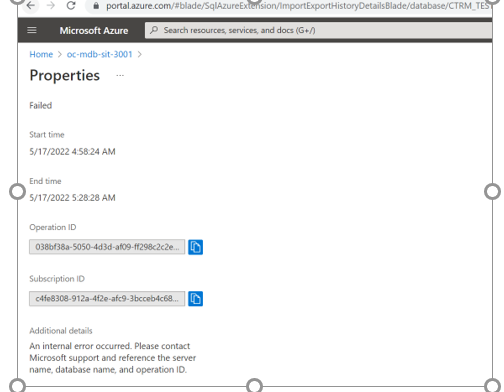
I’m trying to restore the DB from the exported file and getting below error. Please check and assist as ap. Thanks
An Azure relational database service.
' cx='32' cy='32' r='32' /%3E%3Ctext x='50%25' y='55%25' dominant-baseline='middle' text-anchor='middle' fill='%23FFF' %3EAS%3C/text%3E%3C/svg%3E)
Hi @Subhashini Umapathy (MINDTREE LIMITED) , please let us know if you need any other details. If any answer helped, you can mark it 'Accept Answer'.

Please make sure you are "restoring" (importing) the database with a different name as the source database from where the bacpac was created. Importing database cannot replace existing databases.
In addition, as a workaround, Try using PowerShell instead of the portal.
New-AzureRmSqlDatabaseImport –ResourceGroupName “sqlgroup” –ServerName “powershellserver” –DatabaseName “mypowershelldatabase” –StorageKeytype “StorageAccessKey” –StorageKey $primarykey -StorageUri $StorageUri –AdministratorLogin $credential.UserName –AdministratorLoginPassword $credential.Password –Edition Basic –ServiceObjectiveName B -DatabaseMaxSizeBytes 50000
Finally, make sure the access tier of the bacpac on Azure Storage is type "Cool".