Azure Synapse Analytics
An Azure analytics service that brings together data integration, enterprise data warehousing, and big data analytics. Previously known as Azure SQL Data Warehouse.
This browser is no longer supported.
Upgrade to Microsoft Edge to take advantage of the latest features, security updates, and technical support.

am trying to build a generic Mapping Data Flow for some basic cleansing on tables in my Data Lake. I need it to be able to work both on an ongoing basis after data already exists in my cleansed tables as well as when new tables are added (it would detect them automatically and create and populate the destination). Both the Source and Destination tables with be Delta tables.
The approach I have taken is to have Sources configured to both my actual source and to the target and use either JOIN transformations or EXISTS transformations to identify the new, updated and removed rows.
This works fine for INSERTS and UPDATES, however my issues is dealing with DELETES when there is no data currently in the destination. Obviously there will be nothing to DELETE - that is as expected. However, because I reference the key column that will exist once data is loaded to the table I get an error on an initial run that states:
ERROR Dataflow AppManager: name=BatchJobListener.failed, opId=xxx, message=Job 'xxx failed due to reason: DF-SINK-007 at Sink 'cleansedTableWithDeletes': Sink results in 0 output columns. Please ensure at least one column is mapped.
The overall process looks as follows:
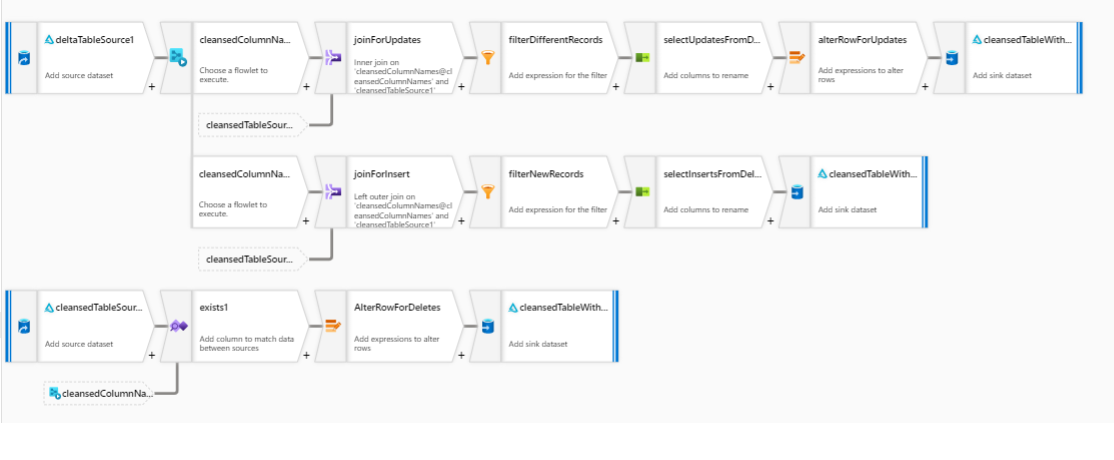
Has anyone developed a pattern that works for a generic flow (this one is parameter driven and ensures schema drift is accommodated) or a way for the Data Flow to think that there IS a column in the destination that it can refer to and get past this issue?
' cx='32' cy='32' r='32' /%3E%3Ctext x='50%25' y='55%25' dominant-baseline='middle' text-anchor='middle' fill='%23FFF' %3EMM%3C/text%3E%3C/svg%3E)
Hello @Martin Cairney and welcome to Microsoft Q&A.
I can't say I've run into this particular scenario before, but I'll work with you to come up with some possibilities. It seems nobody else has replied yet. I have not tested any of the below ideas yet. This is a first round of creativity.
If the sink works with everything except deletes, what if we used a conditional split to divert the deletes to a separate stream when the sink contains 0 rows. This new stream can either be abandoned or written after the insert / update stream finishes writing. See the sink ordering features.
If the issues is that the table doesn't exist, rather than a lack of rows, how about a pre-copy script to create the table. Wait, this is delta, does that even apply?
No I'm looking at this wrong... It isn't the write/sink that is causing the problem. It is the Exists trying to access the missing data. You have already segregated the delete "leg" of the flow.
I'm hoping, that if we put the exists1, and AlterRowForDeletes inside a flowlet, the execution will skip the flowlet when 0 rows are passed to it. No, that probably won't work, because 0 rows into a black box does not mean 0 rows out of a black box.
We could put that leg in a separate data flow ... nah, lets make that the last option.
Okay, Question: Is "cleansedTableSource" the same as "CleansedTableWith..." ? Explicit and deliberate ordering of writing to sinks, I hope will make that missing column appear.
cleansedTableSource IS the same as the CleansedTableWith... sinks.
I had a look at the write ordering to the sinks, but it seems that the read part for cleansedTableSource doesn't respect that and there is currently no way to enforce a read order either.
I'm thinking the DELETE path in a separate Data Flow is probably the only way to make this work currently
Well, let's see if @MarkKromer-MSFT has any ideas. If not, he will be made aware of the use case.
Unfortunately, any response will have to wait a few days for Microsoft Build to finish, @Martin Cairney .

In the sink "cleansedTableWithDeletes", do you have Allow Schema Drift enabled?
@Martin Cairney did Mark Kromer's suggestion help?
In the sink "cleansedTableWithDeletes", do you have Allow Schema Drift enabled?
@MartinJaffer-MSFT / @MarkKromer-MSFT - any further ideas I can try to address this?
This was already enabled