Azure Synapse Analytics
An Azure analytics service that brings together data integration, enterprise data warehousing, and big data analytics. Previously known as Azure SQL Data Warehouse.
This browser is no longer supported.
Upgrade to Microsoft Edge to take advantage of the latest features, security updates, and technical support.
' cx='32' cy='32' r='32' /%3E%3Ctext x='50%25' y='55%25' dominant-baseline='middle' text-anchor='middle' fill='%23FFF' %3EM%3C/text%3E%3C/svg%3E)
Hi!
In Azure Data Factory I'm using a Copy Data action. I have my source table and my target table. I want to use Upsert in Sink to copy data to the target table.
The target table has a field EmployeeID which is a primary key and has identity to increment with 1.
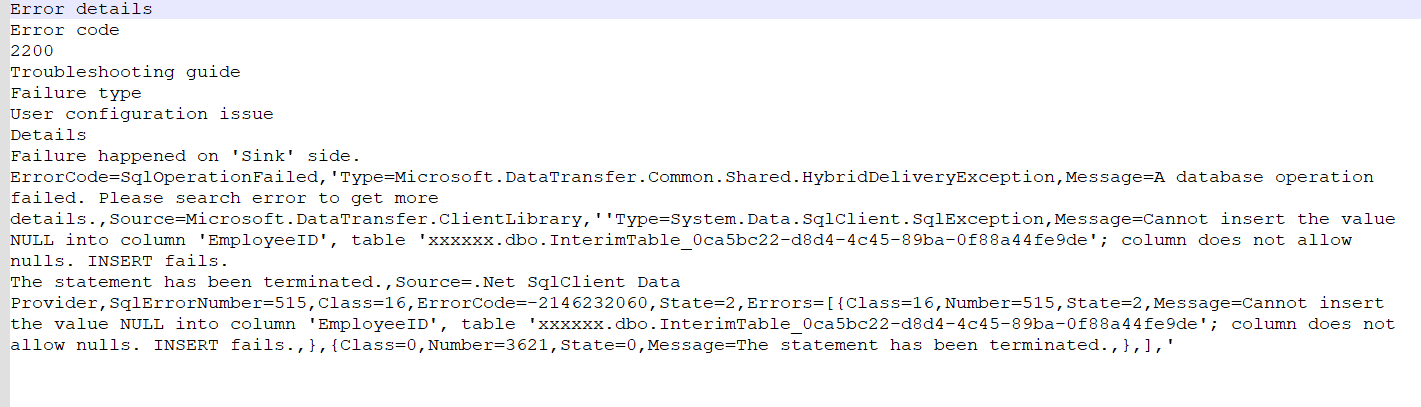
The column that I compare key data is of course another column. I do all the mapping and remove the mapping between EmployeeID. When I run this I get an error that I cannot insert null in EmployeeID. I tried to do a full insert and it works without the EmployeeID but when I change to Upsert it fails. Why does it want to insert something in EmployeeID, there is no mapping and it can't be.
Any help?
Hi!
You explained my scenario 100% correct. And yes I've coded sprocs with Merge to make it work but I would really prefer not having code.
/Magnus
' cx='32' cy='32' r='32' /%3E%3Ctext x='50%25' y='55%25' dominant-baseline='middle' text-anchor='middle' fill='%23FFF' %3EMS%3C/text%3E%3C/svg%3E)
@AnnuKumari-MSFT Any update on this?
I haven't heard anything more than this. I'm creating thos Merge procedures but I would love to replace them with the Upsert functionality.

Hi @Magnus ,
Just following up to see if the below answer helped. Please do consider clicking Accept Answer as accepted answers help community as well.
' cx='32' cy='32' r='32' /%3E%3Ctext x='50%25' y='55%25' dominant-baseline='middle' text-anchor='middle' fill='%23FFF' %3EHL%3C/text%3E%3C/svg%3E)
A work-around that worked for me where the destination table is an SQL server table is to create a view that excluded the Identity column. The use the view in the copy activity destination.
Hi @Magnus ,
Thankyou for using Microsoft Q& A platform and thanks for posting your query.
As I understand your query, you are trying to perform Upsert in SQL table which is having Employee ID as identity column . However, it fails when you are removing EmployeeID column from mapping so that it automatically inserts the EmployeeId value. Please correct me if my understanding is incorrect.
I tried to reproduce your scenario and witnessed same issue. Insert is working fine after removing the identity column from mapping while upsert is failing.
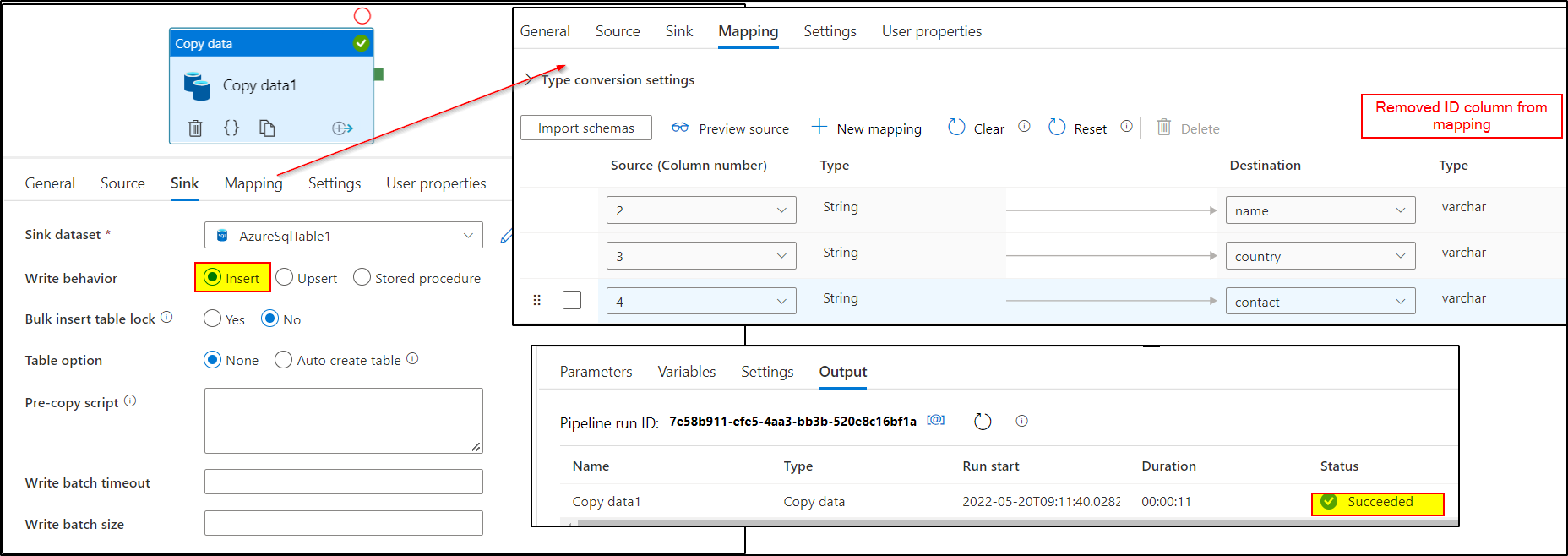
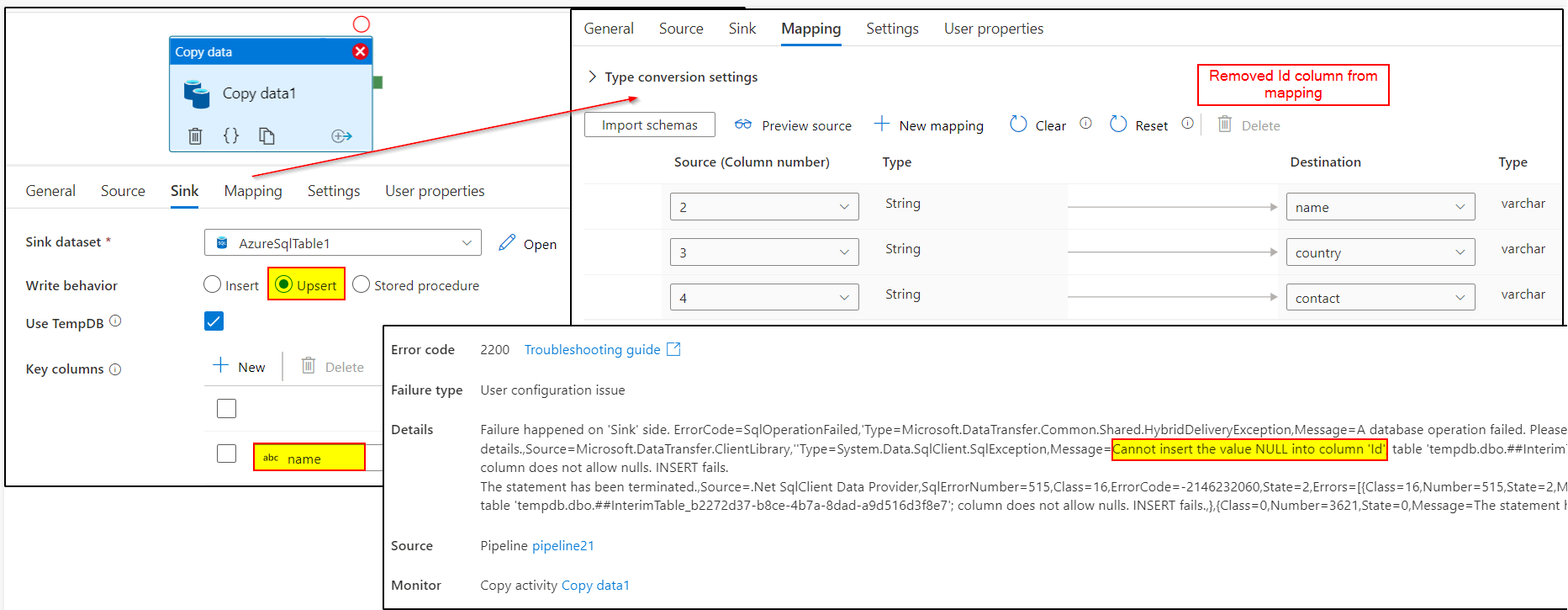
I have raised the issue with internal team , will keep you posted once I hear back from them . Thankyou for your patience!
Meanwhile, temporary workaround is to create custom Stored procedure to perform the Upsert using Merge statement.
Please check the following article for the help : Invoke a stored procedure from a SQL sink
Hi @Magnus ,
I had taken this ahead with our product team and was waiting for their response. Thanks for pointing this out, they have identified the issue as a bug. Below is the response from them:
"we took some time to look into this. This should be a bug in SQL upsert feature. Upsert would need a interim table to store the data from source, and based on the interim table to do the upsert to target table. However the interim table shares exact the same schema as target table, so it requires the ID to be not null. We will track and fix this bug. Currently please create custom Stored procedure to perform the Upsert using Merge statement as workaround. Thanks."
There is no specified deadline for the fix but I will try to track it and ask the team to prioritize this fix. Kindly consider clicking Accept Answer as accepted answer helps community as well.
Hi @Magnus ,
Just checking in to see if the above answer helped. Please do consider clicking Accept Answer as accepted answers help community as well.
' cx='32' cy='32' r='32' /%3E%3Ctext x='50%25' y='55%25' dominant-baseline='middle' text-anchor='middle' fill='%23FFF' %3ED%3C/text%3E%3C/svg%3E)
Hi, any progress with this as I'm having the same issue.
' cx='32' cy='32' r='32' /%3E%3Ctext x='50%25' y='55%25' dominant-baseline='middle' text-anchor='middle' fill='%23FFF' %3EDL%3C/text%3E%3C/svg%3E)
Hi,
any progress with this?
I'm having the same issue.
Diego
Hi @Diego Lazzarino ,
This is one of the issue I am constantly bugging the product team for. However, it will take time for the fix as per the Product team. Sorry for the inconvenience and thank you for your patience. I will keep this issue open until it's resolved and would provide constant updates as and when I get. Thanks !
' cx='32' cy='32' r='32' /%3E%3Ctext x='50%25' y='55%25' dominant-baseline='middle' text-anchor='middle' fill='%23FFF' %3ERP%3C/text%3E%3C/svg%3E)
Hello,
do you have a planned release that for this? Unfortunately, the workaround with SP is not working when the source and sink data is in different databases...
Thanks for the feedback.
Raffael
' cx='32' cy='32' r='32' /%3E%3Ctext x='50%25' y='55%25' dominant-baseline='middle' text-anchor='middle' fill='%23FFF' %3EAM%3C/text%3E%3C/svg%3E)
Any update to this issue? The SPROC alternative will not work for our scenario.
Hi @Magnus , @Raffael Pfister , @Arnel Manalo , @DeamM ,
Product team updated that the fix is ready and they are going to deploy this fix by next week . Thankyou for your patience !
' cx='32' cy='32' r='32' /%3E%3Ctext x='50%25' y='55%25' dominant-baseline='middle' text-anchor='middle' fill='%23FFF' %3EAM%3C/text%3E%3C/svg%3E)
I was able to confirm Upsert works now, I tested the Insert and Update side, Thanks!
I was able to Insert and Update a record into a table containing an identity column through copy data's upsert, thanks!
Hi @Raffael Pfister , @Arnel Manalo , @DeamM ,
Could you please validate is the fix is working for you.
@Magnus ,
If it's working for you , Please do consider clicking Accept Answer as accepted answers help community as well.
' cx='32' cy='32' r='32' /%3E%3Ctext x='50%25' y='55%25' dominant-baseline='middle' text-anchor='middle' fill='%23FFF' %3EPB%3C/text%3E%3C/svg%3E)
I am experiencing this problem today on my data factory. Is there something I might be doing wrong that would prevent my DF from being updated with this fix, @AnnuKumari-MSFT ?
' cx='32' cy='32' r='32' /%3E%3Ctext x='50%25' y='55%25' dominant-baseline='middle' text-anchor='middle' fill='%23FFF' %3EVN%3C/text%3E%3C/svg%3E)
Hi,
Can you please let us know how you were able to achieve this using upsert? I tried it and get the "can't insert NULL value into the PK column".
Thanks
Naveen
In the Copy data activity which is called from a ForEach activity, the Source uses a parameterized Dataset and Use Query is set as Query which is also parameterized. 
The Sink is also parameterized: 
Hi,
I am doing the exact same thing except that I am not doing it using parameters. I am still getting the same error. Is there a different version I am using vs you? Insert works but upsert is not working.
Thanks
Naveen
Hi,
Do we need to update our ADF version or it should work automatically? I am still facing an issue when I do the Upsert. Any help on this is greatly appreciated.
Thanks
Naveen
' cx='32' cy='32' r='32' /%3E%3Ctext x='50%25' y='55%25' dominant-baseline='middle' text-anchor='middle' fill='%23FFF' %3EMS%3C/text%3E%3C/svg%3E)
@AnnuKumari-MSFT We are seeing no change since the fix went out. Our copy activities still fail when we try to upsert to a table with an identity column.
Same here :(
Hi @Vellanki, Naveen ,
I am checking internally on this. Thankyou for your patience.
Can you share the query you're running?
' cx='32' cy='32' r='32' /%3E%3Ctext x='50%25' y='55%25' dominant-baseline='middle' text-anchor='middle' fill='%23FFF' %3ERT%3C/text%3E%3C/svg%3E)
I have ran into the same issue as everyone else. Has anyone heard of an ETA? Thanks!
' cx='32' cy='32' r='32' /%3E%3Ctext x='50%25' y='55%25' dominant-baseline='middle' text-anchor='middle' fill='%23FFF' %3EFG%3C/text%3E%3C/svg%3E)
Hi @AnnuKumari-MSFT , I'm also running into the same issue. Do you happen to know what or when from the Product Team on this fix ? Thanks !
Its quite sad we have not received any update on this. I have a direct line to MS experts, and they advised me to come here! IMO ADF is not enterprise ready. There are so many issues with it (and they are constantly changing it on the backend) and the answer is always "you will need to build a custom solution as a work around". This was the answer to the UPSERT problem. I implemented a custom solution. Good luck!
Thanks for you reply @Robert T . May I ask what was/is the custom solution you implemented ?
Fortunately, I was able to work with our team to remove all calculated/auto incremented NOT NULL fields. Since the temp table used to load by ADF replicates the destination/sink table this allowed it to work.
If we weren't able to change the table, I was going to bulk load into a temp table (identical to the sink) and then execute a sproc to do the migration in to the sink. Basically, do exactly what ADF is doing but the right way.
' cx='32' cy='32' r='32' /%3E%3Ctext x='50%25' y='55%25' dominant-baseline='middle' text-anchor='middle' fill='%23FFF' %3ETP%3C/text%3E%3C/svg%3E)
Hi,
If you are having this error, you can remove the ID column from the sink data source schema.
As long as, a "not nullable" column in the sink schema, interim table will not let you send null data as it will not understand if your DB will handle it or not.
Only way to really "not send" it and let DB handle the Identity is to remove it from the schema manually.
In the data source schema click the View

Delete the block for your ID column and click OK.

' cx='32' cy='32' r='32' /%3E%3Ctext x='50%25' y='55%25' dominant-baseline='middle' text-anchor='middle' fill='%23FFF' %3EE%3C/text%3E%3C/svg%3E)
I had this issue as well. To get around it, we left new records with a null value in the Id column, then split the ADF pipeline into two actions. The first action updates existing records (and includes the Id field in the mapping), the second action inserts new records (and does not include the Id field in the mapping).