Azure Logic Apps
An Azure service that automates the access and use of data across clouds without writing code.
This browser is no longer supported.
Upgrade to Microsoft Edge to take advantage of the latest features, security updates, and technical support.
' cx='32' cy='32' r='32' /%3E%3Ctext x='50%25' y='55%25' dominant-baseline='middle' text-anchor='middle' fill='%23FFF' %3ERD%3C/text%3E%3C/svg%3E)
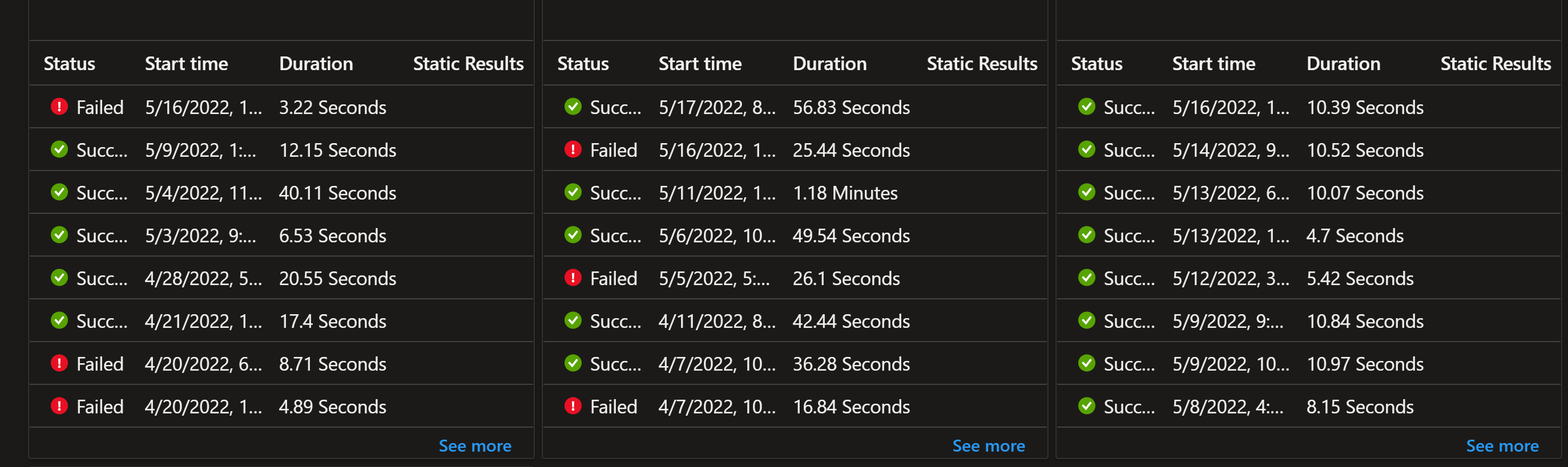
I built a dashboard in the Azure portal some time ago where I monitored the run history of several logic apps I support. It looks like the image below. The problem is that I no longer find where to pin the run history of a logic app to a dashboard. Did this functionality get moved? It's super useful so it makes no sense for it to have been removed.

Hi There,
Thank you for asking this question on the Microsoft Q&A Platform.
Could you please let us know where did you built that dashboard for run history, in Logs or Diagnostic?
You can check the Diagnostic blade within Logic Apps and there you can view the successful and failed logic app runs, and you can pin to the Azure dashboard
Regards,
Kamlesh Kumar
BizTalk Techie
If this answer solved your problem, please click the Verify Answer button (found below the answer) to help other users who have the same question.
' cx='32' cy='32' r='32' /%3E%3Ctext x='50%25' y='55%25' dominant-baseline='middle' text-anchor='middle' fill='%23FFF' %3ESS%3C/text%3E%3C/svg%3E)
The ability to add this widget to the dashboard was removed. As a work around, I pin the logic app to the dashboard (and get the 2x2 default square.) Then I download the template, update it to the WorkflowAllRunsCollectionPart (I copied the correct section from an existing widget. There are a few changes to the json.) Then I update the dashboard using Powershell and my run history widgets are there!

One option is to send your logic app logs to an Azure Monitor Workspace. From there you could create a pin-able workbook. One added benefit is you could represent several apps in one tile.