Community Center | Not monitored
Tag not monitored by Microsoft.

This browser is no longer supported.
Upgrade to Microsoft Edge to take advantage of the latest features, security updates, and technical support.
' cx='32' cy='32' r='32' /%3E%3Ctext x='50%25' y='55%25' dominant-baseline='middle' text-anchor='middle' fill='%23FFF' %3E4%3C/text%3E%3C/svg%3E)
안녕하세요,
COUNTIF를 사용해서 수식을 이용하여 값을 구한 뒤 저장을 한 후 다시 열면 복구 하겠냐는 메세지가 나옵니다.
수식 설명을 하자면,
=COUNTIF('[(통합)서울지사.xlsx]Sheet1'!G2:G2000,""&A3&"")
위 수식은 다른 엑셀파일내에서 검색을 해서 해당 엑셀 파일의 주어진 셀값과 대조하여 개수를 구하는 식입니다.
위 수식을 넣기만 하면 에러가 나옵니다..

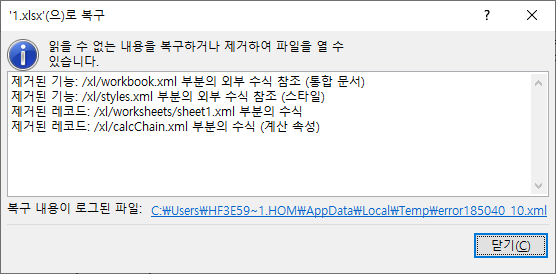
복구를 하게 되면 이렇게 뜹니다..
204405-error185040-01.xml
위 파일은 복구 하면서 저장된 파일입니다 로그된 파일.
해결 방법좀 부탁드립니다.
Tag not monitored by Microsoft.
Answer accepted by question author
' cx='32' cy='32' r='32' /%3E%3Ctext x='50%25' y='55%25' dominant-baseline='middle' text-anchor='middle' fill='%23FFF' %3EA%3C/text%3E%3C/svg%3E)
Q&A forums are currently English only. I'd try asking for help over here in dedicated forums.
https://social.msdn.microsoft.com/Forums/ko-kr/home
https://social.technet.microsoft.com/Forums/ko-kr/home
https://answers.microsoft.com/ko-kr
--please don't forget to upvote and Accept as answer if the reply is helpful--