Microsoft 365 and Office | SharePoint Server | For business
A family of Microsoft on-premises document management and storage systems.

This browser is no longer supported.
Upgrade to Microsoft Edge to take advantage of the latest features, security updates, and technical support.
' cx='32' cy='32' r='32' /%3E%3Ctext x='50%25' y='55%25' dominant-baseline='middle' text-anchor='middle' fill='%23FFF' %3EA%3C/text%3E%3C/svg%3E)
I have a list with some custom fields and a view grouped per Author. When the view is accessed it shows the not expanded groups, once one is expanded sometimes randomly it shows the wrong data:
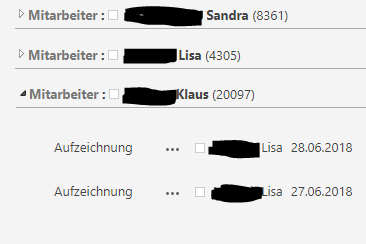
As shown, expanding the Klaus group, Lisas items are shown.
SharePoint version: 16.0.5278.1000 (OnPremise)
For developing I use Chrome, for the businness my company uses Edge. The problem is present on both browsers which in my opinion is obvious, since both are built on Chromium.
In the debugging console I can see the call to the server is the following:
http://portal/mySite/_layouts/15/inplview.aspx?List={E81DCCD3-8E12-45BC-BF9C-610E48CFF94D}&View={84514658-A9E9-4F23-86D2-8C2042BA4E07}&ViewCount=254&IsXslView=TRUE&IsCSR=TRUE&ListViewPageUrl=http://portal/mySite/Lists/myList/AllItems.aspx&IsRibbon=TRUE&Cmd=EcbView&GroupString=;#***** Klaus;#&IsGroupRender=TRUE&WebPartID={84514658-A9E9-4F23-86D2-8C2042BA4E07}&DrillDown=1
Sometimes it works as expected, sometimes I got an error (the call is canceled), another call is made without user interact:

The new created call contains the wrong filter parameter, which is the filter parameter of the previous call.
I tested it also on another list, same problem.
Best regards,
Emanuel

Thank you for your question. We are currently looking into this issue and will give you an update as soon as possible. Thank you for your understanding and support.
Hi @Anonymous ,
Your question seems to require in-depth investigation of your environment. It is recommended to open a ticket to deal with it and wait for a reply from Microsoft to respond back.
If the answer is helpful, please click "Accept Answer" and kindly upvote it. If you have extra questions about this answer, please click "Comment".
Note: Please follow the steps in our documentation to enable e-mail notifications if you want to receive the related email notification for this thread.
Hi @Anonymous ,
Would you tell me whether your issue has been resolved or have any update? Looking forward to your sharing. Thank you.
Hi, I updated the system to 16.0.5317.1000, problem was not resolved.

@Anonymous To narrow down this issue, let's verify the followings:
Please check ULS log files to see if there are clues about this issue. The path of ULS log files is: C:\Program Files\Common Files\microsoft shared\Web Server Extensions\16\LOGS.
No particular entries found in the logs.
A further reason to leave Microsoft SharePoint and move to another Software.
Strange issue. I suggest you open a ticket from Microsoft for further investigation.
We will migrate to SP OnPremise 2019 the next months, let's see if it solves.
I installed the available CU KB5002231, upgrading to 16.0.5266.1000. Problem still exists.
Upgrading to SharePoint 2019 did not help. Problem still exists.