SQL Server Integration Services
A Microsoft platform for building enterprise-level data integration and data transformations solutions.
This browser is no longer supported.
Upgrade to Microsoft Edge to take advantage of the latest features, security updates, and technical support.
' cx='32' cy='32' r='32' /%3E%3Ctext x='50%25' y='55%25' dominant-baseline='middle' text-anchor='middle' fill='%23FFF' %3EA%3C/text%3E%3C/svg%3E)
My SQL Server version is 2012.
I have an SSIS package that is registered in a SQL Server. I have created a SQL Server Agent Job to run my SSIS package.
The SSIS has parameters. So, I thought that a parameter may be set in SQL Server Agent Job GUI:
SQL Management Studio -> SQL Server Agent -> Jobs -> My Job -> Job Set properties -> configuration.
I see that a Parameters tab does exist, but it is disabled and displays nothing, whereas my SSIS has several parameters. See the screenshot attached.
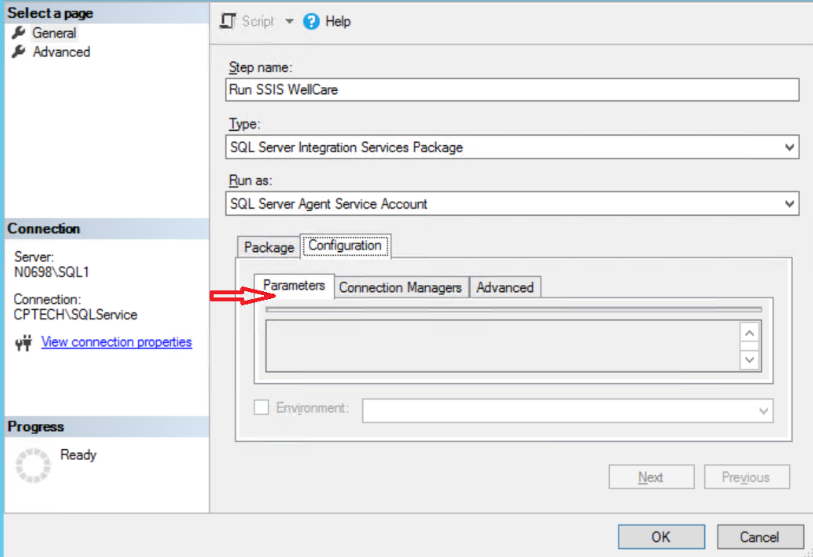
How can I fix this problem?

Hi @Anonymous ,
Please first have a double check that the package has parameter.
I tested locally that if the package do not have parameter, we could not use the parameter.
Secondly, please have a check if you have the full permission to modify Integration Services packages.
Details you may refer to integration-services-roles-ssis-service.
Regards,
Zoe
If the answer is the right solution, please click "Accept Answer" and kindly upvote it. If you have extra questions about this answer, please click "Comment".
Note: Please follow the steps in our documentation to enable e-mail notifications if you want to receive the related email notification for this thread.
' cx='32' cy='32' r='32' /%3E%3Ctext x='50%25' y='55%25' dominant-baseline='middle' text-anchor='middle' fill='%23FFF' %3EVS%3C/text%3E%3C/svg%3E)
Hi Zoe,
Thank you for the answer.
Could you please clarify the “… please have a check if you have the full permission to modify Integration Services packages”. What does it mean exactly? Does it mean that the user needs ssis_admin role? Or something else?
Hi Victor,
As mentioned Integration Services Roles (SSIS Service).
Members of the db_ssisadmin role and the dc_admin role may be able to elevate their privileges to sysadmin. This elevation of privilege can occur because these roles can modify Integration Services packages and Integration Services packages can be executed by SQL Server using the sysadmin security context of SQL Server Agent.