Azure Monitor
An Azure service that is used to collect, analyze, and act on telemetry data from Azure and on-premises environments.
This browser is no longer supported.
Upgrade to Microsoft Edge to take advantage of the latest features, security updates, and technical support.
' cx='32' cy='32' r='32' /%3E%3Ctext x='50%25' y='55%25' dominant-baseline='middle' text-anchor='middle' fill='%23FFF' %3EA%3C/text%3E%3C/svg%3E)
I want to issue an alert when a certain number of requests are exceeded.
To check the number of requests, I ran the following queries in AppService respectively.
let start=datetime("2022-05-26 00:00:00") -9h;
let end = datetime("2022-05-27 14:30:00") -9h;
AppServiceHTTPLogs
| where TimeGenerated between (start .. end)
| summarize count() by bin(TimeGenerated, 1h)
let metricName ="Requests";
let start=datetime("2022-05-26 00:00:00") -9h;
let end = datetime("2022-05-27 14:30:00") -9h;
AzureMetrics
| where TimeGenerated between (start .. end)
| where MetricName==metricName
| summarize sum(total) by bin(TimeGenerated, 1h)
Then
2022/5/26 0:00
AppServiceHTTPLogs:3115
AzureMetrics :3045
2022/5/26 1:00
AppServiceHTTPLogs:2961
AzureMetrics :2928
:
The numbers did not match each hour.
If you look at the description of Requests in Azure Metrics
"The total number of requests, regardless of the resulting HTTP status code."
I think it matches the number of lines output to AppServiceHTTPLogs, is that wrong?
Which is more appropriate, AppServiceHTTPLogs output rows or AzureMetrics-Requests total, when monitoring over-requests?
' cx='32' cy='32' r='32' /%3E%3Ctext x='50%25' y='55%25' dominant-baseline='middle' text-anchor='middle' fill='%23FFF' %3EAM%3C/text%3E%3C/svg%3E)
@真 川崎 , thank you for the question. I am reaching out to our team for more information about it and will keep this thread updated with the information that I receive.
Hi @真 川崎 ,
After doing some tests with a test AzureWebApp deployed, I noticed the following:
1. The Requests in AzureMetric stores the Total Requests with aggregation also in place. Therefore, a single record here might correspond to multiple requests. In the screenshot below, the record count is 3 but Total sums up to 4. (Note the TimeGrain columns as PT1M which means that the metrics are aggregated every 1 minute).
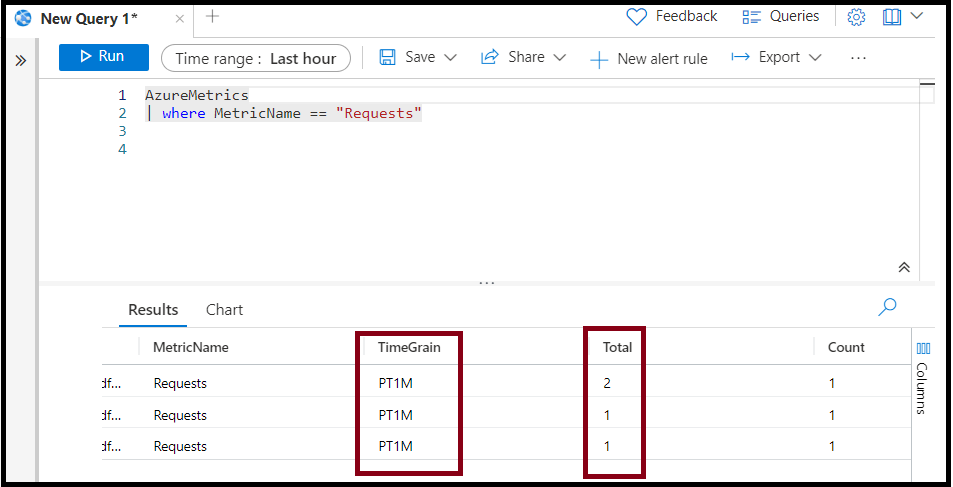
2. For the same AppService over the same time range, the AppServiceHTTPLogs has 4 records matching the numbers.

Therefore, for your requirement, you can use the count of record as returned from AppServiceHTTPLogs (or even the AzureMetrics/Requests, but that will require the use of sum over Total)
Please let me know if you have any questions.
---
Please 'Accept as answer' and ‘Upvote’ if it helped so that it can help others in the community looking for help on similar topics.
@真 川崎 , I wanted to check if you had a chance to review my answer above. Please let me know if you have any queries or concerns.
Please 'Accept as answer' if it helped so that it can help others in the community looking for help on similar topics.
Thank you. It was helpful.