Missing closing '}' While loop Powershell error

Kyoto Tasori 21 Reputation points
2022-05-27T21:51:42.093+00:00

My program is simple and I keep getting the error

while ($true) {
    $shell = Read-Host -Prompt "<";
    if (($shell -Split " ")[0] -eq "clear") {
        Clear-Host;
        if (($shell -Split " ")[1..1] -eq "-echo") {
            Write-Host "0" -ForegroundColor Blue;
        }
    }
    #########.
    if (($shell -Split " ")[0] -eq "math") {

    }
    Output/Variable Management
    $shell = $null;
}

Exception calling "Create" with "1" argument(s): "At line:1 char:15

  • while ($true) { $shell = Read-Host -Prompt "<"; if (($shell - ...
  • ~
    Missing closing '}' in statement block or type definition."
    At C:\Users\epicv\Tasori OS\homeHost.ps1:26 char:5
  • Invoke-Command -ScriptBlock ([scriptblock]::Create((Get-Content " ...
  • ~~~~~~~~~~~~~~~~~~~~~~~~~~~~~~~~~~~~~~~~~~~~~~~~~~~~~~~~~~~~~~~~~
  • CategoryInfo : NotSpecified: (:) [], MethodInvocationException
  • FullyQualifiedErrorId : ParseException
Windows for business | Windows Server | User experience | PowerShell
Windows for business | Windows Server | User experience | Other
0 comments No comments
{count} votes

1 answer

Sort by: Most helpful
  1. MotoX80 37,156 Reputation points
    2022-05-27T23:13:16.387+00:00

    Missing closing '}' in statement block or type definition."
    At C:\Users\epicv\Tasori OS\homeHost.ps1:26 char:5

    • Invoke-Command -ScriptBlock ([scriptblock]::Create((Get-Content " ...

    There is no Invoke-Command in the code that you posted. Did you only post a part of the script?

    It's a little hard to see, but if you test your code in Powershell_ISE, when you click on a bracket, ISE will highlight (grey background) it's matching bracket. That should help you "see" where you need to add a bracket.
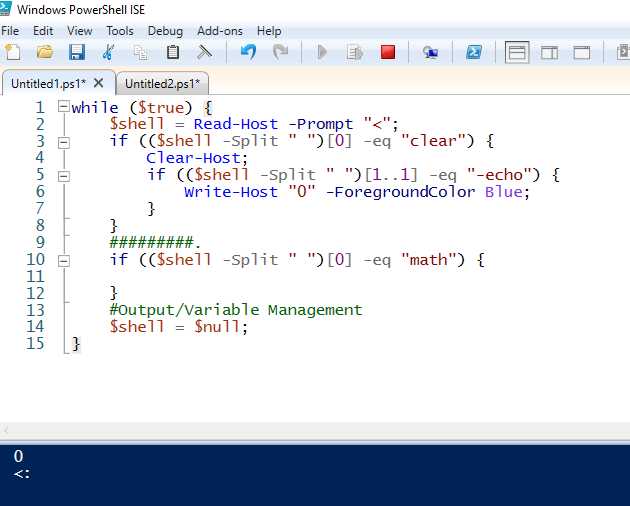
    206333-capture.png

    1 person found this answer helpful.

Your answer

Answers can be marked as 'Accepted' by the question author and 'Recommended' by moderators, which helps users know the answer solved the author's problem.

