Exchange Online
A cloud-based service included in Microsoft 365, delivering scalable messaging and collaboration features with simplified management and automatic updates.
This browser is no longer supported.
Upgrade to Microsoft Edge to take advantage of the latest features, security updates, and technical support.
' cx='32' cy='32' r='32' /%3E%3Ctext x='50%25' y='55%25' dominant-baseline='middle' text-anchor='middle' fill='%23FFF' %3EKL%3C/text%3E%3C/svg%3E)
Hi,
I've the following java code to start a powershell script that connect using Connect-ExchangeOnline.
It works perfectly when invoking it from command line and from within a JSP with the tomcat within Netbean IDE.
However, if I run the same JSP in just tomcat itself (without Netbean) it hang with error timeout.
Do note, the environment I am running this code has a Proxy Server and all the necessary netsh winhttp set proxy xxxx has been performed.
Have anyone encounter this before?
Best Regards
StringBuilder sbInput = new StringBuilder();
StringBuilder sbError = new StringBuilder();
String[] commandList =
{
"powershell.exe", "-ExecutionPolicy", "Unrestricted", "-noprofile", "-noninteractive", "c:/temp/test.ps1"
};
ProcessBuilder pb = new ProcessBuilder(commandList);
Process proc = pb.start();
proc.getOutputStream().close();
InputStream inputstream = proc.getInputStream();
InputStreamReader inputstreamreader = new InputStreamReader(inputstream);
BufferedReader bufferedreader = new BufferedReader(inputstreamreader);
String line;
while ((line = bufferedreader.readLine()) != null)
{
sbInput.append(line + "\n");
}
inputstream = proc.getErrorStream();
inputstreamreader = new InputStreamReader(inputstream);
bufferedreader = new BufferedReader(inputstreamreader);
while ((line = bufferedreader.readLine()) != null)
{
sbError.append(line + "\n");
}
A cloud-based service included in Microsoft 365, delivering scalable messaging and collaboration features with simplified management and automatic updates.
Answer accepted by question author
' cx='32' cy='32' r='32' /%3E%3Ctext x='50%25' y='55%25' dominant-baseline='middle' text-anchor='middle' fill='%23FFF' %3EJS%3C/text%3E%3C/svg%3E)
Hi @Kian-Lee Ng
Glad to know that your issue is resolved now, and thanks for sharing the solution above! Since our forum has the policy that The question author cannot accept their own answer. They can only accept answers by others, and according to the scenario introduced here: Answering your own questions on Microsoft Q&A
I would make a brief summary of this post so that other forum members could easily find useful information here:
[Java Powershell Exchangeonline in Tomcat directly doesn't work but using tomcat in netbean works - Summary]
Issue Symptom:
The java code(which is used to start a powershell script that connect using Connect-ExchangeOnline) works perfectly when invoking it from command line and from within a JSP with the tomcat within Netbean IDE.
However, when run the same JSP in just tomcat itself (without Netbean) it hang with error timeout.
Solution:
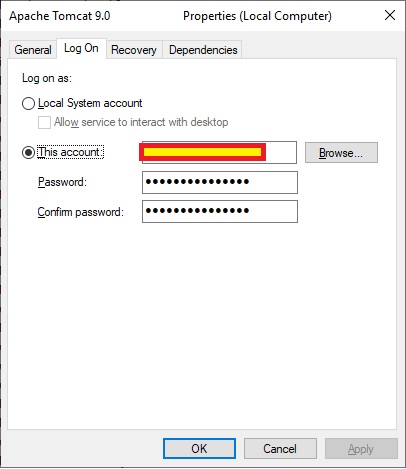
The issue is solved by dedicating an account in "This Account" under the "Log On" tab of the Tomcat "Services".
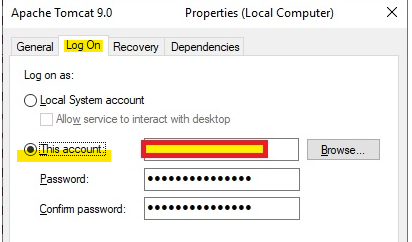
You could "Accept Answer" for this summary to close this thread, and your action would be helpful to other users who encounter the same issue and read this thread. Thanks for your understanding!
If an Answer is helpful, please click "Accept Answer" and upvote it.
Note: Please follow the steps in our documentation to enable e-mail notifications if you want to receive the related email notification for this thread.
I've managed to solve this issue by dedicating an account in "This Account" under the "Log On" tab of the Tomcat "Services". Not sure why though, but it works perfectly again. :)