Developer technologies | ASP.NET | ASP.NET Core
A set of technologies in the .NET Framework for building web applications and XML web services.
This browser is no longer supported.
Upgrade to Microsoft Edge to take advantage of the latest features, security updates, and technical support.
' cx='32' cy='32' r='32' /%3E%3Ctext x='50%25' y='55%25' dominant-baseline='middle' text-anchor='middle' fill='%23FFF' %3ERD%3C/text%3E%3C/svg%3E)
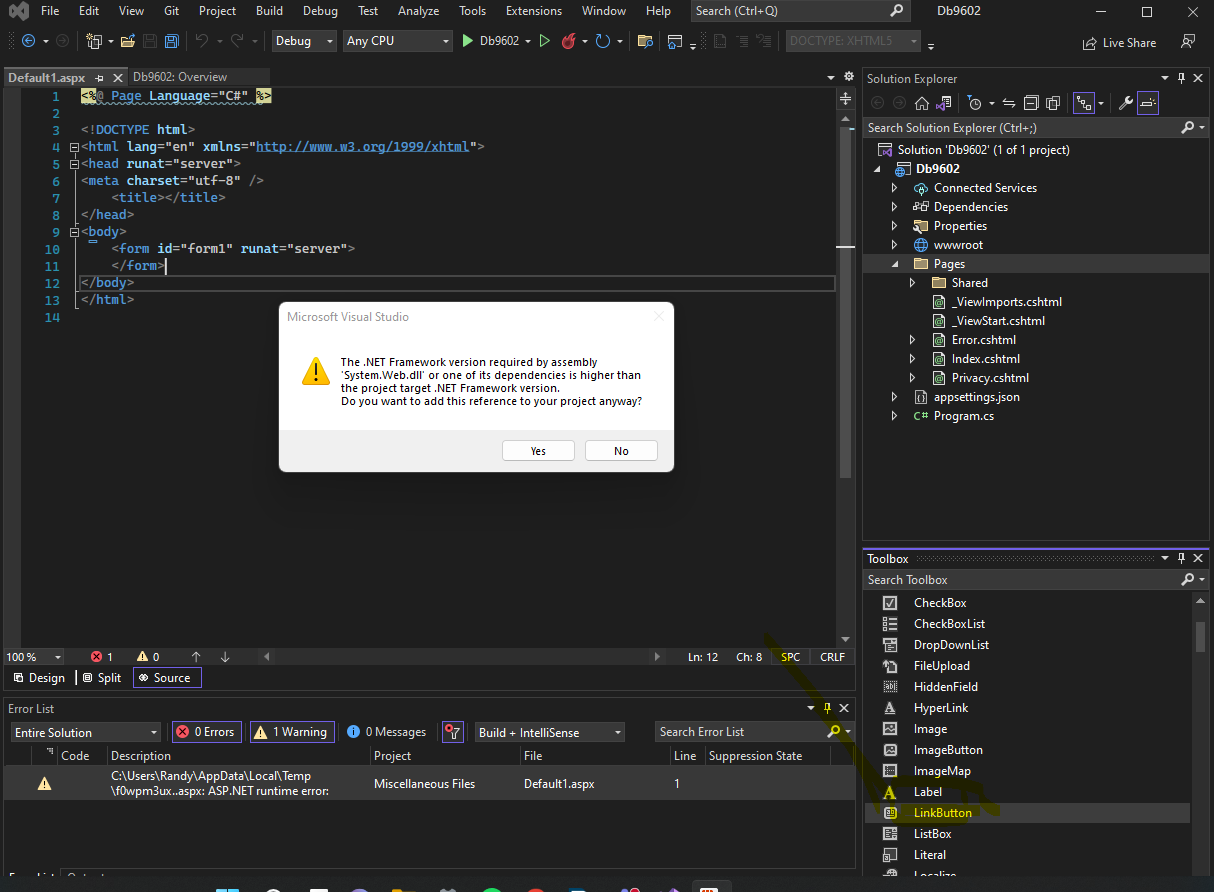
I am trying to code a C# app on asp.net web core.
I have installed the .net framework 6.0. my computer is a windows 11.
However, I get these two errors whenever I try to add a button or something related. any solution to this?
' cx='32' cy='32' r='32' /%3E%3Ctext x='50%25' y='55%25' dominant-baseline='middle' text-anchor='middle' fill='%23FFF' %3EBS%3C/text%3E%3C/svg%3E)
Your confusion is that visual studio supports lots of environments (languages, runtimes, sdks). Many of the environments have designers or toolboxes.
The toolbox you are trying to use is for the asp.net .net 4.* webform projects. Webforms support was not ported to the newer .net core framework, and can not be used with .net 6 projects.
asp.net net 6 uses razor pages, and currently there is no designer or toolbox support. Your error is caused by the toolbox code checking if the required webforms library (system.web.dll) for its code generation is installed in the project. As there is web form library for asp.net core, you get this error.
Thank you. Although I haven't figured out a way to make the web forms work on VS 2022, Thanks to your answer I realized that this is a compatibility issue, so I have downgraded my VS to 2019 and now can work without any issues :) toolboxes and web forms work with 19 editions.

Are you trying to use a .net framework dll in a .net 6 project (.net core)?
Hello, this screenshot was a .net core project. But then I tried the same with an ASP.Net Web application and got the same error.
to add to this, I am a complete beginner on VS 2022 and C#, ASP.NET. I am trying to set up a work environment for a class
' cx='32' cy='32' r='32' /%3E%3Ctext x='50%25' y='55%25' dominant-baseline='middle' text-anchor='middle' fill='%23FFF' %3EA%3C/text%3E%3C/svg%3E)
Hi @Randunu Dimeshan ,
The .aspx web page and the Web Server control (with runnat = "server") is in the ASP.NET 4.x Web Form application, it is not work in the Asp.net core application.
The difference between Asp.net core and .Net Framework, I suggest you could refer the following articles:
Choose between ASP.NET 4.x and ASP.NET Core
.NET vs. .NET Framework for server apps
Then, to learn Asp.net core, I suggest you could refer the following tutorials:
Tutorial: Create a Razor Pages web app with ASP.NET Core
Get started with ASP.NET Core MVC
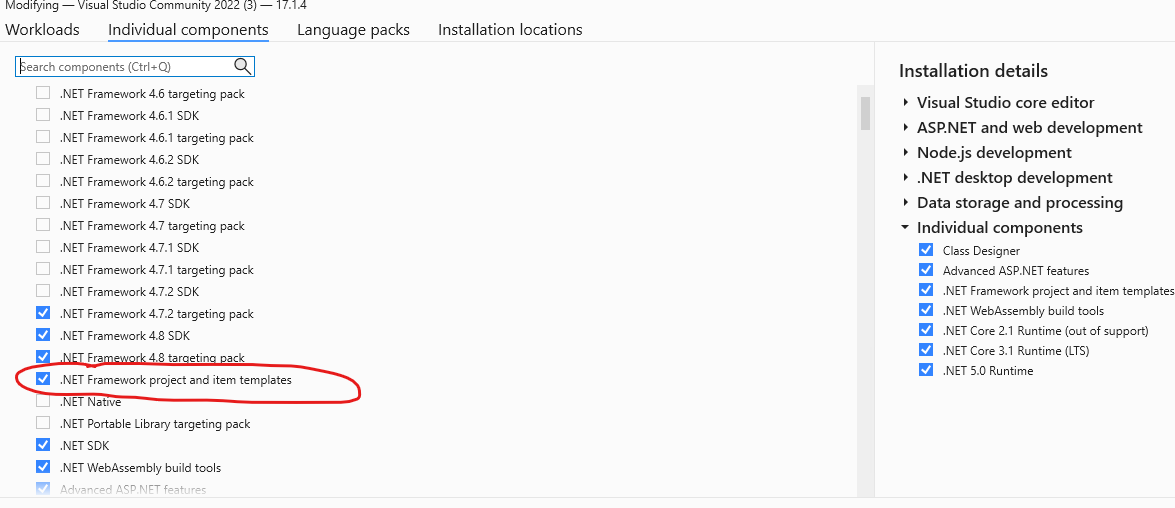
Besides, if you want to create the .Net Framework application (Asp.net 4.X), you can install the relate component from the Visual Studio Installer, select the ".NET Framework project and item templates" options:
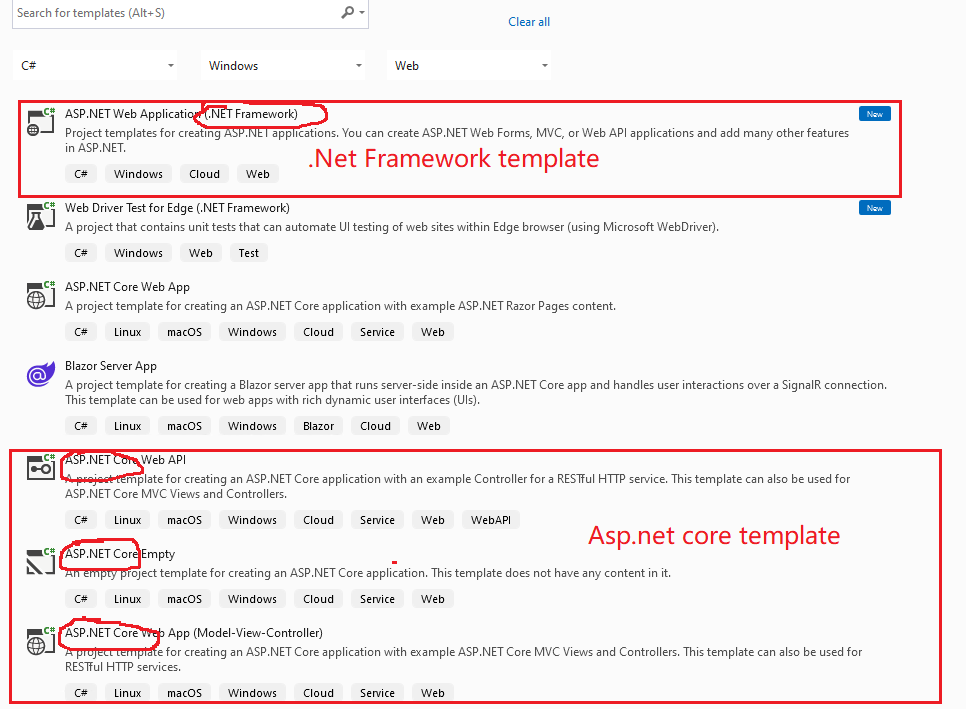
Then, when create the new project via the VS 2022, you can choose the .Net framework template:
If the answer is the right solution, please click "Accept Answer" and kindly upvote it. If you have extra questions about this answer, please click "Comment".
Note: Please follow the steps in our documentation to enable e-mail notifications if you want to receive the related email notification for this thread.
Best regards,
Dillion
Thank you for the follow-up. I have installed all the components you listed above. And when I try to create an asp.net framework template, it still gives the runtime error notice as in the first picture along with the assembly error msg which shows in my first picture regardless. Should I reinstall the framework and see if it gets fixed?

The same error indicates that you are still trying to use Web Forms server controls in a .NET Core Razor Pages project. Maybe, speak with the class instructor to figure out what type of project your should be building. I assume Razor Pages since Web Form is rather old.
In the mean time, there are Razor Page tutorials on this site which will be helpful to get you started.