Microsoft 365 and Office | Install, redeem, activate | For business | Windows
Processes in Microsoft 365 for setting up Office apps, redeeming product keys, and activating licenses.

This browser is no longer supported.
Upgrade to Microsoft Edge to take advantage of the latest features, security updates, and technical support.
' cx='32' cy='32' r='32' /%3E%3Ctext x='50%25' y='55%25' dominant-baseline='middle' text-anchor='middle' fill='%23FFF' %3EA%3C/text%3E%3C/svg%3E)
打开一个新建的word的时候,提示说“您的管理员没有安装宏支持功能”。
Processes in Microsoft 365 for setting up Office apps, redeeming product keys, and activating licenses.
' cx='32' cy='32' r='32' /%3E%3Ctext x='50%25' y='55%25' dominant-baseline='middle' text-anchor='middle' fill='%23FFF' %3EKM%3C/text%3E%3C/svg%3E)
Hello,
The "openspecs-questions" tag deals with requests related to Open Specifications documentation issues.
The Open Specifications can be found at: http://msdn.microsoft.com/en-us/library/cc203350.aspx.
Your question does not appear to be related to the Open Specifications documentation set.
I have added the "office-itpro" tag in hopes that you get the answer you're looking for.
Kristian S
Windows Open Spec Protocols

Hi @氓 文
Welcome to Q&A forum ~
Currently in Microsoft Q&A we only support English, could you please edit your question into English?
Thanks for your understanding.
Can you let us konow which version of Office 2019 are you using now?
click File in Word > Options > Trust Center > Trust Center Settings > Macro Settings, make sure the VBA is not disabled. 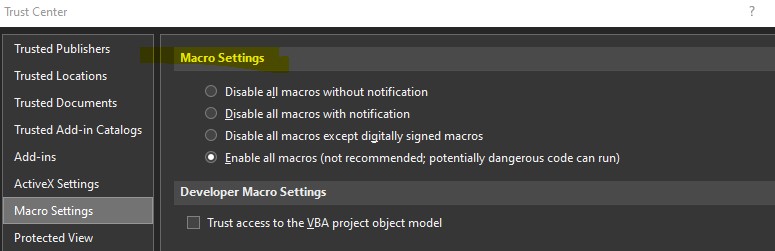
Besides, I suggest you run Word in safe mode to check this issue.
File > Options > Add-ins > Manage, COM add-ins > Go, clear the check boxes for any enabled COM add-ins, select OK. If the steps above do not work, I suggest you perform an Online Repair for Office from Control Pannel.
If the answer is helpful, please click "Accept Answer" and kindly upvote it. If you have extra questions about this answer, please click "Comment".
Note: Please follow the steps in our documentation to enable e-mail notifications if you want to receive the related email notification for this thread.