Azure Virtual Network
An Azure networking service that is used to provision private networks and optionally to connect to on-premises datacenters.
This browser is no longer supported.
Upgrade to Microsoft Edge to take advantage of the latest features, security updates, and technical support.
' cx='32' cy='32' r='32' /%3E%3Ctext x='50%25' y='55%25' dominant-baseline='middle' text-anchor='middle' fill='%23FFF' %3EML%3C/text%3E%3C/svg%3E)
Hi, how can i find the client / vm where the self hosted integration runtime was installed? In data factory configuration only the public ip is available. Thx for any helpful information
' cx='32' cy='32' r='32' /%3E%3Ctext x='50%25' y='55%25' dominant-baseline='middle' text-anchor='middle' fill='%23FFF' %3EMM%3C/text%3E%3C/svg%3E)
Hello and welcome to Microsoft Q&A @Müller, André .
So I understand you forgot which VM you installed the integration runtime on. The truth is Data Factory itself does not "know" which machine you installed on, so as far as I know, searching by public IP is all there is... unless.
Unless you installed some command on the machine which would return the machine designation. Then you could run a pipeline to execute and return that value. If there is such a command already, I am not familiar with it.
So, I am referring you to my colleagues in Networking. I'm thinking there is an easier way to lookup which VM has your public IP than just checking manually each and every one.
' cx='32' cy='32' r='32' /%3E%3Ctext x='50%25' y='55%25' dominant-baseline='middle' text-anchor='middle' fill='%23FFF' %3ECM%3C/text%3E%3C/svg%3E)
Hello @Müller, André ,
If I understand correctly from the question, you need to find the VM where self-hosted integration runtime was installed, and you know the public IP associated with this VM.

When you get the public IP resource, you can get the associated NIC with the IP on the overview page as shown below.
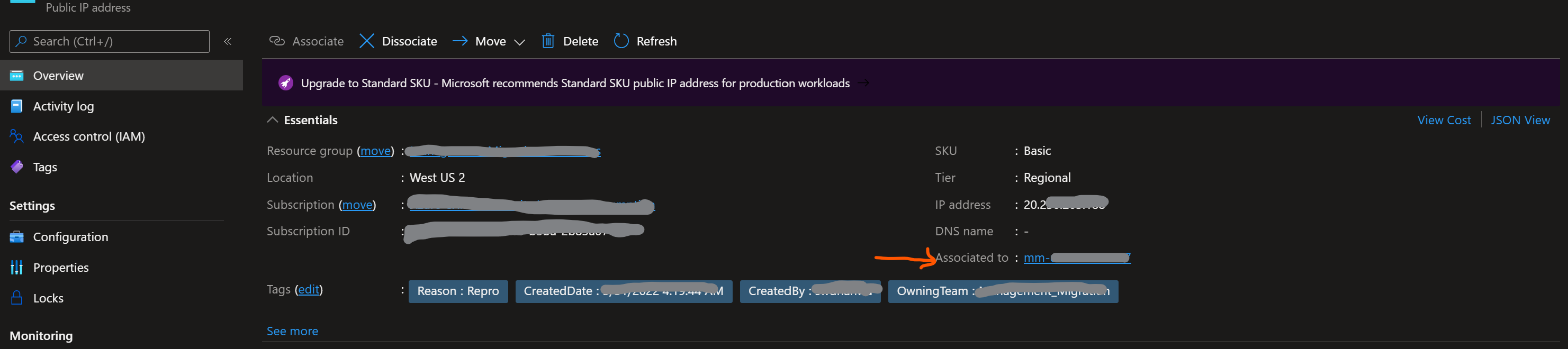
When you click on the NIC above, on its overview page you will see the associated VM.

Get-AzPublicIpAddress -Name <PublicIPName>
In the IP configuration section you will get the information on your NIC, using which you can run the below command to get information on VM associate with the NIC.
Get-AzNetworkInterface -Name <NICName> -ResourceGroupName <RGName>
If you do not have PowerShell set-up on your local machine, you can use Azure cloudshell to run these commands.
Hope this helps! Please let me know if you have any additional questions. Thank you!