Developer technologies | Transact-SQL
A Microsoft extension to the ANSI SQL language that includes procedural programming, local variables, and various support functions.
This browser is no longer supported.
Upgrade to Microsoft Edge to take advantage of the latest features, security updates, and technical support.
' cx='32' cy='32' r='32' /%3E%3Ctext x='50%25' y='55%25' dominant-baseline='middle' text-anchor='middle' fill='%23FFF' %3EC%3C/text%3E%3C/svg%3E)
Hi All,
Based one below data i need to derive the Expected values from 2018Q1 to 2020Q1 in SQL.
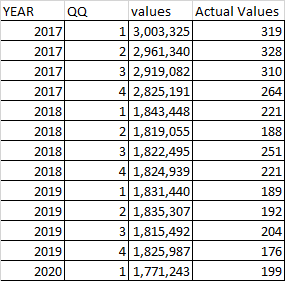
have excel formula to calculate the excepted values. I have base value is 0.21 for all the years. Below formula for to get the expected value for 2018Q1. I want automate this logic in SQL.
MAX(AVERAGE(((0.21*(2961340/3000)-328)),((0.21*(2919082/3000)-310)),((0.21*(2825191/3000)-264)),((0.21*(1843448/3000)-221))),0)
Thanks,
CMK
A Microsoft extension to the ANSI SQL language that includes procedural programming, local variables, and various support functions.

This formula seems to give 0 because the average is negative. Is it correct?
sorry for the confusion. i need to subtract the actual value-expected value then it should b positive

Hi @cmk ,
Could you please validate all the answers so far and provide any update about this?
Please remember to accept the answers if they helped. Your action would be helpful to other users who encounter the same issue and read this thread.
Thank you for understanding!
Best regards
Melissa
Answer accepted by question author
Check this script:
declare @table table ( [YEAR] int, QQ int, [values] int, [Actual Values] int )

insert into @table values
( 2017, 1, 3003325, 319 ),
( 2017, 2, 2961340, 328 ),
( 2017, 3, 2919082, 310 ),
( 2017, 4, 2825191, 264 ),
( 2018, 1, 1843448, 221 ),
( 2018, 2, 1819055, 188 ),
( 2018, 3, 1822495, 251 ),
( 2018, 4, 1824939, 221 ),
( 2019, 1, 1831440, 189 ),
( 2019, 2, 1835307, 192 ),
( 2019, 3, 1815492, 204 ),
( 2019, 4, 1825987, 176 ),
( 2020, 1, 1771243, 199 )

;
with Q1 as
(
    select *,
        LAG([values], 3) over (order by [YEAR], QQ) as v3,
        LAG([values], 2) over (order by [YEAR], QQ) as v2,
        LAG([values], 1) over (order by [YEAR], QQ) as v1,
        LAG([values], 0) over (order by [YEAR], QQ) as v0,
        LAG([Actual values], 3) over (order by [YEAR], QQ) as av3,
        LAG([Actual values], 2) over (order by [YEAR], QQ) as av2,
        LAG([Actual values], 1) over (order by [YEAR], QQ) as av1,
        LAG([Actual values], 0) over (order by [YEAR], QQ) as av0
    from @table
),
Q2 as
(
    select *,
        ((av3 - 0.21 * v3 / 3000) + (av2 - 0.21 * v2 / 3000) + (av1 - 0.21 * v1 / 3000) + (av0 - 0.21 * v0 / 3000)) / 4 as average
    from Q1
)
select [YEAR], QQ, [values], [Actual values], case when average > 0 then average else 0 end as Expected
from Q2
order by [YEAR], QQ
Show the right formula if these calculations are incorrect.
Hi @cmk ,
Please refer below query and check whether it is also working. Thanks.
declare @Average table ( [YEAR] int, [QQ] int, [values] int, [Actual Values] int )

 insert into @Average values
 ( 2017, 1, 3003325, 319 ),
 ( 2017, 2, 2961340, 328 ),
 ( 2017, 3, 2919082, 310 ),
 ( 2017, 4, 2825191, 264 ),
 ( 2018, 1, 1843448, 221 ),
 ( 2018, 2, 1819055, 188 ),
 ( 2018, 3, 1822495, 251 ),
 ( 2018, 4, 1824939, 221 ),
 ( 2019, 1, 1831440, 189 ),
 ( 2019, 2, 1835307, 192 ),
 ( 2019, 3, 1815492, 204 ),
 ( 2019, 4, 1825987, 176 ),
 ( 2020, 1, 1771243, 199 )

select [YEAR], [QQ], [values],[Actual Values],
case when [YEAR]>=2018 then avg([Actual Values]-(0.21*([values]/3000)))
OVER (ORDER BY [YEAR], [QQ] ROWS  BETWEEN 3 PRECEDING AND CURRENT ROW )
else 0 end as Average from @Average
order by [YEAR], [QQ];
Output:
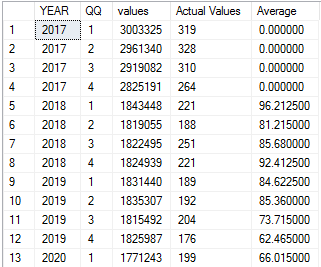
Best regards
Melissa
If the answer is helpful, please click "Accept Answer" and upvote it.
Note: Please follow the steps in our documentation to enable e-mail notifications if you want to receive the related email notification for this thread.