Exchange Online
A cloud-based service included in Microsoft 365, delivering scalable messaging and collaboration features with simplified management and automatic updates.
This browser is no longer supported.
Upgrade to Microsoft Edge to take advantage of the latest features, security updates, and technical support.
' cx='32' cy='32' r='32' /%3E%3Ctext x='50%25' y='55%25' dominant-baseline='middle' text-anchor='middle' fill='%23FFF' %3EM%3C/text%3E%3C/svg%3E)
Dear Forum,
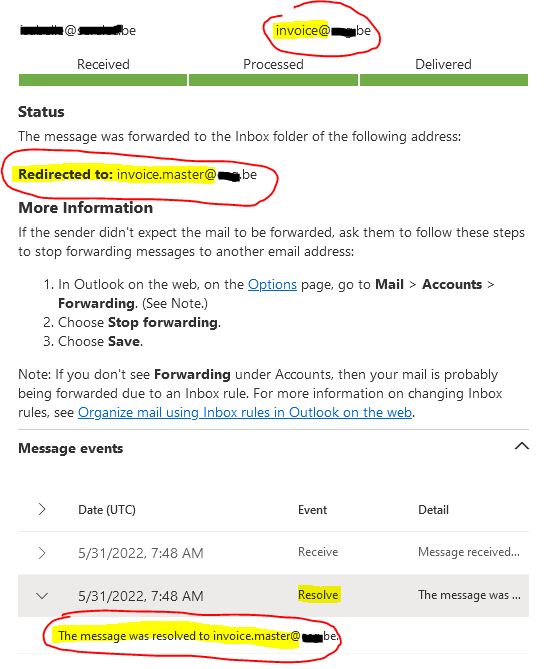
We use Exchange Online Protection as our mailfilter. We have a mailbox with primary smtp "invoice.master@keyman .be". The mailbox also has an alias "invoice@keyman .be". There are currently outlook rules set for this alias to move messages to a specific folder. However when a message arrives on Exchange Online addressed to "invoice@keyman .be", the message always gets redirected to "invoice.master@keyman .be". This renders the "invoice@keyman .be" rule useless in Outlook, since the alias is now missing from the message header.
How can we stop "Exchange Online" from redirecting or resolving the alias to the primary smtp??? (see attach with a screenshot for clarification)
206974-alias-redirected-to-primarysmtp.jpg
We have a exchange hybrid set up and this mailbox resides on our Exchange OnPrem (Exchange Server 2016 CU22).
Thanks in advance!
Kind regards,
Michiel
A cloud-based service included in Microsoft 365, delivering scalable messaging and collaboration features with simplified management and automatic updates.
The administration and maintenance of Microsoft Exchange Server to ensure secure, reliable, and efficient email and collaboration services across an organization.
The administration of a hybrid deployment that connects on-premises Exchange Server with Exchange Online, enabling seamless integration and centralized control.

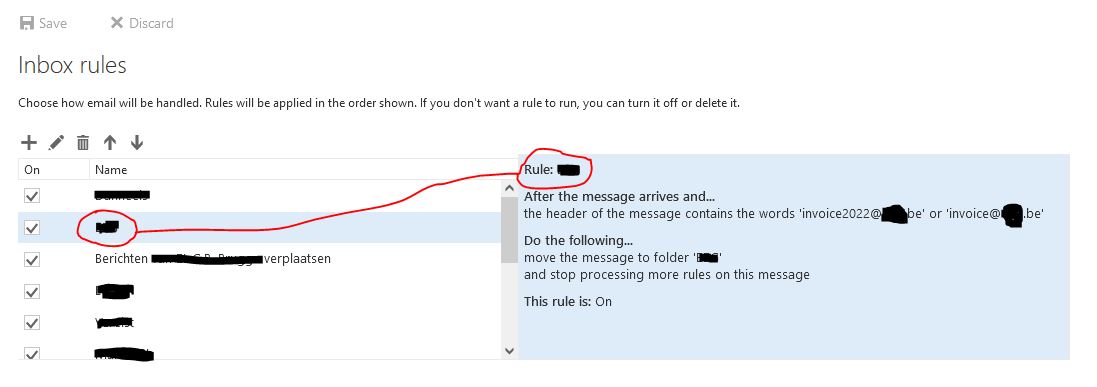
What is the Outlook rule exactly?
' cx='32' cy='32' r='32' /%3E%3Ctext x='50%25' y='55%25' dominant-baseline='middle' text-anchor='middle' fill='%23FFF' %3EJS%3C/text%3E%3C/svg%3E)
Hi @Miba2504
Agree with Andy, and you may also check the discussion in this related thread: Alias email address getting replaced by primary email address - invalidates routing rules
When messages are sent from an authenticated user, the alias will be resolved to the primary SMTP.
And anonymous messages sent from outside of Exchange do not resolve the sender address.
If an Answer is helpful, please click "Accept Answer" and upvote it.
Note: Please follow the steps in our documentation to enable e-mail notifications if you want to receive the related email notification for this thread.
how are these messages being sent? From an authenticated user? or did it work before?
If its from an authenticated user, that is expected as Exchange will resolve that and the alias wont show up in the header.
By the way, have you enabled the ability to send from any alias in Exchange Online? that should preserve the original sender if you can move the mailbox to Exchange Online
https://techcommunity.microsoft.com/t5/exchange-team-blog/sending-from-email-aliases-public-preview/ba-p/3070501
Messages sent to aliases were rewritten to the primary SMTP address in the past. Complex routing configurations may rely on this behavior. When the sending from aliases feature is enabled, rewriting to the user’s primary SMTP address will stop, which could break routing.
When using the user’s primary SMTP address in a Message Trace query, the results do not include messages sent using an alias. To trace messages sent to or from an alias, you need to use the alias in your query. This is less of a known issue and more about highlighting the change to existing behavior.
This feature is for Exchange Online-hosted mailboxes only. Messages to and from on-premises can be subject to rewriting the aliases on those servers.
' cx='32' cy='32' r='32' /%3E%3Ctext x='50%25' y='55%25' dominant-baseline='middle' text-anchor='middle' fill='%23FFF' %3EMM%3C/text%3E%3C/svg%3E)
Dear all,
i've a similar issue on my Exchange Online.
I've many contacts in the GAL that have more that one email address and when i receive and email and i reply to it, the system will change the recipiant email to the primary address.
For example in my GAL i've a contact below
If the contact send me an email from ******@email.com and i reply to it, the syste will change the recipient email to ******@email.com.
How can i avoid this situation (considering also i'm using also OWA and Outlook mobile to work with emails)?
Thanks
Massimo Mattiello
' cx='32' cy='32' r='32' /%3E%3Ctext x='50%25' y='55%25' dominant-baseline='middle' text-anchor='middle' fill='%23FFF' %3EVI%3C/text%3E%3C/svg%3E)
Hi @ Massimo,
could you please explain what's the problem? On recipient's end the user sees your email has been sent to ******@mail.com. Do you want the recipient knows you have sent to ******@mail.com?
Hi @Victor ,
my contact sent me an email using ******@mail.com and i want to reply to him to that email but Exchange change the recipient addredd into ******@email.com by default. Is there a way to avoid this situation?
Thanks
Create as many contacts as many addresses has this external correspondent.
Hi @Miba2504
Glad to know that your issue is resolved now, I would make a brief summary of this post so that other forum members could easily find useful information here:
[Exchange Online always redirects alias to primary smtp - Summary]
Issue Symptom:
Outlook rule not working for mailboxes located on-prem when the messages are sent to the mailbox alias.
After the message arrives and...
the header of the message contains the words 'alias@keyman .com'
Do the following...
move the message to folder 'COMPANY'
and stop processing more rules on this message
Solution:
Move the on-prem mailbox to cloud, and the external emails send to the email alias can successfully apply the outlook rule and be moved to the specific folder.
You could "Accept Answer" for this summary to close this thread, and your action would be helpful to other users who encounter the same issue and read this thread. Thanks for your understanding!
If an Answer is helpful, please click "Accept Answer" and upvote it.
Note: Please follow the steps in our documentation to enable e-mail notifications if you want to receive the related email notification for this thread.
Dear Andy,
Thank you for your feedback. I was also thinking about enabling this feature: "Send from aliases" in an effort to solve my problem...
Now that you mentioned it as well, I'll try it out and see if it changes anything... I'll migrate the mailbox to exchange online first.
Dear Joyceshen, I came across this post as well: https://learn.microsoft.com/en-us/answers/questions/133111/alias-email-address-getting-replaced-by-primary-em.html
Because it describes the same phenomenon as we have, only we have this issue as well from external senders... So if somebody outside our Exchange organization sends an email to "invoice@keyman .be", it gets redirected as well to "invoice.master@keyman .be". This issue is not related to only authenticated users...
Kind regards,
Michiel
Hi,
Thanks for your your clarification, you could try moving your users to cloud firstly, I test this in exchange online, external emails to the email alias can successfully apply the outlook rule and be moved to the specific folder.
If an Answer is helpful, please click "Accept Answer" and upvote it.
Note: Please follow the steps in our documentation to enable e-mail notifications if you want to receive the related email notification for this thread.
Hi,
Waiting for your feedback here if you have any progress about this question:)
If an Answer is helpful, please click "Accept Answer" and upvote it.
Note: Please follow the steps in our documentation to enable e-mail notifications if you want to receive the related email notification for this thread.
Hi Joyceshen-MSFT,
Thanks for the message. I got delayed by other work, the mailbox is now moving to EXO in a migrationbatch.
I'll give feedback once the move is complete and I tested the Outlook rule again.
Kind regards,
Hi,
Feel free to share your update here, waiting for your good news!
If an Answer is helpful, please click "Accept Answer" and upvote it.
Note: Please follow the steps in our documentation to enable e-mail notifications if you want to receive the related email notification for this thread.
Dear Joyceshen,
After moving the mailbox to exchange online and enabling the feature "send from aliases" the issue got solved.
So this forumpost can be closed :)
Thank you very much for the support.
Kind regards,
Michiel
HI, if you could mark my answer as accepted we can close this up. Thanks!
Dear Andy,
In the attachment you can find the specific Outlook rule.
After the message arrives and...
the header of the message contains the words 'invoice2022@keyman .be' or 'invoice@keyman .be'
Do the following...
move the message to folder 'COMPANY'
and stop processing more rules on this message
This rule is: On!
Thanks in advance.
Kind regards,
Michiel