Developer technologies | Transact-SQL
A Microsoft extension to the ANSI SQL language that includes procedural programming, local variables, and various support functions.
This browser is no longer supported.
Upgrade to Microsoft Edge to take advantage of the latest features, security updates, and technical support.
' cx='32' cy='32' r='32' /%3E%3Ctext x='50%25' y='55%25' dominant-baseline='middle' text-anchor='middle' fill='%23FFF' %3EA%3C/text%3E%3C/svg%3E)
Hi Export,
I have Source data that has already in summary format
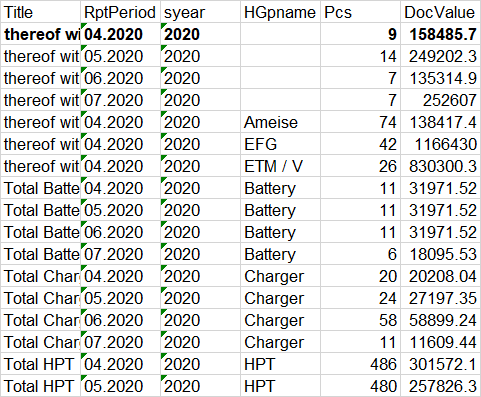
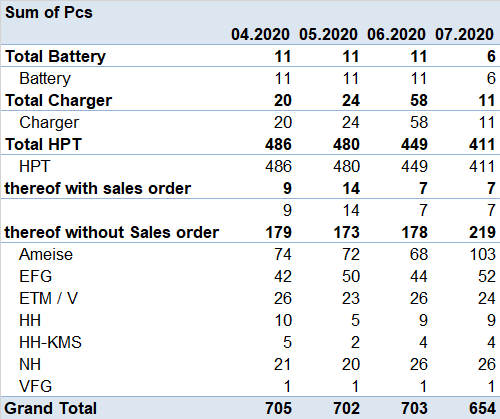
How to use the SQL to transform it to below
DECLARE
    @columns NVARCHAR(MAX) = '',
    @sql     NVARCHAR(MAX) = '';

		-- select the category names
		SELECT
			@columns+=QUOTENAME(RptPeriod) + ','
		FROM
			(
			select distinct RptPeriod from
			Vw_NEWStock#
			) as NewPeiord

		ORDER BY
			RptPeriod;


		-- remove the last comma
		SET @columns = LEFT(@columns, LEN(@columns) - 1);

		PRINT @columns
		-- construct dynamic SQL


		SET @sql ='
		SELECT * FROM
		(
			SELECT
				Title, RptPeriod,HGpname,Pcs,docvalue
			FROM
			   Vw_NewStock#
		) DynamicViewNewStock
		PIVOT(
			Sum(Docvalue)
			FOR RptPeriod IN ('+ @columns +')
		) AS pivot_table;'
END

Hi @Ann ,
Could you please validate all the answers so far and provide any update about this?
Please remember to accept the answers if they helped. Your action would be helpful to other users who encounter the same issue and read this thread. Thank you for understanding!
Best regards
Melissa

It's not really clear what your question is. You are posting some code. What does that code do?
In any case, why do you want to use SQL for this? You have some data which you seem to want to present in some format. That format is often best achieved in the presentation layer. Several reporting components have built-in pivoting capabilities.
If you really want to do this in SQL, I have written how to do dynamic pivots here: http://www.sommarskog.se/dynamic_sql.html#pivot.
If you want someone to write a query for you, you should post CREATE TABLE statements for your table(s) and INSERT statements with sample data, enough to illustrate all angles of the problem, together with the expected result. Then we can copy and paste into a query window to develop a tested solution.
But chances are good that you should not use SQL at all for this.
Hi @Ann ,
Please refer below:
DECLARE
     @columns NVARCHAR(MAX) = '',
     @sql     NVARCHAR(MAX) = '';

         SELECT
             @columns+=QUOTENAME(RptPeriod) + ','
         FROM
             (
             select distinct RptPeriod from
             Vw_NEWStock#
             ) as NewPeiord
         ORDER BY
             RptPeriod;

         SET @columns = LEFT(@columns, LEN(@columns) - 1);

        DECLARE  @columns1  NVARCHAR(MAX) = '',
 @columns2  NVARCHAR(MAX) = '';

         SELECT
             @columns1+='MAX('+QUOTENAME(RptPeriod)+') '+ QUOTENAME(RptPeriod) + ','
         FROM
             (
             select distinct RptPeriod from
             Vw_NEWStock#
             ) as NewPeiord
         ORDER BY
             RptPeriod;

         SET @columns1= LEFT(@columns1, LEN(@columns1) - 1);

     SELECT
             @columns2+='SUM('+QUOTENAME(RptPeriod)+')'+ ','
         FROM
             (
             select distinct RptPeriod from
             Vw_NEWStock#
             ) as NewPeiord
         ORDER BY
             RptPeriod;

         SET @columns2= LEFT(@columns2, LEN(@columns2) - 1);

         SET @sql =';WITH CTE AS(
         SELECT Title [Sum of Pcs],HGPname,'+ @columns1 +' FROM
         (
             SELECT
                 Title, RptPeriod, HGpname,Pcs,docvalue
             FROM
                Vw_NewStock#
         ) DynamicViewNewStock
         PIVOT(
             Sum(Pcs)
             FOR RptPeriod IN ('+ @columns +')
         ) AS pivot_table
  GROUP BY pivot_table.title,pivot_table.HGPname
  )
 SELECT * FROM
 (SELECT * FROM CTE
 UNION ALL
 select ''Grand Total'' [Sum of Pcs],null HGPname,'+@columns2+' FROM CTE) A
 ORDER BY [Sum of Pcs] desc'

          EXECUTE sp_executesql  @sql
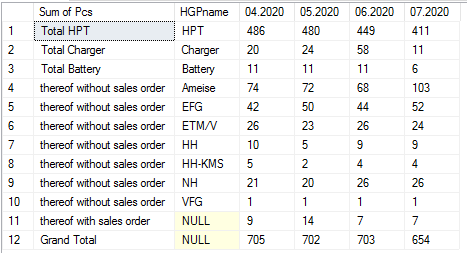
Example output:
Best regards
Melissa
If the answer is helpful, please click "Accept Answer" and upvote it.
Note: Please follow the steps in our documentation to enable e-mail notifications if you want to receive the related email notification for this thread.